> ## Documentation Index
> Fetch the complete documentation index at: https://docs.prefect.io/llms.txt
> Use this file to discover all available pages before exploring further.
# Legacy
> prefect-dbt 0.6.6 and earlier — DbtCoreOperation, DbtCliProfile, and TargetConfigs
This guide covers the `prefect-dbt` API as it existed in **0.6.6 and earlier** — `DbtCoreOperation`, `DbtCliProfile`, the `TargetConfigs` hierarchy, and the pre-built `trigger_dbt_cli_command` / `dbt_build_task` tasks. These APIs still work in modern releases, but for new projects prefer [`PrefectDbtRunner`](/integrations/prefect-dbt/runner), which provides better logging, asset lineage, and failure handling.
Before creating blocks for the first time, register `prefect-dbt`'s block types:
```bash theme={null}
prefect block register -m prefect_dbt
```
`prefect-dbt` supports a couple of ways to run dbt Core commands.
A `DbtCoreOperation` block will run the commands as shell commands, while other tasks use dbt's [Programmatic Invocation](#programmatic-invocation).
Optionally, specify the `project_dir`.
If `profiles_dir` is not set, the `DBT_PROFILES_DIR` environment variable will be used.
If `DBT_PROFILES_DIR` is not set, the default directory will be used `$HOME/.dbt/`.
## Use an existing profile
If you have an existing dbt `profiles.yml` file, specify the `profiles_dir` where the file is located:
```python theme={null}
from prefect import flow
from prefect_dbt.cli.commands import DbtCoreOperation
@flow
def trigger_dbt_flow() -> str:
result = DbtCoreOperation(
commands=["pwd", "dbt debug", "dbt run"],
project_dir="PROJECT-DIRECTORY-PLACEHOLDER",
profiles_dir="PROFILES-DIRECTORY-PLACEHOLDER"
).run()
return result
if __name__ == "__main__":
trigger_dbt_flow()
```
If you are already using Prefect blocks such as the [Snowflake Connector block](/integrations/prefect-snowflake), you can use those blocks to [create a new `profiles.yml` with a `DbtCliProfile` block](#create-a-new-profilesyml-file-with-blocks).
### Use environment variables with Prefect secret blocks
If you use environment variables in `profiles.yml`, set a Prefect Secret block as an environment variable:
```python theme={null}
import os
from prefect.blocks.system import Secret
secret_block = Secret.load("DBT_PASSWORD_PLACEHOLDER")
# Access the stored secret
DBT_PASSWORD = secret_block.get()
os.environ["DBT_PASSWORD"] = DBT_PASSWORD
```
This example `profiles.yml` file could then access that variable.
```yaml theme={null}
profile:
target: prod
outputs:
prod:
type: postgres
host: 127.0.0.1
# IMPORTANT: Make sure to quote the entire Jinja string here
user: dbt_user
password: "{{ env_var('DBT_PASSWORD') }}"
```
## Create a new `profiles.yml` file with blocks
If you don't have a `profiles.yml` file, you can use a `DbtCliProfile` block to create `profiles.yml`.
Then, specify `profiles_dir` where `profiles.yml` will be written.
Here's example code with placeholders:
```python theme={null}
from prefect import flow
from prefect_dbt.cli import DbtCliProfile, DbtCoreOperation
@flow
def trigger_dbt_flow():
dbt_cli_profile = DbtCliProfile.load("DBT-CLI-PROFILE-BLOCK-PLACEHOLDER")
with DbtCoreOperation(
commands=["dbt debug", "dbt run"],
project_dir="PROJECT-DIRECTORY-PLACEHOLDER",
profiles_dir="PROFILES-DIRECTORY-PLACEHOLDER",
dbt_cli_profile=dbt_cli_profile,
) as dbt_operation:
dbt_process = dbt_operation.trigger()
# do other things before waiting for completion
dbt_process.wait_for_completion()
result = dbt_process.fetch_result()
return result
if __name__ == "__main__":
trigger_dbt_flow()
```
**Supplying the `dbt_cli_profile` argument will overwrite existing `profiles.yml` files**
If you already have a `profiles.yml` file in the specified `profiles_dir`, the file will be overwritten. If you do not specify a profiles directory, `profiles.yml` at `~/.dbt/` would be overwritten.
Visit the [SDK reference](/integrations/prefect-dbt/api-ref/prefect_dbt-cli-configs-base) in the side navigation to see other built-in `TargetConfigs` blocks.
If the desired service profile is not available, you can build one from the generic `TargetConfigs` class.
## Programmatic Invocation
`prefect-dbt` has some pre-built tasks that use dbt's [programmatic invocation](https://docs.getdbt.com/reference/programmatic-invocations).
For example:
```python theme={null}
from prefect import flow
from prefect_dbt.cli.commands import trigger_dbt_cli_command, dbt_build_task
@flow
def dbt_build_flow():
trigger_dbt_cli_command(
command="dbt deps", project_dir="/Users/test/my_dbt_project_dir",
)
dbt_build_task(
project_dir = "/Users/test/my_dbt_project_dir",
create_summary_artifact = True,
summary_artifact_key = "dbt-build-task-summary",
extra_command_args=["--select", "foo_model"]
)
if __name__ == "__main__":
dbt_build_flow()
```
See the [SDK reference](/integrations/prefect-dbt/api-ref/prefect_dbt-cli-commands) for other pre-built tasks.
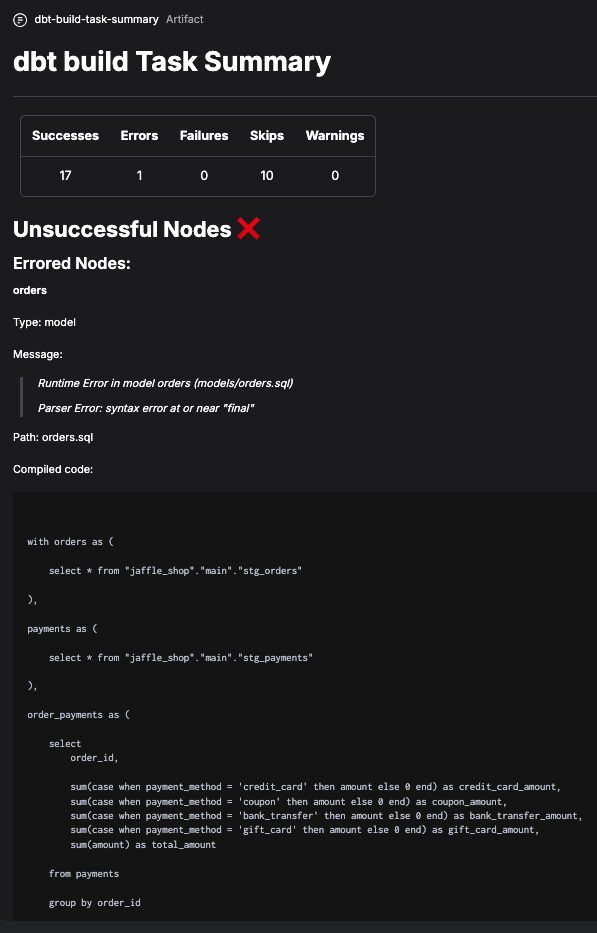
### Create a summary artifact
These pre-built tasks can also create artifacts. These artifacts have extra information about dbt Core runs, such as messages and compiled code for nodes that fail or have errors.
 ## BigQuery CLI profile block example
To create dbt Core target config and profile blocks for BigQuery:
1. Save and load a `GcpCredentials` block.
2. Determine the schema / dataset you want to use in BigQuery.
3. Create a short script, replacing the placeholders.
```python theme={null}
from prefect_gcp.credentials import GcpCredentials
from prefect_dbt.cli import BigQueryTargetConfigs, DbtCliProfile
credentials = GcpCredentials.load("CREDENTIALS-BLOCK-NAME-PLACEHOLDER")
target_configs = BigQueryTargetConfigs(
schema="SCHEMA-NAME-PLACEHOLDER", # also known as dataset
credentials=credentials,
)
target_configs.save("TARGET-CONFIGS-BLOCK-NAME-PLACEHOLDER")
dbt_cli_profile = DbtCliProfile(
name="PROFILE-NAME-PLACEHOLDER",
target="TARGET-NAME-placeholder",
target_configs=target_configs,
)
dbt_cli_profile.save("DBT-CLI-PROFILE-BLOCK-NAME-PLACEHOLDER")
```
To create a dbt Core operation block:
1. Determine the dbt commands you want to run.
2. Create a short script, replacing the placeholders.
```python theme={null}
from prefect_dbt.cli import DbtCliProfile, DbtCoreOperation
dbt_cli_profile = DbtCliProfile.load("DBT-CLI-PROFILE-BLOCK-NAME-PLACEHOLDER")
dbt_core_operation = DbtCoreOperation(
commands=["DBT-CLI-COMMANDS-PLACEHOLDER"],
dbt_cli_profile=dbt_cli_profile,
overwrite_profiles=True,
)
dbt_core_operation.save("DBT-CORE-OPERATION-BLOCK-NAME-PLACEHOLDER")
```
Load the saved `DbtCoreOperation` block to reuse it in a flow:
```python theme={null}
from prefect_dbt.cli import DbtCoreOperation
DbtCoreOperation.load("DBT-CORE-OPERATION-BLOCK-NAME-PLACEHOLDER")
```
## BigQuery CLI profile block example
To create dbt Core target config and profile blocks for BigQuery:
1. Save and load a `GcpCredentials` block.
2. Determine the schema / dataset you want to use in BigQuery.
3. Create a short script, replacing the placeholders.
```python theme={null}
from prefect_gcp.credentials import GcpCredentials
from prefect_dbt.cli import BigQueryTargetConfigs, DbtCliProfile
credentials = GcpCredentials.load("CREDENTIALS-BLOCK-NAME-PLACEHOLDER")
target_configs = BigQueryTargetConfigs(
schema="SCHEMA-NAME-PLACEHOLDER", # also known as dataset
credentials=credentials,
)
target_configs.save("TARGET-CONFIGS-BLOCK-NAME-PLACEHOLDER")
dbt_cli_profile = DbtCliProfile(
name="PROFILE-NAME-PLACEHOLDER",
target="TARGET-NAME-placeholder",
target_configs=target_configs,
)
dbt_cli_profile.save("DBT-CLI-PROFILE-BLOCK-NAME-PLACEHOLDER")
```
To create a dbt Core operation block:
1. Determine the dbt commands you want to run.
2. Create a short script, replacing the placeholders.
```python theme={null}
from prefect_dbt.cli import DbtCliProfile, DbtCoreOperation
dbt_cli_profile = DbtCliProfile.load("DBT-CLI-PROFILE-BLOCK-NAME-PLACEHOLDER")
dbt_core_operation = DbtCoreOperation(
commands=["DBT-CLI-COMMANDS-PLACEHOLDER"],
dbt_cli_profile=dbt_cli_profile,
overwrite_profiles=True,
)
dbt_core_operation.save("DBT-CORE-OPERATION-BLOCK-NAME-PLACEHOLDER")
```
Load the saved `DbtCoreOperation` block to reuse it in a flow:
```python theme={null}
from prefect_dbt.cli import DbtCoreOperation
DbtCoreOperation.load("DBT-CORE-OPERATION-BLOCK-NAME-PLACEHOLDER")
```