> ## Documentation Index
> Fetch the complete documentation index at: https://docs.prefect.io/llms.txt
> Use this file to discover all available pages before exploring further.
# How to build deployments via CI/CD
> CI/CD resources for working with Prefect.
export const home = {
tf: "https://registry.terraform.io/providers/PrefectHQ/prefect/latest/docs/guides/getting-started",
cli: "https://docs.prefect.io/v3/api-ref/cli/index",
api: "https://app.prefect.cloud/api/docs",
helm: "https://github.com/PrefectHQ/prefect-helm/tree/main/charts"
};
export const TF = ({name, href}) => You can manage {name} with the Terraform provider for Prefect.
;
Many organizations deploy Prefect workflows through their CI/CD process.
Each organization has their own unique CI/CD setup, but a common pattern is to use CI/CD to manage
Prefect [deployments](/v3/concepts/deployments).
Combining Prefect's deployment features with CI/CD tools enables efficient management of flow code
updates, scheduling changes, and container builds.
This guide uses [GitHub Actions](https://docs.github.com/en/actions) to implement a CI/CD process,
but these concepts are generally applicable across many CI/CD tools.
Note that Prefect's primary ways for creating deployments, a `.deploy` flow method or a `prefect.yaml`
configuration file, are both designed for building and pushing images to a Docker registry.
## Get started with GitHub Actions and Prefect
In this example, you'll write a GitHub Actions workflow that runs each time you push to your repository's
`main` branch. This workflow builds and pushes a Docker image containing your flow code to Docker Hub, then deploys the flow to Prefect Cloud.
### Repository secrets
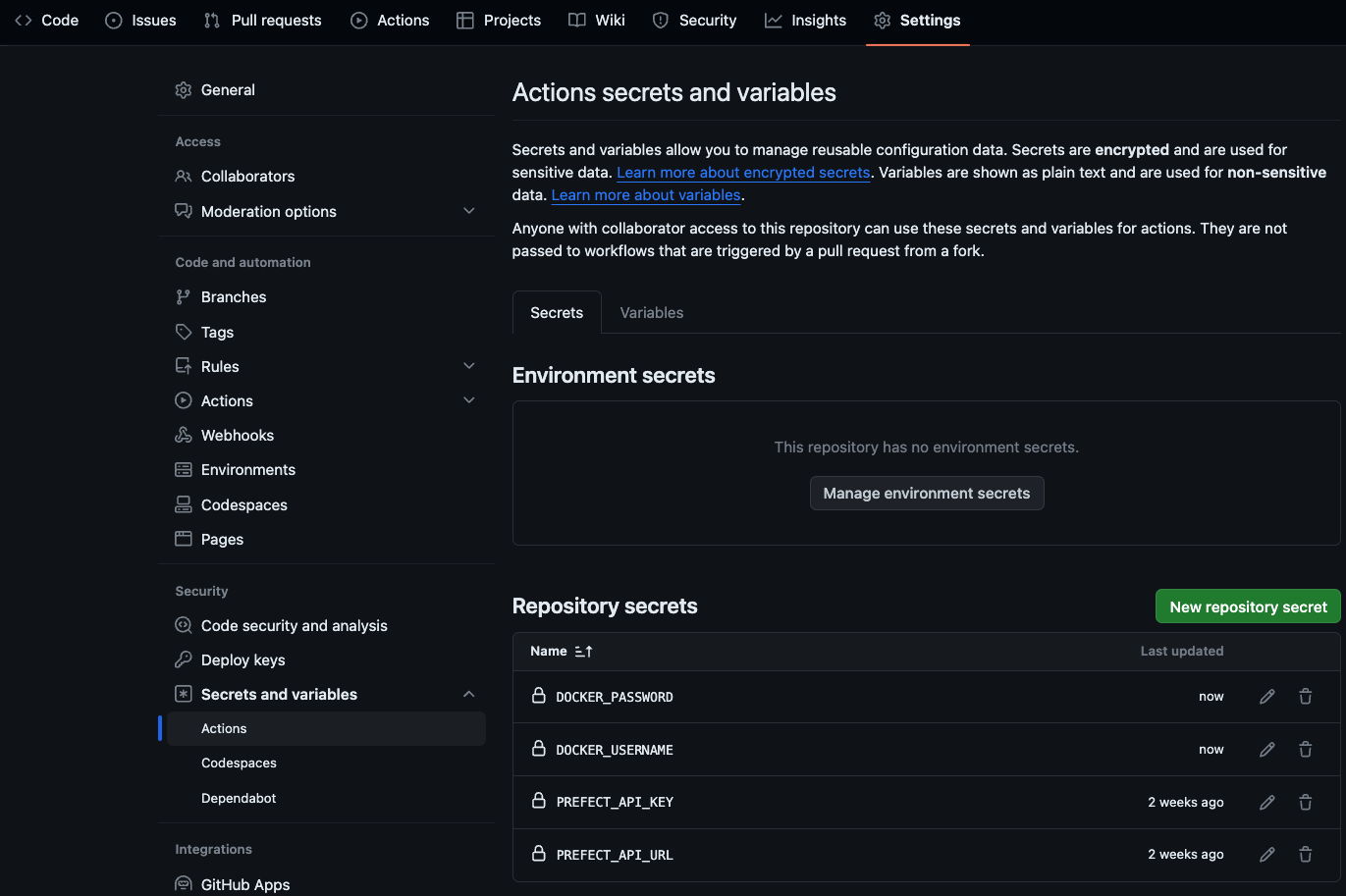
Your CI/CD process must be able to authenticate with Prefect to deploy flows.
Deploy flows securely and non-interactively in your CI/CD process by saving your `PREFECT_API_URL` and
`PREFECT_API_KEY` [as secrets in your repository's settings](https://docs.github.com/en/actions/security-guides/using-secrets-in-github-actions). This allows them to be accessed in your CI/CD runner's environment without exposing them in any scripts or configuration files.
In this scenario, deploying flows involves building and pushing Docker images, so add `DOCKER_USERNAME`
and `DOCKER_PASSWORD` as secrets to your repository as well.
Create secrets for GitHub Actions in your repository under
**Settings -> Secrets and variables -> Actions -> New repository secret**:
 ### Write a GitHub workflow
To deploy your flow through GitHub Actions, you need a workflow YAML file. GitHub looks for workflow
YAML files in the `.github/workflows/` directory in the root of your repository. In their simplest form,
GitHub workflow files are made up of triggers and jobs.
The `on:` trigger is set to run the workflow each time a push occurs on the `main` branch of the repository.
The `deploy` job is comprised of four `steps`:
* **`Checkout`** clones your repository into the GitHub Actions runner so you can reference files or
run scripts from your repository in later steps.
* **`Log in to Docker Hub`** authenticates to DockerHub so your image can be pushed to the Docker
registry in your DockerHub account. [docker/login-action](https://github.com/docker/login-action) is an
existing GitHub action maintained by Docker. `with:` passes values into the Action, similar to passing
parameters to a function.
* **`Setup Python`** installs your selected version of Python.
* **`Prefect Deploy`** installs the dependencies used in your flow, then deploys your flow. `env:` makes
the `PREFECT_API_KEY` and `PREFECT_API_URL` secrets from your repository available as environment variables during this step's execution.
For reference, the examples below live in their respective branches of
[this repository](https://github.com/prefecthq/cicd-example).
`flow.py`
```python theme={null}
from prefect import flow
@flow(log_prints=True)
def hello():
print("Hello!")
if __name__ == "__main__":
hello.deploy(
name="my-deployment",
work_pool_name="my-work-pool",
image="my_registry/my_image:my_image_tag",
)
```
`.github/workflows/deploy-prefect-flow.yaml`
```yaml theme={null}
name: Deploy Prefect flow
on:
push:
branches:
- main
jobs:
deploy:
name: Deploy
runs-on: ubuntu-latest
steps:
- name: Checkout
uses: actions/checkout@v4
- name: Log in to Docker Hub
uses: docker/login-action@v3
with:
username: ${{ secrets.DOCKER_USERNAME }}
password: ${{ secrets.DOCKER_PASSWORD }}
- name: Setup Python
uses: actions/setup-python@v5
with:
python-version: "3.12"
- name: Prefect Deploy
env:
PREFECT_API_KEY: ${{ secrets.PREFECT_API_KEY }}
PREFECT_API_URL: ${{ secrets.PREFECT_API_URL }}
run: |
pip install -r requirements.txt
python flow.py
```
`flow.py`
```python theme={null}
from prefect import flow
@flow(log_prints=True)
def hello():
print("Hello!")
```
`prefect.yaml`
```yaml theme={null}
name: cicd-example
prefect-version: 3.0.0
build:
- prefect_docker.deployments.steps.build_docker_image:
id: build-image
requires: prefect-docker>=0.7.1
image_name: my_registry/my_image
tag: my_image_tag
dockerfile: auto
push:
- prefect_docker.deployments.steps.push_docker_image:
requires: prefect-docker>=0.7.1
image_name: "{{ build-image.image_name }}"
tag: "{{ build-image.tag }}"
pull: null
deployments:
- name: my-deployment
entrypoint: flow.py:hello
work_pool:
name: my-work-pool
work_queue_name: default
job_variables:
image: "{{ build-image.image }}"
```
`.github/workflows/deploy-prefect-flow.yaml`
```yaml theme={null}
name: Deploy Prefect flow
on:
push:
branches:
- main
jobs:
deploy:
name: Deploy
runs-on: ubuntu-latest
steps:
- name: Checkout
uses: actions/checkout@v4
- name: Log in to Docker Hub
uses: docker/login-action@v3
with:
username: ${{ secrets.DOCKER_USERNAME }}
password: ${{ secrets.DOCKER_PASSWORD }}
- name: Setup Python
uses: actions/setup-python@v5
with:
python-version: "3.12"
- name: Prefect Deploy
env:
PREFECT_API_KEY: ${{ secrets.PREFECT_API_KEY }}
PREFECT_API_URL: ${{ secrets.PREFECT_API_URL }}
run: |
pip install -r requirements.txt
prefect deploy -n my-deployment
```
### Run a GitHub workflow
After pushing commits to your repository, GitHub automatically triggers a run of your workflow.
Monitor the status of running and completed workflows from the **Actions** tab of your repository.
### Write a GitHub workflow
To deploy your flow through GitHub Actions, you need a workflow YAML file. GitHub looks for workflow
YAML files in the `.github/workflows/` directory in the root of your repository. In their simplest form,
GitHub workflow files are made up of triggers and jobs.
The `on:` trigger is set to run the workflow each time a push occurs on the `main` branch of the repository.
The `deploy` job is comprised of four `steps`:
* **`Checkout`** clones your repository into the GitHub Actions runner so you can reference files or
run scripts from your repository in later steps.
* **`Log in to Docker Hub`** authenticates to DockerHub so your image can be pushed to the Docker
registry in your DockerHub account. [docker/login-action](https://github.com/docker/login-action) is an
existing GitHub action maintained by Docker. `with:` passes values into the Action, similar to passing
parameters to a function.
* **`Setup Python`** installs your selected version of Python.
* **`Prefect Deploy`** installs the dependencies used in your flow, then deploys your flow. `env:` makes
the `PREFECT_API_KEY` and `PREFECT_API_URL` secrets from your repository available as environment variables during this step's execution.
For reference, the examples below live in their respective branches of
[this repository](https://github.com/prefecthq/cicd-example).
`flow.py`
```python theme={null}
from prefect import flow
@flow(log_prints=True)
def hello():
print("Hello!")
if __name__ == "__main__":
hello.deploy(
name="my-deployment",
work_pool_name="my-work-pool",
image="my_registry/my_image:my_image_tag",
)
```
`.github/workflows/deploy-prefect-flow.yaml`
```yaml theme={null}
name: Deploy Prefect flow
on:
push:
branches:
- main
jobs:
deploy:
name: Deploy
runs-on: ubuntu-latest
steps:
- name: Checkout
uses: actions/checkout@v4
- name: Log in to Docker Hub
uses: docker/login-action@v3
with:
username: ${{ secrets.DOCKER_USERNAME }}
password: ${{ secrets.DOCKER_PASSWORD }}
- name: Setup Python
uses: actions/setup-python@v5
with:
python-version: "3.12"
- name: Prefect Deploy
env:
PREFECT_API_KEY: ${{ secrets.PREFECT_API_KEY }}
PREFECT_API_URL: ${{ secrets.PREFECT_API_URL }}
run: |
pip install -r requirements.txt
python flow.py
```
`flow.py`
```python theme={null}
from prefect import flow
@flow(log_prints=True)
def hello():
print("Hello!")
```
`prefect.yaml`
```yaml theme={null}
name: cicd-example
prefect-version: 3.0.0
build:
- prefect_docker.deployments.steps.build_docker_image:
id: build-image
requires: prefect-docker>=0.7.1
image_name: my_registry/my_image
tag: my_image_tag
dockerfile: auto
push:
- prefect_docker.deployments.steps.push_docker_image:
requires: prefect-docker>=0.7.1
image_name: "{{ build-image.image_name }}"
tag: "{{ build-image.tag }}"
pull: null
deployments:
- name: my-deployment
entrypoint: flow.py:hello
work_pool:
name: my-work-pool
work_queue_name: default
job_variables:
image: "{{ build-image.image }}"
```
`.github/workflows/deploy-prefect-flow.yaml`
```yaml theme={null}
name: Deploy Prefect flow
on:
push:
branches:
- main
jobs:
deploy:
name: Deploy
runs-on: ubuntu-latest
steps:
- name: Checkout
uses: actions/checkout@v4
- name: Log in to Docker Hub
uses: docker/login-action@v3
with:
username: ${{ secrets.DOCKER_USERNAME }}
password: ${{ secrets.DOCKER_PASSWORD }}
- name: Setup Python
uses: actions/setup-python@v5
with:
python-version: "3.12"
- name: Prefect Deploy
env:
PREFECT_API_KEY: ${{ secrets.PREFECT_API_KEY }}
PREFECT_API_URL: ${{ secrets.PREFECT_API_URL }}
run: |
pip install -r requirements.txt
prefect deploy -n my-deployment
```
### Run a GitHub workflow
After pushing commits to your repository, GitHub automatically triggers a run of your workflow.
Monitor the status of running and completed workflows from the **Actions** tab of your repository.
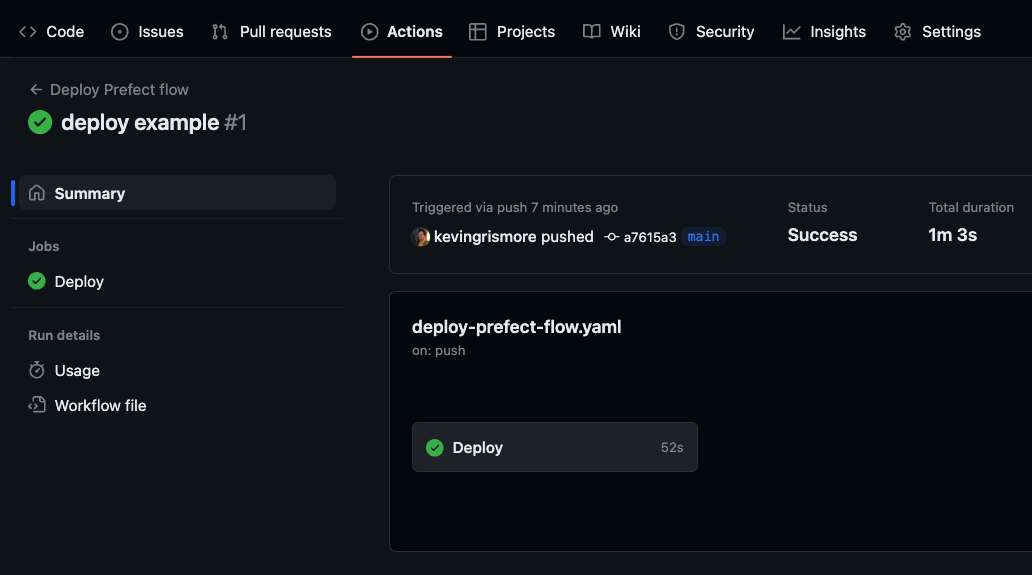 View the logs from each workflow step as they run. The `Prefect Deploy` step includes output about
your image build and push, and the creation/update of your deployment.
```bash theme={null}
Successfully built image '***/cicd-example:latest'
Successfully pushed image '***/cicd-example:latest'
Successfully created/updated all deployments!
Deployments
|-----------------------------------------|
| Name | Status Details |
|---------------------|---------|---------|
| hello/my-deployment | applied | |
|-----------------------------------------|
```
## Advanced example
In more complex scenarios, CI/CD processes often need to accommodate several additional
considerations to enable a smooth development workflow:
* Making code available in different environments as it advances through stages of development
* Handling independent deployment of distinct groupings of work, as in a monorepo
* Efficiently using build time to avoid repeated work
This [example repository](https://github.com/prefecthq/cicd-example-workspaces) addresses each of these
considerations with a combination of Prefect's and GitHub's capabilities.
### Deploy to multiple workspaces
The deployment processes to run are automatically selected when changes are pushed, depending on
two conditions:
```yaml theme={null}
on:
push:
branches:
- stg
- main
paths:
- "project_1/**"
```
* **`branches:`** - which branch has changed. This ultimately selects which Prefect workspace a
deployment is created or updated in. In this example, changes on the `stg` branch deploy flows to a
staging workspace, and changes on the `main` branch deploy flows to a production workspace.
* **`paths:`** - which project folders' files have changed. Since each project folder contains its own flows,
dependencies, and `prefect.yaml`, it represents a complete set of logic and configuration that can deploy
independently. Each project in this repository gets its own GitHub Actions workflow YAML file.
The `prefect.yaml` file in each project folder depends on environment variables dictated by the
selected job in each CI/CD workflow; enabling external code storage for Prefect deployments that is clearly
separated across projects and environments.
Deployments in this example use S3 for code storage. So it's important that push steps place flow files
in separate locations depending upon their respective environment and project—so no deployment overwrites another
deployment's files.
### Caching build dependencies
Since building Docker images and installing Python dependencies are essential parts of the deployment process,
it's useful to rely on caching to skip repeated build steps.
The `setup-python` action offers [caching options](https://github.com/actions/setup-python#caching-packages-dependencies)
so Python packages do not have to be downloaded on repeat workflow runs.
```yaml theme={null}
- name: Setup Python
uses: actions/setup-python@v5
with:
python-version: "3.12"
cache: "pip"
```
The `build-push-action` for building Docker images also offers
[caching options for GitHub Actions](https://docs.docker.com/build/cache/backends/gha/).
If you are not using GitHub, other remote [cache backends](https://docs.docker.com/build/cache/backends/)
are available as well.
```yaml theme={null}
- name: Build and push
id: build-docker-image
env:
GITHUB_SHA: ${{ steps.get-commit-hash.outputs.COMMIT_HASH }}
uses: docker/build-push-action@v5
with:
context: ${{ env.PROJECT_NAME }}/
push: true
tags: ${{ secrets.DOCKER_USERNAME }}/${{ env.PROJECT_NAME }}:${{ env.GITHUB_SHA }}-stg
cache-from: type=gha
cache-to: type=gha,mode=max
```
```
importing cache manifest from gha:***
DONE 0.1s
[internal] load build context
transferring context: 70B done
DONE 0.0s
[2/3] COPY requirements.txt requirements.txt
CACHED
[3/3] RUN pip install -r requirements.txt
CACHED
```
## Prefect GitHub Actions
Prefect provides its own GitHub Action for [deployment creation](https://github.com/PrefectHQ/actions-prefect-deploy).
This action simplifies deploying with CI/CD when using `prefect.yaml`,
especially in cases where a repository contains flows used in multiple deployments across multiple
Prefect Cloud workspaces.
Here's an example of integrating these actions into the workflow above:
```yaml theme={null}
name: Deploy Prefect flow
on:
push:
branches:
- main
jobs:
deploy:
name: Deploy
runs-on: ubuntu-latest
steps:
- name: Checkout
uses: actions/checkout@v4
- name: Log in to Docker Hub
uses: docker/login-action@v3
with:
username: ${{ secrets.DOCKER_USERNAME }}
password: ${{ secrets.DOCKER_PASSWORD }}
- name: Setup Python
uses: actions/setup-python@v5
with:
python-version: "3.12"
- name: Run Prefect Deploy
uses: PrefectHQ/actions-prefect-deploy@v4
with:
deployment-names: my-deployment
requirements-file-paths: requirements.txt
deployment-file-path: prefect.yaml
env:
PREFECT_API_KEY: ${{ secrets.PREFECT_API_KEY }}
PREFECT_API_URL: ${{ secrets.PREFECT_API_URL }}
```
## Authenticate to other Docker image registries
The `docker/login-action` GitHub Action supports pushing images to a wide variety of image registries.
For example, if you are storing Docker images in AWS Elastic Container Registry, you can add your ECR
registry URL to the `registry` key in the `with:` part of the action and use an `AWS_ACCESS_KEY_ID` and
`AWS_SECRET_ACCESS_KEY` as your `username` and `password`.
```yaml theme={null}
- name: Login to ECR
uses: docker/login-action@v3
with:
registry: .dkr.ecr..amazonaws.com
username: ${{ secrets.AWS_ACCESS_KEY_ID }}
password: ${{ secrets.AWS_SECRET_ACCESS_KEY }}
```
## Further reading
View the logs from each workflow step as they run. The `Prefect Deploy` step includes output about
your image build and push, and the creation/update of your deployment.
```bash theme={null}
Successfully built image '***/cicd-example:latest'
Successfully pushed image '***/cicd-example:latest'
Successfully created/updated all deployments!
Deployments
|-----------------------------------------|
| Name | Status Details |
|---------------------|---------|---------|
| hello/my-deployment | applied | |
|-----------------------------------------|
```
## Advanced example
In more complex scenarios, CI/CD processes often need to accommodate several additional
considerations to enable a smooth development workflow:
* Making code available in different environments as it advances through stages of development
* Handling independent deployment of distinct groupings of work, as in a monorepo
* Efficiently using build time to avoid repeated work
This [example repository](https://github.com/prefecthq/cicd-example-workspaces) addresses each of these
considerations with a combination of Prefect's and GitHub's capabilities.
### Deploy to multiple workspaces
The deployment processes to run are automatically selected when changes are pushed, depending on
two conditions:
```yaml theme={null}
on:
push:
branches:
- stg
- main
paths:
- "project_1/**"
```
* **`branches:`** - which branch has changed. This ultimately selects which Prefect workspace a
deployment is created or updated in. In this example, changes on the `stg` branch deploy flows to a
staging workspace, and changes on the `main` branch deploy flows to a production workspace.
* **`paths:`** - which project folders' files have changed. Since each project folder contains its own flows,
dependencies, and `prefect.yaml`, it represents a complete set of logic and configuration that can deploy
independently. Each project in this repository gets its own GitHub Actions workflow YAML file.
The `prefect.yaml` file in each project folder depends on environment variables dictated by the
selected job in each CI/CD workflow; enabling external code storage for Prefect deployments that is clearly
separated across projects and environments.
Deployments in this example use S3 for code storage. So it's important that push steps place flow files
in separate locations depending upon their respective environment and project—so no deployment overwrites another
deployment's files.
### Caching build dependencies
Since building Docker images and installing Python dependencies are essential parts of the deployment process,
it's useful to rely on caching to skip repeated build steps.
The `setup-python` action offers [caching options](https://github.com/actions/setup-python#caching-packages-dependencies)
so Python packages do not have to be downloaded on repeat workflow runs.
```yaml theme={null}
- name: Setup Python
uses: actions/setup-python@v5
with:
python-version: "3.12"
cache: "pip"
```
The `build-push-action` for building Docker images also offers
[caching options for GitHub Actions](https://docs.docker.com/build/cache/backends/gha/).
If you are not using GitHub, other remote [cache backends](https://docs.docker.com/build/cache/backends/)
are available as well.
```yaml theme={null}
- name: Build and push
id: build-docker-image
env:
GITHUB_SHA: ${{ steps.get-commit-hash.outputs.COMMIT_HASH }}
uses: docker/build-push-action@v5
with:
context: ${{ env.PROJECT_NAME }}/
push: true
tags: ${{ secrets.DOCKER_USERNAME }}/${{ env.PROJECT_NAME }}:${{ env.GITHUB_SHA }}-stg
cache-from: type=gha
cache-to: type=gha,mode=max
```
```
importing cache manifest from gha:***
DONE 0.1s
[internal] load build context
transferring context: 70B done
DONE 0.0s
[2/3] COPY requirements.txt requirements.txt
CACHED
[3/3] RUN pip install -r requirements.txt
CACHED
```
## Prefect GitHub Actions
Prefect provides its own GitHub Action for [deployment creation](https://github.com/PrefectHQ/actions-prefect-deploy).
This action simplifies deploying with CI/CD when using `prefect.yaml`,
especially in cases where a repository contains flows used in multiple deployments across multiple
Prefect Cloud workspaces.
Here's an example of integrating these actions into the workflow above:
```yaml theme={null}
name: Deploy Prefect flow
on:
push:
branches:
- main
jobs:
deploy:
name: Deploy
runs-on: ubuntu-latest
steps:
- name: Checkout
uses: actions/checkout@v4
- name: Log in to Docker Hub
uses: docker/login-action@v3
with:
username: ${{ secrets.DOCKER_USERNAME }}
password: ${{ secrets.DOCKER_PASSWORD }}
- name: Setup Python
uses: actions/setup-python@v5
with:
python-version: "3.12"
- name: Run Prefect Deploy
uses: PrefectHQ/actions-prefect-deploy@v4
with:
deployment-names: my-deployment
requirements-file-paths: requirements.txt
deployment-file-path: prefect.yaml
env:
PREFECT_API_KEY: ${{ secrets.PREFECT_API_KEY }}
PREFECT_API_URL: ${{ secrets.PREFECT_API_URL }}
```
## Authenticate to other Docker image registries
The `docker/login-action` GitHub Action supports pushing images to a wide variety of image registries.
For example, if you are storing Docker images in AWS Elastic Container Registry, you can add your ECR
registry URL to the `registry` key in the `with:` part of the action and use an `AWS_ACCESS_KEY_ID` and
`AWS_SECRET_ACCESS_KEY` as your `username` and `password`.
```yaml theme={null}
- name: Login to ECR
uses: docker/login-action@v3
with:
registry: .dkr.ecr..amazonaws.com
username: ${{ secrets.AWS_ACCESS_KEY_ID }}
password: ${{ secrets.AWS_SECRET_ACCESS_KEY }}
```
## Further reading