> ## Documentation Index
> Fetch the complete documentation index at: https://docs.prefect.io/llms.txt
> Use this file to discover all available pages before exploring further.
# Configure UI forms for validating workflow inputs
> Learn how to craft validated and user-friendly input forms for workflows.
Parameterizing workflows is a critical part of orchestration. It allows you to create contracts between modular workflows in your organization and empower less-technical users to interact with your workflows intuitively.
[Pydantic](https://docs.pydantic.dev/) is a powerful library for data validation using Python type annotations, which is used by Prefect to build a parameter schema for your workflow.
This allows you to:
* check runtime parameter values against the schema (from the UI or the SDK)
* build a user-friendly form in the Prefect UI
* easily reuse parameter types in similar workflows
In this tutorial, we'll craft a workflow signature that the Prefect UI will render as a self-documenting form.
## Motivation
Let's say you have a workflow that triggers a marketing email blast which looks like:
```python theme={null}
@flow
def send_marketing_email(
mailing_lists: list[str],
subject: str,
body: str,
test_mode: bool = False,
attachments: list[str] | None = None
):
"""
Send a marketing email blast to the given lists.
Args:
mailing_lists: A list of lists to email.
subject: The subject of the email.
body: The body of the email.
test_mode: Whether to send a test email.
attachments: A list of attachments to include in the email.
"""
...
```
When you deploy this flow, Prefect will automatically inspect your function signature and generate a form for you:
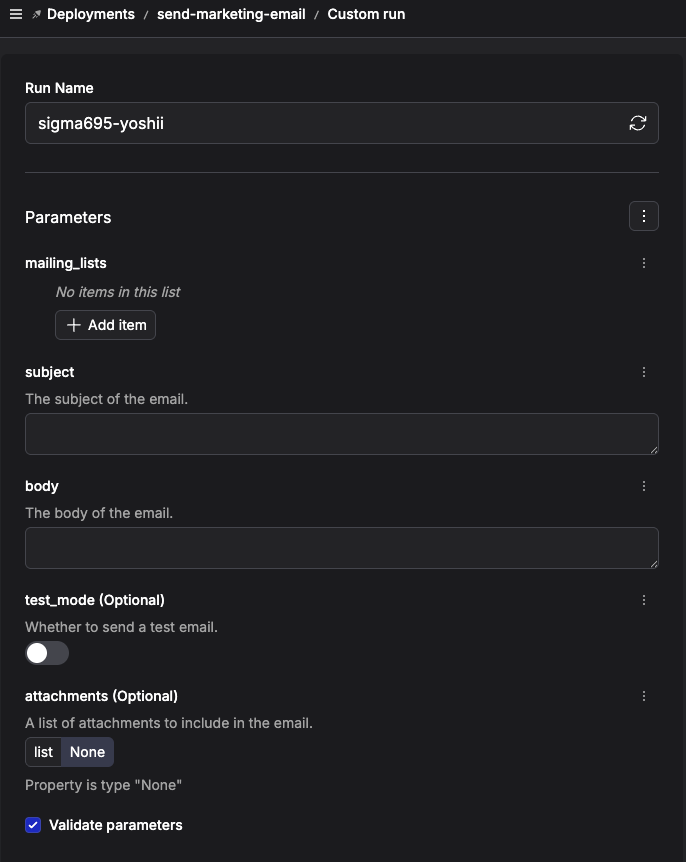 This is good enough for many cases, but consider these additional constraints that could arise from business needs or tech stack restrictions:
* there are only a few valid values for `mailing_lists`
* the `subject` must not exceed 30 characters
* no more than 5 `attachments` are allowed
You *can* simply check these constraints in the body of your flow function:
```python theme={null}
@flow
def send_marketing_email(...):
if len(subject) > 30:
raise ValueError("Subject must be less than 30 characters")
if mailing_lists not in ["newsletter", "customers", "beta-testers"]:
raise ValueError("Invalid list to email")
if len(attachments) > 5:
raise ValueError("Too many attachments")
# etc...
```
but there are several downsides to this:
* you have to spin up the infrastructure associated with your flow in order to check the constraints, which is wasteful if it turns out that bad parameters were provided
* this might get duplicative, especially if you have similarly constrained parameters for different workflows
To improve on this, we will use `pydantic` to build a convenient, self-documenting, and reusable flow signature that the Prefect UI can build a better form from.
## Building a convenient flow signature
Let's address the constraints on `mailing_lists`, `subject`, and `attachments`.
### Using `Literal` to restrict valid values
> there are only a few valid values for `mailing_lists`
Say our valid mailing lists are: `["newsletter", "customers", "beta-testers"]`
We can define a `Literal` to specify the valid values for the `mailing_lists` parameter.
```python theme={null}
from typing import Literal
MailingList = Literal["newsletter", "customers", "beta-testers"]
```
You can use an `Enum` to achieve the same effect.
```python theme={null}
from enum import Enum
class MailingList(Enum):
NEWSLETTER = "newsletter"
CUSTOMERS = "customers"
BETA_TESTERS = "beta-testers"
```
### Using a `BaseModel` subclass to group and constrain parameters
Both the `subject` and `attachments` parameters have constraints that we want to enforce.
> the `subject` must not exceed 30 characters
> the `attachments` must not exceed 5 items
Additionally, the `subject`, `body`, and `attachments` parameters are all related to the same thing: the content of the email.
We can define a `BaseModel` subclass to group these parameters together and apply these constraints.
```python theme={null}
from pydantic import BaseModel, Field
class EmailContent(BaseModel):
subject: str = Field(max_length=30)
body: str = Field(default=...)
attachments: list[str] = Field(default_factory=list, max_length=5)
```
`pydantic.Field` accepts a `description` kwarg that is displayed in the form above the field input.
```python theme={null}
subject: str = Field(description="The subject of the email", max_length=30)
```
This is good enough for many cases, but consider these additional constraints that could arise from business needs or tech stack restrictions:
* there are only a few valid values for `mailing_lists`
* the `subject` must not exceed 30 characters
* no more than 5 `attachments` are allowed
You *can* simply check these constraints in the body of your flow function:
```python theme={null}
@flow
def send_marketing_email(...):
if len(subject) > 30:
raise ValueError("Subject must be less than 30 characters")
if mailing_lists not in ["newsletter", "customers", "beta-testers"]:
raise ValueError("Invalid list to email")
if len(attachments) > 5:
raise ValueError("Too many attachments")
# etc...
```
but there are several downsides to this:
* you have to spin up the infrastructure associated with your flow in order to check the constraints, which is wasteful if it turns out that bad parameters were provided
* this might get duplicative, especially if you have similarly constrained parameters for different workflows
To improve on this, we will use `pydantic` to build a convenient, self-documenting, and reusable flow signature that the Prefect UI can build a better form from.
## Building a convenient flow signature
Let's address the constraints on `mailing_lists`, `subject`, and `attachments`.
### Using `Literal` to restrict valid values
> there are only a few valid values for `mailing_lists`
Say our valid mailing lists are: `["newsletter", "customers", "beta-testers"]`
We can define a `Literal` to specify the valid values for the `mailing_lists` parameter.
```python theme={null}
from typing import Literal
MailingList = Literal["newsletter", "customers", "beta-testers"]
```
You can use an `Enum` to achieve the same effect.
```python theme={null}
from enum import Enum
class MailingList(Enum):
NEWSLETTER = "newsletter"
CUSTOMERS = "customers"
BETA_TESTERS = "beta-testers"
```
### Using a `BaseModel` subclass to group and constrain parameters
Both the `subject` and `attachments` parameters have constraints that we want to enforce.
> the `subject` must not exceed 30 characters
> the `attachments` must not exceed 5 items
Additionally, the `subject`, `body`, and `attachments` parameters are all related to the same thing: the content of the email.
We can define a `BaseModel` subclass to group these parameters together and apply these constraints.
```python theme={null}
from pydantic import BaseModel, Field
class EmailContent(BaseModel):
subject: str = Field(max_length=30)
body: str = Field(default=...)
attachments: list[str] = Field(default_factory=list, max_length=5)
```
`pydantic.Field` accepts a `description` kwarg that is displayed in the form above the field input.
```python theme={null}
subject: str = Field(description="The subject of the email", max_length=30)
```
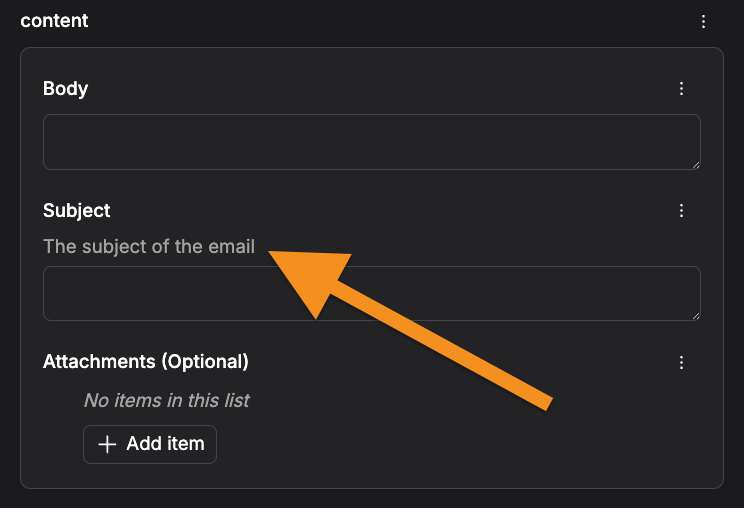 Similarly, you can:
* pass `title` to `Field` to override the field name in the form
* define a docstring for `EmailContent` to add a description to this group of parameters in the form
### Rewriting the flow signature
Now that we have defined the `MailingList` and `EmailContent` types, we can use them in our flow signature:
```python theme={null}
@flow
def send_marketing_email(
mailing_lists: list[MailingList],
content: EmailContent,
test_mode: bool = False,
):
...
```
The resulting form looks like this:
Similarly, you can:
* pass `title` to `Field` to override the field name in the form
* define a docstring for `EmailContent` to add a description to this group of parameters in the form
### Rewriting the flow signature
Now that we have defined the `MailingList` and `EmailContent` types, we can use them in our flow signature:
```python theme={null}
@flow
def send_marketing_email(
mailing_lists: list[MailingList],
content: EmailContent,
test_mode: bool = False,
):
...
```
The resulting form looks like this:
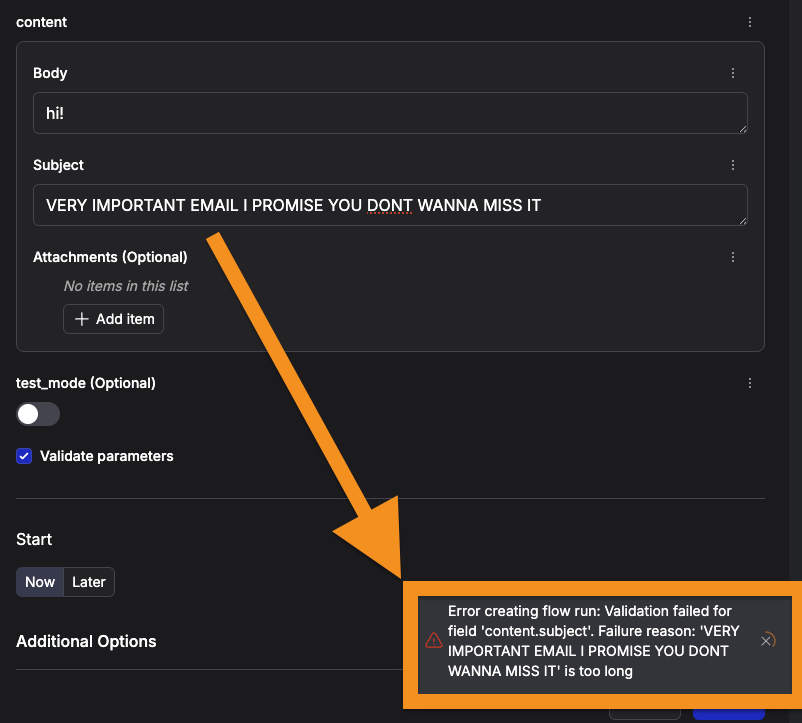
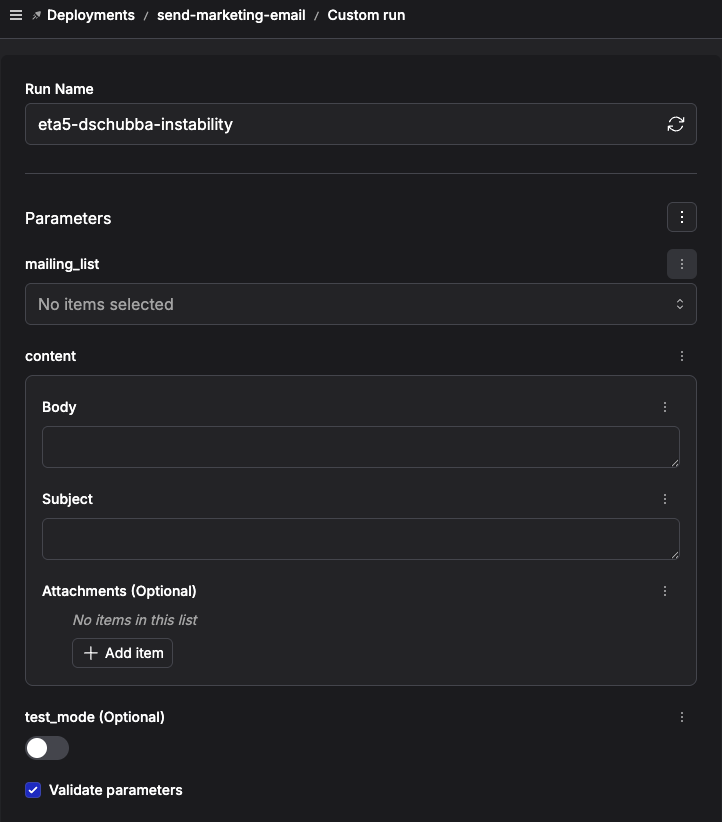 where the `mailing_lists` parameter renders as a multi-select dropdown that only allows the `Literal` values from our `MailingList` type.
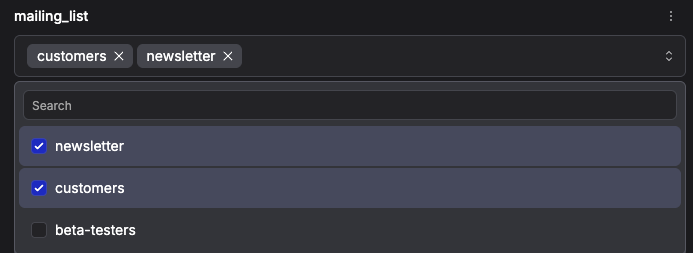 and any constraints you've defined on the `EmailContent` fields will be enforced before the run is submitted.
 ```python theme={null}
from typing import Literal
from prefect import flow
from pydantic import BaseModel, Field
MailingList = Literal["newsletter", "customers", "beta-testers"]
class EmailContent(BaseModel):
subject: str = Field(max_length=30)
body: str = Field(default=...)
attachments: list[str] = Field(default_factory=list, max_length=5)
@flow
def send_marketing_email(
mailing_list: list[MailingList],
content: EmailContent,
test_mode: bool = False,
):
pass
if __name__ == "__main__":
send_marketing_email.serve()
```
### Using `json_schema_extra` to order fields in the form
By default, your flow parameters are rendered in the order defined by your `@flow` function signature.
Within a given `BaseModel` subclass, parameters are rendered in the following order:
* parameters with a `default` value are rendered first, alphabetically
* parameters without a `default` value are rendered next, alphabetically
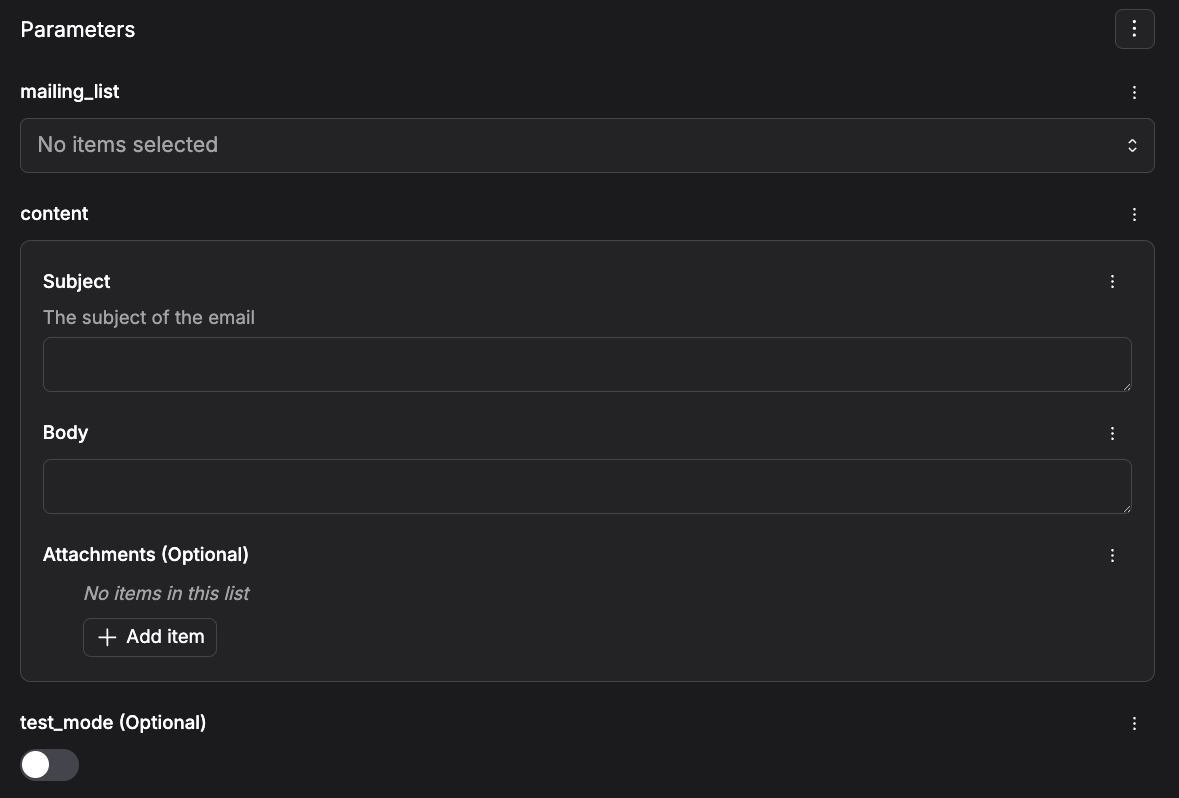
You can control the order of the parameters within a `BaseModel` subclass by passing `json_schema_extra` to the `Field` constructor with a `position` key.
Taking our `EmailContent` model from the previous example, let's enforce that `subject` should be displayed first, then `body`, then `attachments`.
```python theme={null}
class EmailContent(BaseModel):
subject: str = Field(
max_length=30,
description="The subject of the email",
json_schema_extra=dict(position=0),
)
body: str = Field(default=..., json_schema_extra=dict(position=1))
attachments: list[str] = Field(
default_factory=list,
max_length=5,
json_schema_extra=dict(position=2),
)
```
The resulting form looks like this:
```python theme={null}
from typing import Literal
from prefect import flow
from pydantic import BaseModel, Field
MailingList = Literal["newsletter", "customers", "beta-testers"]
class EmailContent(BaseModel):
subject: str = Field(max_length=30)
body: str = Field(default=...)
attachments: list[str] = Field(default_factory=list, max_length=5)
@flow
def send_marketing_email(
mailing_list: list[MailingList],
content: EmailContent,
test_mode: bool = False,
):
pass
if __name__ == "__main__":
send_marketing_email.serve()
```
### Using `json_schema_extra` to order fields in the form
By default, your flow parameters are rendered in the order defined by your `@flow` function signature.
Within a given `BaseModel` subclass, parameters are rendered in the following order:
* parameters with a `default` value are rendered first, alphabetically
* parameters without a `default` value are rendered next, alphabetically
You can control the order of the parameters within a `BaseModel` subclass by passing `json_schema_extra` to the `Field` constructor with a `position` key.
Taking our `EmailContent` model from the previous example, let's enforce that `subject` should be displayed first, then `body`, then `attachments`.
```python theme={null}
class EmailContent(BaseModel):
subject: str = Field(
max_length=30,
description="The subject of the email",
json_schema_extra=dict(position=0),
)
body: str = Field(default=..., json_schema_extra=dict(position=1))
attachments: list[str] = Field(
default_factory=list,
max_length=5,
json_schema_extra=dict(position=2),
)
```
The resulting form looks like this:
 ## Using callable and class parameters
If your parameter model includes `Callable` or `Type` fields, Prefect can't serialize them
to JSON. The UI shows a placeholder like `` instead of actual values, and
automation templates can't access individual fields.
Pydantic's [`ImportString`](https://docs.pydantic.dev/latest/api/types/#pydantic.types.ImportString)
type solves this. It accepts a dotted import path as a string (e.g. `"mymodule.my_func"`),
resolves it to the real Python object at validation time, and serializes back to a string
for JSON.
For example, an order ingestion flow that needs a different normalizer per vendor:
```python vendors.py theme={null}
from datetime import datetime
from typing import Any
from pydantic import BaseModel
class Order(BaseModel):
order_id: str
customer_email: str
total_cents: int
currency: str
placed_at: datetime
class StripeCharge(BaseModel):
id: str
receipt_email: str
amount: int
currency: str
created: int
class ShopifyOrder(BaseModel):
name: str
email: str
total_price: str
currency: str
created_at: str
def normalize_stripe(records: list[dict[str, Any]]) -> list[dict[str, Any]]:
return [
{
"order_id": r["id"],
"customer_email": r["receipt_email"],
"total_cents": r["amount"],
"currency": r["currency"],
"placed_at": datetime.fromtimestamp(r["created"]).isoformat(),
}
for r in records
]
def normalize_shopify(records: list[dict[str, Any]]) -> list[dict[str, Any]]:
return [
{
"order_id": r["name"],
"customer_email": r["email"],
"total_cents": int(float(r["total_price"]) * 100),
"currency": r["currency"],
"placed_at": r["created_at"],
}
for r in records
]
```
Use `ImportString` in the parameter model so the normalizer and raw schema are editable
strings in the UI, but resolve to real Python objects at runtime:
```python pipeline.py theme={null}
from typing import Any, Callable, Type
from pydantic import BaseModel, ImportString, TypeAdapter
from prefect import flow, task
class IngestConfig(BaseModel):
vendor: str
normalizer: ImportString[Callable[[list[dict[str, Any]]], list[dict[str, Any]]]]
raw_schema: ImportString[Type[BaseModel]]
@task
def fetch_raw_records(vendor: str) -> list[dict[str, Any]]:
...
@task
def validate_raw(
records: list[dict[str, Any]], schema: type[BaseModel]
) -> list[BaseModel]:
adapter = TypeAdapter(list[schema])
return adapter.validate_python(records)
@task
def normalize(
records: list[dict[str, Any]],
normalizer: Callable[[list[dict[str, Any]]], list[dict[str, Any]]],
) -> list[dict[str, Any]]:
return normalizer(records)
@flow(flow_run_name="ingest-{config.vendor}", log_prints=True)
def ingest_orders(config: IngestConfig):
raw = fetch_raw_records(config.vendor)
validated_raw = validate_raw(raw, config.raw_schema)
orders = normalize(raw, config.normalizer)
print(f"vendor: {config.vendor}, validated: {len(validated_raw)}, produced: {len(orders)}")
if __name__ == "__main__":
ingest_orders.serve(
name="order-ingestion",
parameters={
"config": {
"vendor": "stripe",
"normalizer": "vendors.normalize_stripe",
"raw_schema": "vendors.StripeCharge",
}
},
)
```
Anyone can override the vendor config when triggering a run:
```bash theme={null}
prefect deployment run 'ingest-orders/order-ingestion' \
-p 'config={
"vendor": "shopify",
"normalizer": "vendors.normalize_shopify",
"raw_schema": "vendors.ShopifyOrder"
}'
```
The server stores clean JSON that the UI and automations can read:
```json theme={null}
{
"config": {
"vendor": "shopify",
"normalizer": "vendors.normalize_shopify",
"raw_schema": "vendors.ShopifyOrder"
}
}
```
`ImportString` requires that the referenced object is importable by dotted path. Lambdas,
closures, and objects defined in `__main__` won't work — move them to a named module
instead.
## Recap
We have now embedded the constraints on our parameters in the types that describe our flow signature, which means:
* the UI can enforce these constraints before the run is submitted - **less wasted infra cycles**
* workflow inputs are **self-documenting**, both in the UI and in the code defining your workflow
* the types used in this signature can be **easily reused** for other similar workflows
## Debugging and related resources
As you craft a schema for your flow signature, you may want to inspect the raw OpenAPI schema that `pydantic` generates, as it is what the Prefect UI uses to build the form.
Call `model_json_schema()` on your `BaseModel` subclass to inspect the raw schema.
```python theme={null}
from rich import print as pprint
from pydantic import BaseModel, Field
class EmailContent(BaseModel):
subject: str = Field(max_length=30)
body: str = Field(default=...)
attachments: list[str] = Field(default_factory=list, max_length=5)
pprint(EmailContent.model_json_schema())
```
```
{
'properties': {
'subject': {'maxLength': 30, 'title': 'Subject', 'type': 'string'},
'body': {'title': 'Body', 'type': 'string'},
'attachments': {'items': {'type': 'string'}, 'maxItems': 5, 'title': 'Attachments', 'type': 'array'}
},
'required': ['subject', 'body'],
'title': 'EmailContent',
'type': 'object'
}
```
For more on constrained types and validation features available in `pydantic`, see their documentation on [models](https://docs.pydantic.dev/latest/concepts/models/) and [types](https://docs.pydantic.dev/latest/concepts/types/).
## Using callable and class parameters
If your parameter model includes `Callable` or `Type` fields, Prefect can't serialize them
to JSON. The UI shows a placeholder like `` instead of actual values, and
automation templates can't access individual fields.
Pydantic's [`ImportString`](https://docs.pydantic.dev/latest/api/types/#pydantic.types.ImportString)
type solves this. It accepts a dotted import path as a string (e.g. `"mymodule.my_func"`),
resolves it to the real Python object at validation time, and serializes back to a string
for JSON.
For example, an order ingestion flow that needs a different normalizer per vendor:
```python vendors.py theme={null}
from datetime import datetime
from typing import Any
from pydantic import BaseModel
class Order(BaseModel):
order_id: str
customer_email: str
total_cents: int
currency: str
placed_at: datetime
class StripeCharge(BaseModel):
id: str
receipt_email: str
amount: int
currency: str
created: int
class ShopifyOrder(BaseModel):
name: str
email: str
total_price: str
currency: str
created_at: str
def normalize_stripe(records: list[dict[str, Any]]) -> list[dict[str, Any]]:
return [
{
"order_id": r["id"],
"customer_email": r["receipt_email"],
"total_cents": r["amount"],
"currency": r["currency"],
"placed_at": datetime.fromtimestamp(r["created"]).isoformat(),
}
for r in records
]
def normalize_shopify(records: list[dict[str, Any]]) -> list[dict[str, Any]]:
return [
{
"order_id": r["name"],
"customer_email": r["email"],
"total_cents": int(float(r["total_price"]) * 100),
"currency": r["currency"],
"placed_at": r["created_at"],
}
for r in records
]
```
Use `ImportString` in the parameter model so the normalizer and raw schema are editable
strings in the UI, but resolve to real Python objects at runtime:
```python pipeline.py theme={null}
from typing import Any, Callable, Type
from pydantic import BaseModel, ImportString, TypeAdapter
from prefect import flow, task
class IngestConfig(BaseModel):
vendor: str
normalizer: ImportString[Callable[[list[dict[str, Any]]], list[dict[str, Any]]]]
raw_schema: ImportString[Type[BaseModel]]
@task
def fetch_raw_records(vendor: str) -> list[dict[str, Any]]:
...
@task
def validate_raw(
records: list[dict[str, Any]], schema: type[BaseModel]
) -> list[BaseModel]:
adapter = TypeAdapter(list[schema])
return adapter.validate_python(records)
@task
def normalize(
records: list[dict[str, Any]],
normalizer: Callable[[list[dict[str, Any]]], list[dict[str, Any]]],
) -> list[dict[str, Any]]:
return normalizer(records)
@flow(flow_run_name="ingest-{config.vendor}", log_prints=True)
def ingest_orders(config: IngestConfig):
raw = fetch_raw_records(config.vendor)
validated_raw = validate_raw(raw, config.raw_schema)
orders = normalize(raw, config.normalizer)
print(f"vendor: {config.vendor}, validated: {len(validated_raw)}, produced: {len(orders)}")
if __name__ == "__main__":
ingest_orders.serve(
name="order-ingestion",
parameters={
"config": {
"vendor": "stripe",
"normalizer": "vendors.normalize_stripe",
"raw_schema": "vendors.StripeCharge",
}
},
)
```
Anyone can override the vendor config when triggering a run:
```bash theme={null}
prefect deployment run 'ingest-orders/order-ingestion' \
-p 'config={
"vendor": "shopify",
"normalizer": "vendors.normalize_shopify",
"raw_schema": "vendors.ShopifyOrder"
}'
```
The server stores clean JSON that the UI and automations can read:
```json theme={null}
{
"config": {
"vendor": "shopify",
"normalizer": "vendors.normalize_shopify",
"raw_schema": "vendors.ShopifyOrder"
}
}
```
`ImportString` requires that the referenced object is importable by dotted path. Lambdas,
closures, and objects defined in `__main__` won't work — move them to a named module
instead.
## Recap
We have now embedded the constraints on our parameters in the types that describe our flow signature, which means:
* the UI can enforce these constraints before the run is submitted - **less wasted infra cycles**
* workflow inputs are **self-documenting**, both in the UI and in the code defining your workflow
* the types used in this signature can be **easily reused** for other similar workflows
## Debugging and related resources
As you craft a schema for your flow signature, you may want to inspect the raw OpenAPI schema that `pydantic` generates, as it is what the Prefect UI uses to build the form.
Call `model_json_schema()` on your `BaseModel` subclass to inspect the raw schema.
```python theme={null}
from rich import print as pprint
from pydantic import BaseModel, Field
class EmailContent(BaseModel):
subject: str = Field(max_length=30)
body: str = Field(default=...)
attachments: list[str] = Field(default_factory=list, max_length=5)
pprint(EmailContent.model_json_schema())
```
```
{
'properties': {
'subject': {'maxLength': 30, 'title': 'Subject', 'type': 'string'},
'body': {'title': 'Body', 'type': 'string'},
'attachments': {'items': {'type': 'string'}, 'maxItems': 5, 'title': 'Attachments', 'type': 'array'}
},
'required': ['subject', 'body'],
'title': 'EmailContent',
'type': 'object'
}
```
For more on constrained types and validation features available in `pydantic`, see their documentation on [models](https://docs.pydantic.dev/latest/concepts/models/) and [types](https://docs.pydantic.dev/latest/concepts/types/).