> ## Documentation Index
> Fetch the complete documentation index at: https://docs.prefect.io/llms.txt
> Use this file to discover all available pages before exploring further.
# Blocks
> Prefect blocks allow you to manage configuration schemas, infrastructure, and secrets for use with deployments or flow scripts.
export const blocks = {
cli: "https://docs.prefect.io/v3/api-ref/cli/block",
api: "https://app.prefect.cloud/api/docs#tag/Blocks",
tf: "https://registry.terraform.io/providers/PrefectHQ/prefect/latest/docs/resources/block"
};
export const TF = ({name, href}) => You can manage {name} with the Terraform provider for Prefect.
;
export const CLI = ({name, href}) => You can manage {name} with the Prefect CLI.
;
Prefect blocks store typed configuration that can be used across workflows and deployments.
The most common use case for blocks is storing credentials used to access external systems such as AWS or GCP.
Prefect supports [a large number of common blocks](#pre-registered-blocks) and provides a Python SDK for creating your own.
**Blocks and parameters**
Blocks are useful for sharing configuration across flow runs and between flows.
For configuration that will change between flow runs, we recommend using [parameters](/v3/develop/write-flows/#parameters).
## How blocks work
There are three layers to a block: its *type*, a *document*, and a Python *class*.
### Block type
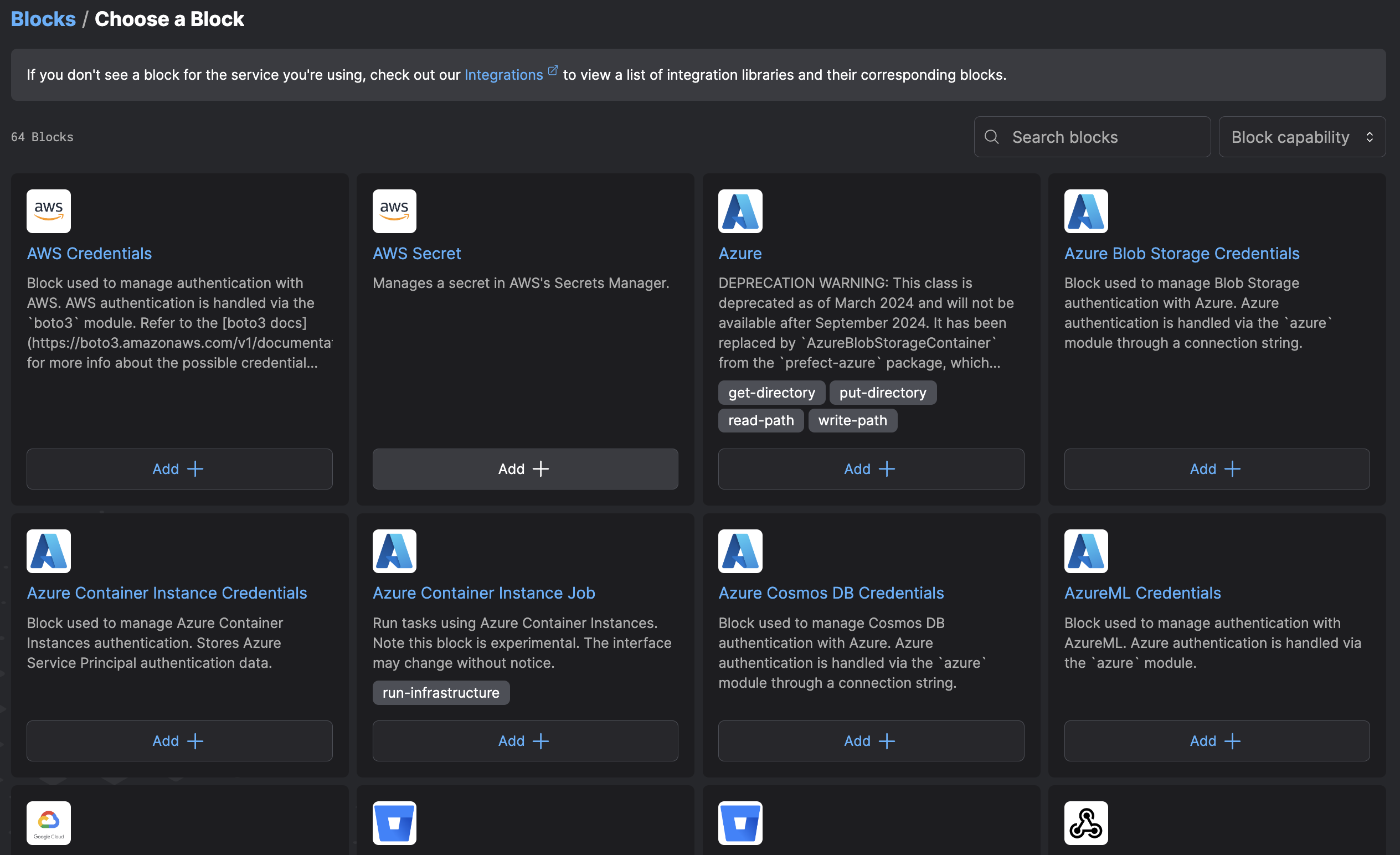
A block *type* is essentially a schema registered with the Prefect API. This schema can be inspected and discovered in the UI on the **Blocks** page.
To see block types available for configuration, use `prefect block type ls`
from the CLI or navigate to the **Blocks** page in the UI and click **+**.
 These types separate blocks from [Prefect variables](/v3/develop/variables/), which are unstructured JSON documents.
In addition, block schemas allow for fields of `SecretStr` type which are stored with additional encryption and not displayed by default in the UI.
Block types are identified by a *slug* that is not configurable.
```python theme={null}
from prefect.blocks.core import Block
class Cube(Block):
edge_length_inches: float
# register the block type under the slug 'cube'
Cube.register_type_and_schema()
```
Users should rarely need to register types in this way - saving a block document will also automatically register its type.
### Block document
A block *document* is an instantiation of the schema, or block type. A document contains *specific* values for each field defined in the schema.
All block types allow for the creation of as many documents as you wish. Building on our example above:
```python theme={null}
from prefect.blocks.core import Block
class Cube(Block):
edge_length_inches: float
# instantiate the type with specific values
rubiks_cube = Cube(edge_length_inches=2.25)
# store those values in a block document
# on the server for future use
rubiks_cube.save("rubiks-cube")
# instantiate and save another block document
tiny_cube = Cube(edge_length_inches=0.001)
tiny_cube.save("tiny")
```
Block documents can also be created and updated in the UI or API for easy change management.
This allows you to work with slowly changing configuration without having to redeploy all workflows that rely on it; for example, you may use this to rotate credentials on a regular basis without touching your deployments.
### Block class
A block *class* is the primary user-facing object; it is a Python class whose attributes are loaded from a block document. Most Prefect blocks encapsulate additional functionality built on top of the block document.
For example, an `S3Bucket` block contains methods for downloading data from, or upload data to, an S3 bucket; a `SnowflakeConnector` block contains methods for querying Snowflake databases.
Returning to our `Cube` example from above:
```python theme={null}
from prefect.blocks.core import Block
class Cube(Block):
edge_length_inches: float
def get_volume(self):
return self.edge_length_inches ** 3
def get_surface_area(self):
return 6 * self.edge_length_inches ** 2
rubiks_cube = Cube.load("rubiks-cube")
rubiks_cube.get_volume() # 11.390625
```
The class itself is *not* stored server-side when registering block types and block documents.
For this reason, we highly recommend loading block documents by first importing the block class and then calling its `load` method with the relevant document name.
## Pre-registered blocks
### Built-in blocks
Commonly used block types come built-in with Prefect.
You can create and use these block types through the UI without installing any additional packages.
| Block | Slug | Description |
| ----------------------- | -------------------- | ------------------------------------------------------------------------------------------------ |
| Custom Webhook | `custom-webhook` | Call custom webhooks. |
| Discord Webhook | `discord-webhook` | Call Discord webhooks. |
| Local File System | `local-file-system` | Store data as a file on a local file system. |
| Mattermost Webhook | `mattermost-webhook` | Send notifications through a provided Mattermost webhook. |
| Microsoft Teams Webhook | `ms-teams-webhook` | Send notifications through a provided Microsoft Teams webhook. |
| Opsgenie Webhook | `opsgenie-webhook` | Send notifications through a provided Opsgenie webhook. |
| Pager Duty Webhook | `pager-duty-webhook` | Send notifications through a provided PagerDuty webhook. |
| Remote File System | `remote-file-system` | Access files on a remote file system. |
| Secret | `secret` | Store a secret value. The value will be obfuscated when this block is logged or shown in the UI. |
| Sendgrid Email | `sendgrid-email` | Send notifications through Sendgrid email. |
| Slack Webhook | `slack-webhook` | Send notifications through a provided Slack webhook. |
| SMB | `smb` | Store data as a file on a SMB share. |
| Twilio SMS | `twilio-sms` | Send notifications through Twilio SMS. |
Built-in blocks should be registered the first time you start a Prefect server. If the auto-registration fails, you can manually register the blocks using `prefect blocks register`.
For example, to register all built-in notification blocks, run `prefect block register -m prefect.blocks.notifications`.
### Blocks in Prefect integration libraries
Some block types that appear in the UI can be created immediately, with the corresponding integration library installed for use.
For example, an AWS Secret block can be created, but not used until the [`prefect-aws` library](/integrations/prefect-aws/) is installed.
Find available block types in many of the published [Prefect integrations libraries](/integrations/).
If a block type is not available in the UI, you can [register it](#register-blocks) through the CLI.
| Block | Slug | Integration |
| ------------------------------------ | -------------------------------------- | ------------------------------------------------------- |
| ECS Task | `ecs-task` | [prefect-aws](/integrations/prefect-aws/) |
| MinIO Credentials | `minio-credentials` | [prefect-aws](/integrations/prefect-aws/) |
| S3 Bucket | `s3-bucket` | [prefect-aws](/integrations/prefect-aws/) |
| Azure Blob Storage Credentials | `azure-blob-storage-credentials` | [prefect-azure](/integrations/prefect-azure/) |
| Azure Container Instance Credentials | `azure-container-instance-credentials` | [prefect-azure](/integrations/prefect-azure/) |
| Azure Container Instance Job | `azure-container-instance-job` | [prefect-azure](/integrations/prefect-azure/) |
| Azure Cosmos DB Credentials | `azure-cosmos-db-credentials` | [prefect-azure](/integrations/prefect-azure/) |
| AzureML Credentials | `azureml-credentials` | [prefect-azure](/integrations/prefect-azure/) |
| BitBucket Credentials | `bitbucket-credentials` | [prefect-bitbucket](/integrations/prefect-bitbucket/) |
| BitBucket Repository | `bitbucket-repository` | [prefect-bitbucket](/integrations/prefect-bitbucket/) |
| Databricks Credentials | `databricks-credentials` | [prefect-databricks](/integrations/prefect-databricks/) |
| dbt CLI BigQuery Target Configs | `dbt-cli-bigquery-target-configs` | [prefect-dbt](/integrations/prefect-dbt/) |
| dbt CLI Profile | `dbt-cli-profile` | [prefect-dbt](/integrations/prefect-dbt/) |
| dbt Cloud Credentials | `dbt-cloud-credentials` | [prefect-dbt](/integrations/prefect-dbt/) |
| dbt CLI Global Configs | `dbt-cli-global-configs` | [prefect-dbt](/integrations/prefect-dbt/) |
| dbt CLI Postgres Target Configs | `dbt-cli-postgres-target-configs` | [prefect-dbt](/integrations/prefect-dbt/) |
| dbt CLI Snowflake Target Configs | `dbt-cli-snowflake-target-configs` | [prefect-dbt](/integrations/prefect-dbt/) |
| dbt CLI Target Configs | `dbt-cli-target-configs` | [prefect-dbt](/integrations/prefect-dbt/) |
| Docker Container | `docker-container` | [prefect-docker](/integrations/prefect-docker/) |
| Docker Host | `docker-host` | [prefect-docker](/integrations/prefect-docker/) |
| Docker Registry Credentials | `docker-registry-credentials` | [prefect-docker](/integrations/prefect-docker/) |
| Email Server Credentials | `email-server-credentials` | [prefect-email](/integrations/prefect-email/) |
| BigQuery Warehouse | `bigquery-warehouse` | [prefect-gcp](/integrations/prefect-gcp/) |
| GCP Cloud Run Job | `cloud-run-job` | [prefect-gcp](/integrations/prefect-gcp/) |
| GCP Credentials | `gcp-credentials` | [prefect-gcp](/integrations/prefect-gcp/) |
| GcpSecret | `gcpsecret` | [prefect-gcp](/integrations/prefect-gcp/) |
| GCS Bucket | `gcs-bucket` | [prefect-gcp](/integrations/prefect-gcp/) |
| Vertex AI Custom Training Job | `vertex-ai-custom-training-job` | [prefect-gcp](/integrations/prefect-gcp/) |
| GitHub Credentials | `github-credentials` | [prefect-github](/integrations/prefect-github/) |
| GitHub Repository | `github-repository` | [prefect-github](/integrations/prefect-github/) |
| GitLab Credentials | `gitlab-credentials` | [prefect-gitlab](/integrations/prefect-gitlab/) |
| GitLab Repository | `gitlab-repository` | [prefect-gitlab](/integrations/prefect-gitlab/) |
| Kubernetes Cluster Config | `kubernetes-cluster-config` | [prefect-kubernetes](/integrations/prefect-kubernetes/) |
| Kubernetes Credentials | `kubernetes-credentials` | [prefect-kubernetes](/integrations/prefect-kubernetes/) |
| Kubernetes Job | `kubernetes-job` | [prefect-kubernetes](/integrations/prefect-kubernetes/) |
| Shell Operation | `shell-operation` | [prefect-shell](/integrations/prefect-shell/) |
| Slack Credentials | `slack-credentials` | [prefect-slack](/integrations/prefect-slack/) |
| Slack Incoming Webhook | `slack-incoming-webhook` | [prefect-slack](/integrations/prefect-slack/) |
| Snowflake Connector | `snowflake-connector` | [prefect-snowflake](/integrations/prefect-snowflake/) |
| Snowflake Credentials | `snowflake-credentials` | [prefect-snowflake](/integrations/prefect-snowflake/) |
| Database Credentials | `database-credentials` | [prefect-sqlalchemy](/integrations/prefect-sqlalchemy/) |
| SQLAlchemy Connector | `sqlalchemy-connector` | [prefect-sqlalchemy](/integrations/prefect-sqlalchemy/) |
Anyone can create a custom block type and, optionally, share it with the community.
## Additional resources
These types separate blocks from [Prefect variables](/v3/develop/variables/), which are unstructured JSON documents.
In addition, block schemas allow for fields of `SecretStr` type which are stored with additional encryption and not displayed by default in the UI.
Block types are identified by a *slug* that is not configurable.
```python theme={null}
from prefect.blocks.core import Block
class Cube(Block):
edge_length_inches: float
# register the block type under the slug 'cube'
Cube.register_type_and_schema()
```
Users should rarely need to register types in this way - saving a block document will also automatically register its type.
### Block document
A block *document* is an instantiation of the schema, or block type. A document contains *specific* values for each field defined in the schema.
All block types allow for the creation of as many documents as you wish. Building on our example above:
```python theme={null}
from prefect.blocks.core import Block
class Cube(Block):
edge_length_inches: float
# instantiate the type with specific values
rubiks_cube = Cube(edge_length_inches=2.25)
# store those values in a block document
# on the server for future use
rubiks_cube.save("rubiks-cube")
# instantiate and save another block document
tiny_cube = Cube(edge_length_inches=0.001)
tiny_cube.save("tiny")
```
Block documents can also be created and updated in the UI or API for easy change management.
This allows you to work with slowly changing configuration without having to redeploy all workflows that rely on it; for example, you may use this to rotate credentials on a regular basis without touching your deployments.
### Block class
A block *class* is the primary user-facing object; it is a Python class whose attributes are loaded from a block document. Most Prefect blocks encapsulate additional functionality built on top of the block document.
For example, an `S3Bucket` block contains methods for downloading data from, or upload data to, an S3 bucket; a `SnowflakeConnector` block contains methods for querying Snowflake databases.
Returning to our `Cube` example from above:
```python theme={null}
from prefect.blocks.core import Block
class Cube(Block):
edge_length_inches: float
def get_volume(self):
return self.edge_length_inches ** 3
def get_surface_area(self):
return 6 * self.edge_length_inches ** 2
rubiks_cube = Cube.load("rubiks-cube")
rubiks_cube.get_volume() # 11.390625
```
The class itself is *not* stored server-side when registering block types and block documents.
For this reason, we highly recommend loading block documents by first importing the block class and then calling its `load` method with the relevant document name.
## Pre-registered blocks
### Built-in blocks
Commonly used block types come built-in with Prefect.
You can create and use these block types through the UI without installing any additional packages.
| Block | Slug | Description |
| ----------------------- | -------------------- | ------------------------------------------------------------------------------------------------ |
| Custom Webhook | `custom-webhook` | Call custom webhooks. |
| Discord Webhook | `discord-webhook` | Call Discord webhooks. |
| Local File System | `local-file-system` | Store data as a file on a local file system. |
| Mattermost Webhook | `mattermost-webhook` | Send notifications through a provided Mattermost webhook. |
| Microsoft Teams Webhook | `ms-teams-webhook` | Send notifications through a provided Microsoft Teams webhook. |
| Opsgenie Webhook | `opsgenie-webhook` | Send notifications through a provided Opsgenie webhook. |
| Pager Duty Webhook | `pager-duty-webhook` | Send notifications through a provided PagerDuty webhook. |
| Remote File System | `remote-file-system` | Access files on a remote file system. |
| Secret | `secret` | Store a secret value. The value will be obfuscated when this block is logged or shown in the UI. |
| Sendgrid Email | `sendgrid-email` | Send notifications through Sendgrid email. |
| Slack Webhook | `slack-webhook` | Send notifications through a provided Slack webhook. |
| SMB | `smb` | Store data as a file on a SMB share. |
| Twilio SMS | `twilio-sms` | Send notifications through Twilio SMS. |
Built-in blocks should be registered the first time you start a Prefect server. If the auto-registration fails, you can manually register the blocks using `prefect blocks register`.
For example, to register all built-in notification blocks, run `prefect block register -m prefect.blocks.notifications`.
### Blocks in Prefect integration libraries
Some block types that appear in the UI can be created immediately, with the corresponding integration library installed for use.
For example, an AWS Secret block can be created, but not used until the [`prefect-aws` library](/integrations/prefect-aws/) is installed.
Find available block types in many of the published [Prefect integrations libraries](/integrations/).
If a block type is not available in the UI, you can [register it](#register-blocks) through the CLI.
| Block | Slug | Integration |
| ------------------------------------ | -------------------------------------- | ------------------------------------------------------- |
| ECS Task | `ecs-task` | [prefect-aws](/integrations/prefect-aws/) |
| MinIO Credentials | `minio-credentials` | [prefect-aws](/integrations/prefect-aws/) |
| S3 Bucket | `s3-bucket` | [prefect-aws](/integrations/prefect-aws/) |
| Azure Blob Storage Credentials | `azure-blob-storage-credentials` | [prefect-azure](/integrations/prefect-azure/) |
| Azure Container Instance Credentials | `azure-container-instance-credentials` | [prefect-azure](/integrations/prefect-azure/) |
| Azure Container Instance Job | `azure-container-instance-job` | [prefect-azure](/integrations/prefect-azure/) |
| Azure Cosmos DB Credentials | `azure-cosmos-db-credentials` | [prefect-azure](/integrations/prefect-azure/) |
| AzureML Credentials | `azureml-credentials` | [prefect-azure](/integrations/prefect-azure/) |
| BitBucket Credentials | `bitbucket-credentials` | [prefect-bitbucket](/integrations/prefect-bitbucket/) |
| BitBucket Repository | `bitbucket-repository` | [prefect-bitbucket](/integrations/prefect-bitbucket/) |
| Databricks Credentials | `databricks-credentials` | [prefect-databricks](/integrations/prefect-databricks/) |
| dbt CLI BigQuery Target Configs | `dbt-cli-bigquery-target-configs` | [prefect-dbt](/integrations/prefect-dbt/) |
| dbt CLI Profile | `dbt-cli-profile` | [prefect-dbt](/integrations/prefect-dbt/) |
| dbt Cloud Credentials | `dbt-cloud-credentials` | [prefect-dbt](/integrations/prefect-dbt/) |
| dbt CLI Global Configs | `dbt-cli-global-configs` | [prefect-dbt](/integrations/prefect-dbt/) |
| dbt CLI Postgres Target Configs | `dbt-cli-postgres-target-configs` | [prefect-dbt](/integrations/prefect-dbt/) |
| dbt CLI Snowflake Target Configs | `dbt-cli-snowflake-target-configs` | [prefect-dbt](/integrations/prefect-dbt/) |
| dbt CLI Target Configs | `dbt-cli-target-configs` | [prefect-dbt](/integrations/prefect-dbt/) |
| Docker Container | `docker-container` | [prefect-docker](/integrations/prefect-docker/) |
| Docker Host | `docker-host` | [prefect-docker](/integrations/prefect-docker/) |
| Docker Registry Credentials | `docker-registry-credentials` | [prefect-docker](/integrations/prefect-docker/) |
| Email Server Credentials | `email-server-credentials` | [prefect-email](/integrations/prefect-email/) |
| BigQuery Warehouse | `bigquery-warehouse` | [prefect-gcp](/integrations/prefect-gcp/) |
| GCP Cloud Run Job | `cloud-run-job` | [prefect-gcp](/integrations/prefect-gcp/) |
| GCP Credentials | `gcp-credentials` | [prefect-gcp](/integrations/prefect-gcp/) |
| GcpSecret | `gcpsecret` | [prefect-gcp](/integrations/prefect-gcp/) |
| GCS Bucket | `gcs-bucket` | [prefect-gcp](/integrations/prefect-gcp/) |
| Vertex AI Custom Training Job | `vertex-ai-custom-training-job` | [prefect-gcp](/integrations/prefect-gcp/) |
| GitHub Credentials | `github-credentials` | [prefect-github](/integrations/prefect-github/) |
| GitHub Repository | `github-repository` | [prefect-github](/integrations/prefect-github/) |
| GitLab Credentials | `gitlab-credentials` | [prefect-gitlab](/integrations/prefect-gitlab/) |
| GitLab Repository | `gitlab-repository` | [prefect-gitlab](/integrations/prefect-gitlab/) |
| Kubernetes Cluster Config | `kubernetes-cluster-config` | [prefect-kubernetes](/integrations/prefect-kubernetes/) |
| Kubernetes Credentials | `kubernetes-credentials` | [prefect-kubernetes](/integrations/prefect-kubernetes/) |
| Kubernetes Job | `kubernetes-job` | [prefect-kubernetes](/integrations/prefect-kubernetes/) |
| Shell Operation | `shell-operation` | [prefect-shell](/integrations/prefect-shell/) |
| Slack Credentials | `slack-credentials` | [prefect-slack](/integrations/prefect-slack/) |
| Slack Incoming Webhook | `slack-incoming-webhook` | [prefect-slack](/integrations/prefect-slack/) |
| Snowflake Connector | `snowflake-connector` | [prefect-snowflake](/integrations/prefect-snowflake/) |
| Snowflake Credentials | `snowflake-credentials` | [prefect-snowflake](/integrations/prefect-snowflake/) |
| Database Credentials | `database-credentials` | [prefect-sqlalchemy](/integrations/prefect-sqlalchemy/) |
| SQLAlchemy Connector | `sqlalchemy-connector` | [prefect-sqlalchemy](/integrations/prefect-sqlalchemy/) |
Anyone can create a custom block type and, optionally, share it with the community.
## Additional resources