> ## Documentation Index
> Fetch the complete documentation index at: https://docs.prefect.io/llms.txt
> Use this file to discover all available pages before exploring further.
# How to manage work pools
> Configure Prefect work pools using the CLI, Terraform, or REST API
export const API = ({name, href}) => You can manage {name} with the Prefect API.
;
export const TF = ({name, href}) => You can manage {name} with the Terraform provider for Prefect.
;
export const work_pools = {
cli: "https://docs.prefect.io/v3/api-ref/cli/work-pool",
api: "https://app.prefect.cloud/api/docs#tag/Work-Pools",
tf: "https://registry.terraform.io/providers/PrefectHQ/prefect/latest/docs/resources/work_pool"
};
export const CLI = ({name, href}) => You can manage {name} with the Prefect CLI.
;
You can configure work pools by using the Prefect UI.
To manage work pools in the UI, click the **Work Pools** icon. This displays a list of currently configured work pools.
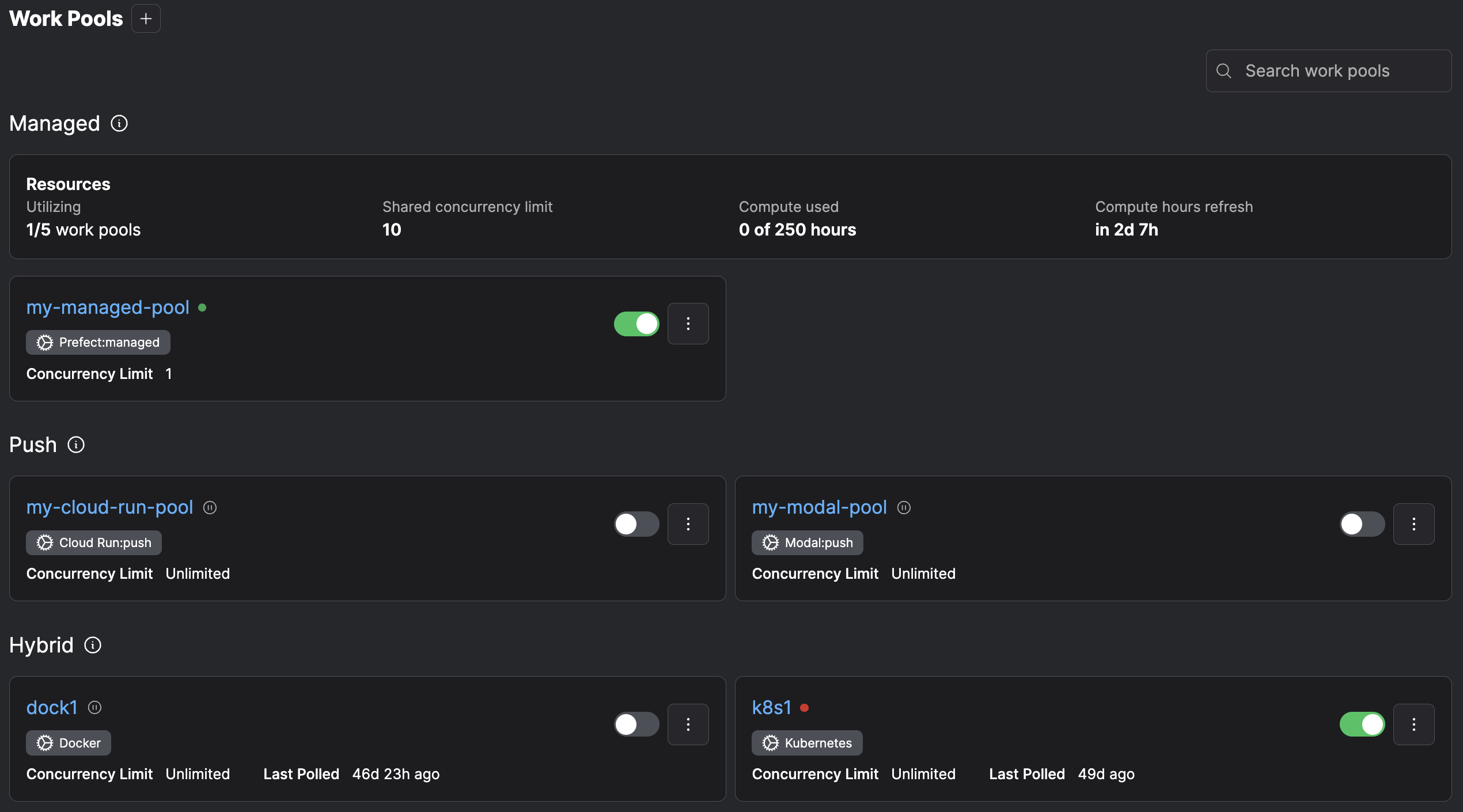 Select the **+** button to create a new work pool. You can specify the details about infrastructure created for this work pool.
## Using the CLI
```bash theme={null}
prefect work-pool create [OPTIONS] NAME
```
`NAME` is a required, unique name for the work pool.
Optional configuration parameters to filter work on the pool include:
**Managing work pools in CI/CD**
Version control your base job template by committing it as a JSON file to a git repository and control updates to your
work pools' base job templates with the `prefect work-pool update` command in your CI/CD pipeline.
For example, use the following command to update a work pool's base job template to the contents of a file named `base-job-template.json`:
```bash theme={null}
prefect work-pool update --base-job-template base-job-template.json my-work-pool
```
### List available work pools
```bash theme={null}
prefect work-pool ls
```
### Inspect a work pool
```bash theme={null}
prefect work-pool inspect 'test-pool'
```
### Preview scheduled work
```bash theme={null}
prefect work-pool preview 'test-pool' --hours 12
```
### Pause a work pool
```bash theme={null}
prefect work-pool pause 'test-pool'
```
### Resume a work pool
```bash theme={null}
prefect work-pool resume 'test-pool'
```
### Delete a work pool
```bash theme={null}
prefect work-pool delete 'test-pool'
```
**Pausing a work pool does not pause deployment schedules**
### Manage concurrency for a work pool
Set concurrency:
```bash theme={null}
prefect work-pool set-concurrency-limit my-pool 10
```
Clear concurrency:
```bash theme={null}
prefect work-pool clear-concurrency-limit my-pool
```
### Base job template
View default base job template:
```bash theme={null}
prefect work-pool get-default-base-job-template --type process
```
Example `prefect.yaml`:
```yaml theme={null}
deployments:
- name: demo-deployment
entrypoint: demo_project/demo_flow.py:some_work
work_pool:
name: above-ground
job_variables:
stream_output: false
```
**Advanced customization of the base job template**
For advanced use cases, create work pools with fully customizable job templates. This customization is available when
creating or editing a work pool on the 'Advanced' tab within the UI or when updating a work pool via the Prefect CLI.
Advanced customization is useful anytime the underlying infrastructure supports a high degree of customization.
In these scenarios a work pool job template allows you to expose a minimal and easy-to-digest set of options to deployment authors.
Additionally, these options are the *only* customizable aspects for deployment infrastructure, which are useful for restricting
capabilities in secure environments. For example, the `kubernetes` worker type allows users to specify a custom job template\
to configure the manifest that workers use to create jobs for flow execution.
See more information about [overriding a work pool's job variables](/v3/deploy/infrastructure-concepts/customize).
## Using Terraform
## Using the REST API
## Further reading
* [Work pools](/v3/concepts/work-pools) concept page
* [Customize job variables](/v3/deploy/infrastructure-concepts/customize) page
Select the **+** button to create a new work pool. You can specify the details about infrastructure created for this work pool.
## Using the CLI
```bash theme={null}
prefect work-pool create [OPTIONS] NAME
```
`NAME` is a required, unique name for the work pool.
Optional configuration parameters to filter work on the pool include:
**Managing work pools in CI/CD**
Version control your base job template by committing it as a JSON file to a git repository and control updates to your
work pools' base job templates with the `prefect work-pool update` command in your CI/CD pipeline.
For example, use the following command to update a work pool's base job template to the contents of a file named `base-job-template.json`:
```bash theme={null}
prefect work-pool update --base-job-template base-job-template.json my-work-pool
```
### List available work pools
```bash theme={null}
prefect work-pool ls
```
### Inspect a work pool
```bash theme={null}
prefect work-pool inspect 'test-pool'
```
### Preview scheduled work
```bash theme={null}
prefect work-pool preview 'test-pool' --hours 12
```
### Pause a work pool
```bash theme={null}
prefect work-pool pause 'test-pool'
```
### Resume a work pool
```bash theme={null}
prefect work-pool resume 'test-pool'
```
### Delete a work pool
```bash theme={null}
prefect work-pool delete 'test-pool'
```
**Pausing a work pool does not pause deployment schedules**
### Manage concurrency for a work pool
Set concurrency:
```bash theme={null}
prefect work-pool set-concurrency-limit my-pool 10
```
Clear concurrency:
```bash theme={null}
prefect work-pool clear-concurrency-limit my-pool
```
### Base job template
View default base job template:
```bash theme={null}
prefect work-pool get-default-base-job-template --type process
```
Example `prefect.yaml`:
```yaml theme={null}
deployments:
- name: demo-deployment
entrypoint: demo_project/demo_flow.py:some_work
work_pool:
name: above-ground
job_variables:
stream_output: false
```
**Advanced customization of the base job template**
For advanced use cases, create work pools with fully customizable job templates. This customization is available when
creating or editing a work pool on the 'Advanced' tab within the UI or when updating a work pool via the Prefect CLI.
Advanced customization is useful anytime the underlying infrastructure supports a high degree of customization.
In these scenarios a work pool job template allows you to expose a minimal and easy-to-digest set of options to deployment authors.
Additionally, these options are the *only* customizable aspects for deployment infrastructure, which are useful for restricting
capabilities in secure environments. For example, the `kubernetes` worker type allows users to specify a custom job template\
to configure the manifest that workers use to create jobs for flow execution.
See more information about [overriding a work pool's job variables](/v3/deploy/infrastructure-concepts/customize).
## Using Terraform
## Using the REST API
## Further reading
* [Work pools](/v3/concepts/work-pools) concept page
* [Customize job variables](/v3/deploy/infrastructure-concepts/customize) page