You can manage {name} with the Terraform provider for Prefect.
; There are two ways to deploy flows to work pools: with a [`prefect.yaml` file](/v3/deploy/infrastructure-concepts/prefect-yaml) or using the [Python `deploy` method](/v3/deploy/infrastructure-concepts/deploy-via-python). In both cases, you can add or override job variables to the work pool's defaults for a given deployment. You can override both a work pool and a deployment when a flow run is triggered. This guide explores common patterns for overriding job variables in both deployment methods. ## Job variables Job variables are infrastructure-related values that are configurable on a work pool. You can override job variables on a per-deployment or per-flow run basis. This allows you to dynamically change infrastructure from the work pool's defaults. For example, when you create or edit a work pool, you can specify a set of environment variables to set in the runtime environment of the flow run. You could set the following value in the `env` field of any work pool: ```json theme={null} { "EXECUTION_ENV": "staging", "MY_NOT_SO_SECRET_CONFIG": "plumbus", } ``` Rather than hardcoding these values into your work pool in the UI (and making them available to all deployments associated with that work pool), you can override these values for a specific deployment. ## Override job variables on a deployment Here's an example repo structure: ``` » tree . |── README.md |── requirements.txt |── demo_project | |── daily_flow.py ``` With a `demo_flow.py` file like: ```python theme={null} import os from prefect import flow, task @task def do_something_important(not_so_secret_value: str) -> None: print(f"Doing something important with {not_so_secret_value}!") @flow(log_prints=True) def some_work(): environment = os.environ.get("EXECUTION_ENVIRONMENT", "local") print(f"Coming to you live from {environment}!") not_so_secret_value = os.environ.get("MY_NOT_SO_SECRET_CONFIG") if not_so_secret_value is None: raise ValueError("You forgot to set MY_NOT_SO_SECRET_CONFIG!") do_something_important(not_so_secret_value) ``` ### Use a `prefect.yaml` file Imagine you have the following deployment definition in a `prefect.yaml` file at the root of your repository: ```yaml theme={null} deployments: - name: demo-deployment entrypoint: demo_project/demo_flow.py:some_work work_pool: name: local schedule: null ```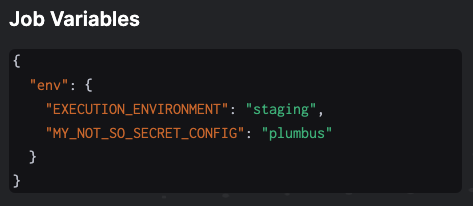 #### Use existing environment variables
To use environment variables that are already set in your local environment, you can template
these in the `prefect.yaml` file using the `{{ $ENV_VAR_NAME }}` syntax:
```yaml theme={null}
deployments:
- name: demo-deployment
entrypoint: demo_project/demo_flow.py:some_work
work_pool:
name: local
job_variables:
env:
EXECUTION_ENVIRONMENT: "{{ $EXECUTION_ENVIRONMENT }}"
MY_NOT_SO_SECRET_CONFIG: "{{ $MY_NOT_SO_SECRET_CONFIG }}"
schedule: null
```
## Override job variables on a flow run
When running flows, you can pass in job variables that override any values set on the work pool or deployment.
Any interface that runs deployments can accept job variables.
### Use the custom run form in the UI
Custom runs allow you to pass in a dictionary of variables into your flow run infrastructure. Using the same
`env` example from above, you could do the following:
#### Use existing environment variables
To use environment variables that are already set in your local environment, you can template
these in the `prefect.yaml` file using the `{{ $ENV_VAR_NAME }}` syntax:
```yaml theme={null}
deployments:
- name: demo-deployment
entrypoint: demo_project/demo_flow.py:some_work
work_pool:
name: local
job_variables:
env:
EXECUTION_ENVIRONMENT: "{{ $EXECUTION_ENVIRONMENT }}"
MY_NOT_SO_SECRET_CONFIG: "{{ $MY_NOT_SO_SECRET_CONFIG }}"
schedule: null
```
## Override job variables on a flow run
When running flows, you can pass in job variables that override any values set on the work pool or deployment.
Any interface that runs deployments can accept job variables.
### Use the custom run form in the UI
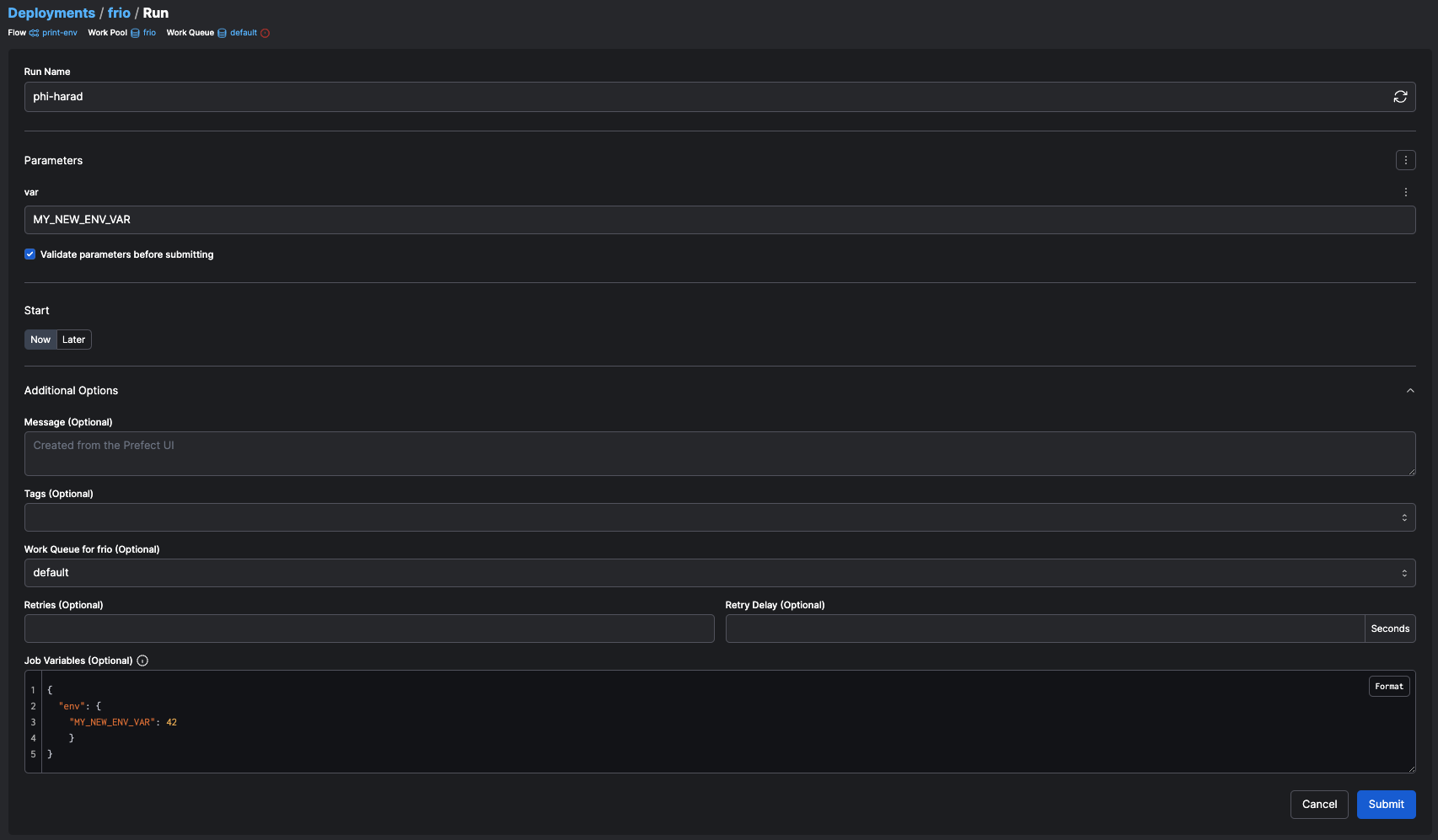
Custom runs allow you to pass in a dictionary of variables into your flow run infrastructure. Using the same
`env` example from above, you could do the following:
 ### Use the CLI
Similarly, runs kicked off through the CLI accept job variables with the `-jv` or `--job-variable` flag.
```bash theme={null}
prefect deployment run \
--id "fb8e3073-c449-474b-b993-851fe5e80e53" \
--job-variable MY_NEW_ENV_VAR=42 \
--job-variable HELLO=THERE
```
### Use job variables in Terraform
### Use the CLI
Similarly, runs kicked off through the CLI accept job variables with the `-jv` or `--job-variable` flag.
```bash theme={null}
prefect deployment run \
--id "fb8e3073-c449-474b-b993-851fe5e80e53" \
--job-variable MY_NEW_ENV_VAR=42 \
--job-variable HELLO=THERE
```
### Use job variables in Terraform