> ## Documentation Index
> Fetch the complete documentation index at: https://docs.prefect.io/llms.txt
> Use this file to discover all available pages before exploring further.
# How to Migrate from Airflow
> Migration from Apache Airflow to Prefect: A Comprehensive How-To Guide
Migrating from Apache Airflow to Prefect simplifies orchestration, reduces overhead, and enables a more Pythonic workflow.
Prefect's flexible **library-based approach** lets you write, test, and run workflows with regular code—without the complexity of schedulers, executors, or metadata databases.
This guide will walk you through a **step-by-step migration**, helping you transition from Airflow DAGs to Prefect flows while mapping key concepts, adapting infrastructure, and optimizing deployments. By the end, you'll have a streamlined, scalable orchestration system that lets your team focus on engineering rather than maintaining workflow infrastructure.
**Airflow to Prefect Mapping**
This table provides a quick reference for migrating key Airflow concepts to their Prefect equivalents. Click on each concept to jump to a detailed explanation.
| **Airflow Concept** | **Prefect Equivalent** | **Key Differences** |
| ---------------------------------------------------------- | ------------------------------------------------------------ | --------------------------------------------------------------------------------------------- |
| [**DAGs**](#choose-a-dag-to-convert) | [**Flows**](#define-a-prefect-flow) | Prefect flows are standard Python functions (`@flow`). No DAG classes or `>>` dependencies. |
| [**Operators**](#create-equivalent-prefect-tasks) | [**Tasks**](#create-equivalent-prefect-tasks) | Prefect tasks (`@task`) replace Airflow Operators, removing the need for specialized classes. |
| [**Executors**](#airflow-executors) | [**Work Pools & Workers**](#airflow-executors) | Prefect decouples task execution using lightweight **workers** polling **work pools**. |
| [**Scheduling**](#prefect-deployment) | [**Deployments**](#prefect-deployment) | Scheduling is separate from flow code and configured externally. |
| [**XComs**](#define-a-prefect-flow) | [**Return Values**](#define-a-prefect-flow) | Prefect tasks return data directly; no need for XComs or metadata storage. |
| [**Hooks & Connections**](#airflow-hooks-and-integrations) | [**Blocks & Integrations**](#airflow-hooks-and-integrations) | Prefect replaces Hooks with **Blocks** for secure resource management. |
| [**Sensors**](#airflow-sensors) | [**Triggers & Event-Driven Flows**](#airflow-sensors) | Prefect uses external event triggers or lightweight polling flows. |
| [**Airflow UI**](#observability) | [**Prefect UI**](#observability) | Prefect provides real-time monitoring, task logs, and automation features. |
There are also so key differences when it comes to task execution, resource control, data passing, and parallelism. We'll cover these in more detail below.
| **Feature** | **Airflow** | **Prefect** |
| --------------------- | ----------------------------------------- | ------------------------------------------ |
| **Task Execution** | Tasks run as independent processes/pods | Tasks execute in single flow runtime |
| **Resource Control** | Task-level via executor settings | Flow-level via work pools & task runners |
| **Data Passing** | Requires XComs or external storage | Direct in-memory data passing |
| **Parallelism** | Managed by executor configuration | Managed by work pools and task runners |
| **Task Dependencies** | Uses `>>` operators and `set_upstream()` | Implicit via Python function calls |
| **DAG Parsing** | Pre-parsed with global variable execution | Standard Python function execution |
| **State & Retries** | Individual task retries, manual DAG fixes | Built-in flow & task retry handling |
| **Scheduling** | Tightly coupled with DAG code | Decoupled via deployments |
| **Infrastructure** | Requires scheduler, metadata DB, workers | Lightweight API server with optional cloud |
## Preparing for migration
Before jumping into code conversion, set the stage for a smooth migration. Preparation includes auditing your existing Airflow DAGs, setting up a Prefect environment for testing, and mapping Airflow concepts to their Prefect equivalents.
**Audit your Airflow DAGs and dependencies:** Catalog all DAGs, schedules, task counts, and dependencies (databases, APIs, cloud services). Identify **high-priority pipelines** (business-critical, failure-prone, frequently updated) and **simpler DAGs** for pilot migration. Start with a small, non-critical DAG to gain confidence before tackling complex workflows.
**Set up Prefect for testing:** Before fully migrating, set up a parallel Prefect environment to test your flows. Prefect provides a managed execution environment out of the box, so you can get started without configuring infrastructure.
1. [**Install Prefect**](/v3/get-started/install) (`pip install prefect`).
2. **Start a Prefect server locally** (`prefect server start`) or sign up for [**Prefect Cloud**](https://app.prefect.cloud/) to run flows immediately.
3. **Run initial flows without infrastructure setup**: Run flows locally or using Prefect Cloud Managed Execution - allowing you to test without configuring work pools or Kubernetes.
Prefect Cloud provides a managed execution environment out of the box, so you can get started without configuring infrastructure.
Once you've validated basic functionality, you can explore configuring an [**execution environment**](/v3/deploy/infrastructure-concepts/work-pools) (e.g., Docker, Kubernetes) for production, which we cover later in this tutorial.
For each Airflow DAG, you can outline its Prefect flow structure (tasks and control flow), where its schedule will live, and what execution infrastructure it needs. With preparation done, it's time to start converting code.
## Converting DAGs to Prefect Flows
In this phase, you will **rewrite your Airflow DAGs as Prefect flows and tasks**. The goal is to replicate each workflow's logic in Prefect, while simplifying wherever possible.
Prefect's API is quite ergonomic - many Airflow users find they can express the same logic with *less code* and *more flexibility*
Let's break down the conversion process step-by-step, and walk through a concrete example.
### Choose a DAG to convert
Start with one of your simpler DAGs (perhaps one of those identified in the audit as an easy win). For illustration, suppose we have an Airflow DAG that runs a simple ETL: it **extracts data**, **transforms** it, and then **loads** the results. In Airflow, this might be defined as:
```python theme={null}
# Airflow DAG example (simplified ETL)
from airflow import DAG
from airflow.operators.python import PythonOperator
from datetime import datetime
# Airflow task functions (to be used by PythonOperator)
def extract_fn():
# ... (extract data, e.g., query an API or database)
return data
def transform_fn(data):
# ... (transform the data)
return processed_data
def load_fn(processed_data):
# ... (load data to target, e.g., save to DB or file)
with DAG("etl_pipeline", start_date=datetime(2023,1,1), schedule_interval="@daily", catchup=False) as dag:
extract = PythonOperator(task_id='extract_data', python_callable=extract_fn)
transform = PythonOperator(task_id='transform_data', python_callable=transform_fn)
load = PythonOperator(task_id='load_data', python_callable=load_fn)
# Set task dependencies
extract >> transform >> load
```
In this Airflow DAG, we define three tasks using `PythonOperator`, then specify that they run sequentially (`extract` then `transform` then `load`).
### Create equivalent Prefect tasks
In Prefect, we'll take the core logic of `extract_fn`, `transform_fn`, `load_fn` and turn each into a `@task` decorated function. The code inside can remain largely the same (minus any Airflow-specific cruft). For example:
```python theme={null}
# Prefect tasks for ETL
from prefect import task, flow
@task
def extract_data():
# ... (extract data as before)
return data
@task
def transform_data(data):
# ... (transform data as before)
return processed_data
@task
def load_data(processed_data):
# ... (load data as before)
```
Notice we simply applied `@task` to each function. No need for a special operator class or task IDs - the function name serves as an identifier, and Prefect will handle the orchestration.
### Define a Prefect flow
Now we write a `@flow` function that calls these tasks in the required order:
```python theme={null}
@flow
def etl_pipeline():
data = extract_data() # calls extract_data task
processed = transform_data(data) # uses output of extract_data
load_data(processed) # calls load_data with result of transform_data
```
This Prefect flow function replaces the Airflow DAG. No need for `>>` dependencies or XComs. **Task results can be stored in variables that are passed directly to other tasks as arguments**. By default, tasks are automatically executed in the order they are called.
Unlike Airflow, where testing often requires an Airflow context, Prefect flows run like standard Python code. You can execute `etl_pipeline()` in an interpreter, import it elsewhere, or test tasks individually (`transform_data.fn(sample_data)`).
* **Airflow:** Defines operators, sets dependencies (`>>`), and relies on XCom for data passing.
* **Prefect:** Calls tasks like functions, with execution order determined by data flow, making workflows more intuitive and testable.
### Branching and conditional logic
In Airflow, conditional branching is typically handled using BranchPythonOperator, ShortCircuitOperator, or trigger rules, requiring explicit DAG constructs to determine execution paths. Prefect simplifies branching by leveraging standard Python if/else logic directly within flows.
**Implementing Branching in Prefect**
Instead of using BranchPythonOperator and dummy tasks for joining paths, you can structure conditional execution using native Python control flow:
```python theme={null}
@flow
def my_flow():
result = extract_data()
if some_condition(result):
outcome = branch_task_a() # a task or subflow for branch A
else:
outcome = branch_task_b() # branch B
final_task(outcome)
```
**Key Differences from Airflow**
| **Feature** | **Airflow (BranchPythonOperator)** | **Prefect (`if/else` logic)** |
| -------------------- | --------------------------------------------------------- | ----------------------------------------------------------------------- |
| **Branching Method** | Often uses specialized operators (`BranchPythonOperator`) | Uses native Python conditionals (`if/else`) |
| **Skipped Tasks** | Unselected branches are explicitly **skipped** | Prefect **only runs** the executed branch—no skipping needed |
| **Join Behavior** | Uses **DummyOperator** to rejoin paths | Downstream tasks execute **automatically** after the conditional branch |
**Advantages of Prefect’s Approach**
* **No special operators** — branching is simpler and more intuitive
* **Cleaner code** — fewer unnecessary tasks like `DummyOperator`
* **No explicit skipping required** — Prefect only executes the called tasks
By using standard Python control flow, Prefect **eliminates complexity** and makes conditional execution more **readable, maintainable, and testable**.
### Retries and error handling
Airflow DAGs often have retry settings either at the DAG level (`default_args`) or per task (e.g., `retries=3`). In Prefect, you can specify [retries](/v3/develop/write-flows#retries) for any task or flow.
Use `@task(retries=2, retry_delay_seconds=60)` to retry a task twice on failure, or `@flow(retries=1)` to retry the entire flow once. Prefect **distinguishes flow and task retries**—flow retries rerun all tasks, while task retries rerun only the failed task. Replace Airflow-specific error handling (`on_failure_callback`, sensors) with Prefect's **Retry**, **State Handlers**, or built-in failure notifications.
### Remove Airflow-specific code
Go through the DAG code and strip out anything that doesn't apply in Prefect.
This includes: DAG declarations (`DAG(...)` blocks), default\_args, Airflow imports (`from airflow...`), XCom push/pull calls (replace with return values), Jinja templating in operator arguments (you can often just compute those values in Python directly or use [Prefect parameters](/v3/deploy/index#workflow-scheduling-and-parametrization)).
If your DAG used Airflow Variables or Connections (Airflow's way to store config in the Metastore), you'll need to supply those to Prefect tasks via another means - for example, as [environment variables](/v3/develop/settings-and-profiles#environment-variables) or using [Prefect Blocks](/integrations/integrations) (like a Block for a database connection string). Essentially, your Prefect flow code should look like a regular Python script with functions, not like an Airflow DAG file.
As an illustration, here's how our example **ETL pipeline** looks after conversion:
```python theme={null}
from prefect import flow, task
@task(retries=1, log_prints=True)
def extract_data():
# fetch data from API (simulated)
data = get_data_from_api()
return data
@task
def transform_data(data):
# process the data
processed = transform(data)
return processed
@task
def load_data(data):
# load data to database
load_into_db(data)
@flow(name="etl_pipeline")
def etl_pipeline_flow():
raw = extract_data()
processed = transform_data(raw)
load_data(processed)
if __name__ == "__main__":
# For local testing
etl_pipeline_flow()
```
Key improvements in this converted code:
* **Direct execution for testing** - `if __name__ == "__main__": etl_pipeline_flow()` allows running the flow locally during development. In production, Prefect handles scheduling.
* **Built-in retries and logging** - `retries=1` ensures one retry on failure, and `log_prints=True` sends `print()` output to Prefect's UI.
* **Pure Python** - No Airflow imports or context, making the flow easy to test, debug, and run consistently across environments (IDE, CI, or production).
### Validate functional equivalence
Once a DAG has been rewritten as a Prefect flow, execute the flow and compare its results with the Airflow DAG to ensure expected outcomes. If discrepancies arise, modify the flow accordingly. Keep in mind the original DAG may have depended on XComs or global variables that you will need to account for.
For each task and special case, including [subDAGs](https://airflow.apache.org/docs/apache-airflow/stable/core-concepts/dags.html#concepts-subdags) and [TaskGroups](https://airflow.apache.org/docs/apache-airflow/stable/core-concepts/dags.html#taskgroups), implement them as subflows or Python functions in Prefect. When transitioning from Airflow's TaskFlow API, keep in mind that Prefect's `@task` decorator serves a similar purpose but does not rely on XComs.
After completing these steps, the Prefect flow should accurately replicate the functionality of the Airflow DAG while being more modular and testable. The migration is now complete, and the next step is to focus on deploying and optimizing the new workflows.
## Infrastructure Migration Considerations
Migrating your code is a big step, but ensuring your workflows run smoothly in Prefect is just as important. Prefect's **flexible execution** makes this easier, supporting Prefect managed execution, local machines, VMs, containers, and Kubernetes with less setup. This section maps Airflowss executors to **Prefect Work Pools and Workers**, while also covering sensors, hooks, logging, and state management to complete your migration.
### Leveraging Prefect Managed Execution
**Running Flows Without Infrastructure Setup**
Prefect Cloud offers [Managed Execution](/v3/how-to-guides/deployment_infra/serverless), allowing you to run flows **without setting up infrastructure or maintaining workers**. With Prefect Managed work pools, Prefect handles compute, execution, and scheduling, eliminating the need for a cloud provider account or on-premises infrastructure.
**Getting Started with Prefect Managed Execution**
```bash theme={null}
prefect work-pool create my-managed-pool --type prefect:managed
```
```python theme={null}
from prefect import flow
if __name__ == "__main__":
flow.from_source(
source="https://github.com/prefecthq/demo.git",
entrypoint="flow.py:my_flow",
).deploy(
name="test-managed-flow",
work_pool_name="my-managed-pool",
)
```
```bash theme={null}
python managed-execution.py
```
This will allow your flow to run remotely without provisioning workers, setting up Kubernetes, or maintaining cloud infrastructure.
**When to Use Prefect Managed Execution**
Ideal for testing and running flows without infrastructure setup, especially for teams that want managed execution without a cloud provider.
If you need custom images, heavy dependencies, private networking, or higher concurrency limits than Prefect's tiers allow.
**Next Steps**
If you require self-hosted execution, the next sections cover how to migrate Airflow Executors to Prefect Work Pools across different infrastructure types (Kubernetes, Docker, Celery, etc.).
For full details on Prefect Managed Execution, refer to the [Managed Execution documentation](/v3/how-to-guides/deployment_infra/serverless).
### Airflow Executors
**Airflow Executors vs Prefect Work Pools/Workers:** Airflow's executor setting determines how tasks are distributed. Prefect's equivalent concept is the [**work pool**](/v3/deploy/infrastructure-concepts/work-pools) (with one or more [**workers**](/v3/deploy/infrastructure-concepts/workers) polling it).
In Airflow, each task executes independently, regardless of the executor used. Whether running with LocalExecutor, CeleryExecutor, or KubernetesExecutor, every task runs as an isolated process or pod. Executors control how and where these tasks are executed, but the core execution model remains task-by-task.
In contrast, Prefect executes an entire flow run within a single execution environment (e.g., a local process, Docker container, or Kubernetes pod). Tasks within a flow execute within the same runtime context, reducing fragmentation and improving performance. Prefect's execution model simplifies resource management, allowing for in-memory data passing between tasks rather than relying on external storage or metadata databases.
Here's a mapping of typical setups:
#### Airflow LocalExecutor
With the **Airflow LocalExecutor** tasks run as subprocesses on the same machine. In Prefect, the default behavior is similar - you can run the flow in a local Python process, and tasks will execute sequentially by default. That does not *have* to be the same machine that is running your Prefect UI and scheduler.
For parallelism on a single machine, use [**`DaskTaskRunner`**](/integrations/prefect-dask/index) to enable multi-process execution:
```python theme={null}
@flow(task_runner=DaskTaskRunner())
```
By default, Prefect's **Process work pool** runs flows as subprocesses. A basic **Airflow LocalExecutor** setup can be replaced with a **Prefect worker** on the same VM using a **process work pool**, eliminating the need for a separate scheduler.
#### Airflow CeleryExecutor
**Airflow CeleryExecutor** where distributed workers run across multiple machines, using a message broker like RabbitMQ/Redis.
Prefect eliminates the need for a **message broker** or **results backend**, as its API server manages work distribution. To replicate an Airflow **CeleryExecutor** setup, deploy **multiple Prefect workers** across machines, all polling from a shared **work pool**.
**Setting Up a Work Pool and Workers**
1. **Create a work pool** (e.g., `"prod-work-pool"`):
```bash theme={null}
prefect work-pool create prod-work-pool --type process
```
2. **Start a worker on each node**, assigning it to the work pool:
```bash theme={null}
prefect worker start -p prod-work-pool
```
3. **Workers poll the work pool** and execute assigned flow runs.
Prefect **work pools** function similarly to **Celery queues**, allowing multiple workers to process tasks concurrently.
#### Airflow KubernetesExecutor
In Airflow, the **KubernetesExecutor** follows the per-task execution model, launching each task in its own Kubernetes pod. Prefect, instead, uses a Kubernetes Work Pool, where each flow run executes in a single Kubernetes pod. This approach reduces fragmentation, as tasks run within the same execution environment rather than spawning separate pods.
**Configuring a Kubernetes Work Pool**
For detailed instructions, see [Prefect's Kubernetes Work Pool documentation](/v3/how-to-guides/deployment_infra/kubernetes). But the general steps to take are:
1. **Create a Kubernetes work pool** with the desired pod template (e.g., image, resources):
```bash theme={null}
prefect work-pool create k8s-pool --type kubernetes
```
2. **Deploy a flow to the Kubernetes work pool**:
```python theme={null}
from prefect import flow
@flow(log_prints=True)
def buy():
print("Buying securities")
if __name__ == "__main__":
buy.deploy(
name="my-code-baked-into-an-image-deployment",
work_pool_name="k8s-pool",
image="my_registry/my_image:my_image_tag"
)
```
Alternatively, you can use a [prefect.yaml](/v3/how-to-guides/deployment_infra/kubernetes#define-a-prefect-deployment) file to deploy your flow to the Kubernetes work pool.
3. [**Run a Kubernetes worker in-cluster**](/v3/how-to-guides/deployment_infra/kubernetes#deploy-a-worker-using-helm) to execute flow runs.
4. **Execution Flow**:
* The worker **picks up a scheduled flow run**.
* It **creates a new pod**, which executes the entire flow.
* The **pod terminates automatically** after execution.
This setup eliminates the need for a long-running scheduler, reducing operational complexity while leveraging Kubernetes for **on-demand, containerized execution**.
#### Airflow CeleryKubernetes
**Airflow + Celery + Kubernetes (CeleryKubernetes Executor)** or other hybrid: Some Airflow deployments use Celery for distributed scheduling but run tasks in containers or on Kubernetes.
Prefect's model can handle these as well by combining approaches - e.g., use a Kubernetes work pool with multiple worker processes distributed as needed. The general principle is that Prefect **work pools** can cover all these patterns (local, multi-machine, containers, serverless) via configuration, not code, and you manage them via Prefect's UI/CLI.
#### Using Serverless compute
Prefect supports [**serverless execution**](/v3/how-to-guides/deployment_infra/serverless) on various cloud platforms, eliminating the need for dedicated infrastructure. Instead of provisioning long-running workers, flows can be executed **on-demand** in ephemeral environments. Prefect's push-based work pools allow flows to be submitted to serverless services, where they run in isolated containers and automatically scale with demand.
**Serverless Platforms**
Prefect flows can run on:
* **AWS ECS** (Fargate or EC2-backed containers)
* **Azure Container Instances (ACI)**
* **Google Cloud Run**
* **Modal** (serverless compute for AI/ML workloads)
* **Coiled** (serverless Dask clusters for parallel workloads)
**Configuring a Serverless Work Pool**
To run flows on a serverless platform, create a **push-based work pool** and configure it to submit jobs to the desired service.
Example: Creating an **ECS work pool**:
```bash theme={null}
prefect work-pool create --type ecs:push --provision-infra my-ecs-pool
```
Deployments can then be configured to use the serverless work pool, allowing Prefect to submit flow runs without maintaining long-lived infrastructure.
For setup details, refer to [Prefect's serverless execution documentation](/v3/how-to-guides/deployment_infra/serverless).
### Airflow Sensors
Airflow Sensors continuously poll for external conditions, such as file availability or database changes, which can tie up resources. Prefect replaces this with an **event-driven approach**, where external systems trigger flow execution when conditions are met.
**Using External Triggers**
Instead of using an Airflow `S3KeySensor`, configure an AWS Lambda or EventBridge rule to call the Prefect API when an S3 file is uploaded. Prefect Cloud and Server provide API endpoints to start flows on demand. Prefect's **Automations** can also trigger flows based on specific conditions.
**Handling Polling Scenarios**
If an external system lacks event-driven capabilities, implement a lightweight **polling flow** that runs on a schedule (e.g., every 5 minutes), checks the condition, and triggers the main flow if met. This approach minimizes idle resource consumption compared to Airflow's persistent sensors.
Prefect's model eliminates long-running sensor tasks, making workflows **more efficient, scalable, and event-driven**.
### Airflow Hooks and Integrations
Airflow provides hooks and operators for interacting with external systems (e.g., **JDBC, cloud services, databases**). In Prefect, these integrations are handled through [**Prefect Integrations**](/integrations/integrations) (e.g., `prefect-snowflake`, `prefect-gcp`, `prefect-dbt`) or by directly using the relevant **Python libraries** within tasks.
**Migrating Airflow Hooks to Prefect**
1. **Identify Airflow hooks** used in your DAGs (e.g., `PostgresHook`, `GoogleCloudStorageHook`).
2. **Replace them with equivalent Prefect integrations** or direct Python library calls.
**Example:** Instead of
```python theme={null}
hook = PostgresHook(postgres_conn_id=my_conn_id)
engine = hook.get_sqlalchemy_engine()
session = sessionmaker(bind=engine)()
```
Use Prefect Blocks for secure credential management:
```python theme={null}
from prefect_sqlalchemy import SqlAlchemyConnector
SqlAlchemyConnector.load("BLOCK_NAME-PLACEHOLDER")
```
3. **Use Prefect Blocks for secrets management**, similar to Airflow Connections, to separate credentials from code.
**Replacing Airflow Operators with Prefect Tasks**
* **Prefect tasks** can call any Python library, eliminating the need for custom Airflow operators.
* Example: Instead of using a **BashOperator** to call an API via a shell script, install the necessary package in the flow's environment and call it directly in a task.
Prefect's approach **removes unnecessary abstraction layers**, allowing direct access to the full Python ecosystem without Airflow-specific constraints.
Basically: **anything done with a custom Airflow operator or hook can be replaced in Prefect with a task using the appropriate Python library.** Prefect removes Airflow's constraints, allowing direct use of the full Python ecosystem. For example, instead of using a **BashOperator** to call an API via a shell script, install the required package in your environment and call it directly from a task, eliminating unnecessary workarounds.
### Observability
#### State and logging
**Task and Flow State Management**
In Airflow, task states (`success`, `failed`, `skipped`, etc.) are stored in a metadata database and displayed in the Airflow UI's DAG run view. Prefect also tracks state for **each task and flow run**, but these states are managed by the **Prefect backend** (Prefect Server or Cloud API) and can be accessed via the **Prefect UI, API, or CLI**.
After migration, similar visibility is available in Prefect's UI, where you can track which flows and tasks succeeded or failed. Prefect also includes additional state management features such as:
* Cancel a flow run (`Cancelling` state).
* Retry a failed flow run (with manual steps).
* **Task caching** between runs to avoid redundant computations.
**Logging Differences**
Airflow logs task execution output to files (stored on executor machines or remote storage), viewable through the UI. Prefect **captures stdout, stderr, and Python logging** from tasks and sends them to the Prefect backend, making logs accessible in the **Prefect UI, API, and CLI**.
To ensure logs appear correctly in Prefect's UI, use `@flow(log_prints=True)` or `@task(log_prints=True)`
These flags route `print()` statements to Prefect logs automatically.
For centralized logging (e.g., ElasticSearch, Stackdriver), Prefect supports [**custom logging handlers**](/v3/advanced/logging-customization) and **third-party integrations**. Logs can be forwarded similarly to how Airflow handled external logging.
**Debugging and Troubleshooting**
Prefect simplifies debugging because tasks are **standard Python functions**. Instead of analyzing scheduler or worker logs, you can:
* **Re-run individual tasks or flows locally** to reproduce issues.
* **Test flows interactively** in an IDE before deploying.
This direct execution model eliminates the need to troubleshoot failures through a scheduling system, making debugging faster and more intuitive than in Airflow.
#### Monitoring
**Notifications and Alerts**
In Airflow, monitoring is typically managed through the UI, email alerts on task failures, and external monitoring of the scheduler.
Prefect provides similar capabilities through *Automations*, which can be configured to trigger alerts via Slack, email, or webhooks based on specific events.
To replicate Airflow's alerting (e.g., failures or SLA misses), configure [**Prefect Automations**](/v3/automate/events/automations-triggers) to:
* Notify on **flow or task failures**.
* Alert when a **flow run exceeds a specified runtime**.
* Trigger **custom actions** based on state changes.
**Service Level Agreements (SLAs)**
Prefect Cloud supports Service Level Agreements (SLAs) to monitor and enforce performance expectations for flow runs. SLAs automatically trigger alerts when predefined thresholds are violated.
SLAs can be defined via the Prefect UI, prefect.yaml, `.deploy()` method, or CLI. Violations generate `prefect.sla.violation` events, which can trigger Automations to send notifications or take corrective actions.
For full configuration details, refer to the [Measure reliability with Service Level Agreements](/v3/automate/events/slas) documentation.
**Implementation Considerations**
Prefect allows flexible logging and alerting adjustments to match existing monitoring workflows. Logging handlers can integrate with **third-party services** (e.g., ElasticSearch, Datadog), and **Prefect's API and UI provide real-time state visibility** for proactive monitoring.
## Deployment & CI/CD Changes
Deploying workflows in Prefect differs from Airflow's approach of “drop DAG files in a folder.” In Prefect, a **Deployment** is the unit of deployment: it associates a flow (Python function) with infrastructure (how/where to run) and optional schedule or triggers. Migrating to Prefect means adopting a new way to package and release your workflows, as well as updating any CI/CD pipelines that automated your Airflow deployments.
### Prefect Deployment
**From Airflow DAG schedules to Prefect Deployment:** In Airflow, deployment usually meant placing your DAG code on the Airflow scheduler (e.g., by committing to a Git repo that the scheduler reads, or copying files to the DAGs directory). There isn't a formal deployment artifact beyond the Python files. Prefect, by contrast, treats deployments as first-class objects. You will create a deployment for each flow (or for each distinct configuration of a flow you want to run). This can be done via code (calling `flow.deploy()`), via CLI (`prefect deployment`), or by writing a YAML (`prefect.yaml`) that describes the deployment.
Key things a **Prefect deployment** defines:
* **Target flow** (which function, and which file or import path it comes from).
* **Infrastructure configuration**: e.g., use the “Kubernetes work pool” or “process” type, possibly the docker image to use, resource settings, etc.
* **Storage of code**: e.g., whether the code is stored in the image, pulled from Git, etc. (Prefect can package code into a Docker image or rely on an existing image).
* **Schedule** (optional): e.g., Cron or interval schedule for automatic runs, or you can leave it manual.
* **Parameters** (optional): default parameter values for the flow, if any.
To migrate each Airflow DAG, you will create a Prefect deployment for its flow. For example, if we converted `etl_pipeline` DAG to `etl_pipeline_flow` in Prefect, we might write a `prefect.yaml` like:
```yaml theme={null}
# prefect.yaml
deployments:
- name: etl-pipeline-prod
flow_name: etl_pipeline_flow
entrypoint: etl_flow.py:etl_pipeline_flow # file and function where the flow is defined
parameters: {}
schedule: "@daily"
work_pool:
name: prod-k8s-pool
# other infra settings like image, etc., if needed
```
This YAML can define multiple deployments, but in this case we have one named “etl-pipeline-prod” which runs daily via the `prod-k8s-pool` (a Kubernetes pool perhaps). In Airflow, these details were all intertwined in the DAG file (the schedule was in code, the infrastructure maybe in the executor config or the DAG via `executor_config`). In Prefect, there is a separation of these concerns.
### Automation via CI/CD
Many organizations use CI/CD to deploy Airflow DAGs (for example, a Git push triggers a Jenkins job that lints DAGs and copies them to the Airflow server). With Prefect, you'll likely adjust your CI/CD to **register Prefect deployments** whenever you update the flow code. Prefect's CLI is your friend here. A common pattern is:
1. On merge to main, build a Docker image with your flow code (if applicable) and push it to a registry.
2. Keep a `prefect.yaml` in version control that defines your work pool, schedule, and other deployment settings.
3. Run `prefect deploy -n ` to create or update the deployment, or use `prefect deploy --all` to deploy every entry in `prefect.yaml` at once.
This can all be scripted. In fact, Prefect provides guidance on using [GitHub Actions or similar tooling to do this](/v3/advanced/deploy-ci-cd). By integrating Prefect's deployment steps into CI, you ensure that any change in your flow code gets reflected in Prefect's orchestrator, much like updating DAG code in Airflow.
Alternatively, if your deployment is set to pull the workflow code from your git repository each time, you only need to push the latest workflow code, and automatically next time your deployment runs it will pull the latest workflow code.
This CI pipeline approach allows versioning and automating your flows deployment, treating them similarly to application code deployments. It's a shift from Airflow where deployment could be syncing a folder — Prefect's method is more **controlled** and **atomic** (you run `prefect deploy`, which reads your `prefect.yaml` and registers everything with Prefect).
### Prefect in Production
Once deployed, Prefect schedules and orchestrates flows based on your **deployments**. Follow these best practices to ensure a reliable production setup:
* **High Availability**: If self-hosting, use PostgreSQL and consider running **multiple API replicas** behind a load balancer. [**Prefect Cloud**](https://prefect.io/cloud) handles availability automatically.
* **Keep Workers Active**: Ensure Prefect workers are always running, whether as systemd services, Docker containers, or Kubernetes deployments.
* **Logging & Observability**: Use Prefect's UI for logs or configure external storage (e.g., S3, Elasticsearch) for **long-term retention**.
* **Notifications & Alerts**: Set up failure alerts via Slack, email, or Twilio using [**Prefect Automations**](/v3/automate/events/automations-triggers) to ensure timely issue resolution.
* **CI/CD & Testing**: Keep `prefect.yaml` in version control and apply it from CI with `prefect deploy`. Unit test tasks as regular Python functions.
* **Configuration Management**: Replace Airflow Variables/Connections with [**Prefect Blocks**](/v3/develop/variables), storing secrets via CLI, UI, or version-controlled JSON.
* **Security & Access Control**: Prefect Cloud includes built-in authentication & role-based access; self-hosted setups should secure API and workers accordingly.
* **Decommissioning Airflow**: Once migration is complete, disable DAGs, archive the code, and shut down Airflow components to reduce operational overhead.
For more details on operating Prefect in production, see the [How-To Guides](/v3/how-to-guides).
## Testing & Validation
Thorough testing ensures your Prefect flows perform like their Airflow equivalents. Since this is a **full migration**, validation is essential before decommissioning Airflow.
**Testing Prefect Flows in Isolation**
* **Unit test task logic** - Write tests for tasks as regular Python functions.
* **Run flows locally** - Run the script that calls your flow function - just like a normal Python script.
* **Use Prefect's local orchestration** - Start a Prefect server (`prefect server start`), register a deployment, and trigger flows via Prefect UI to mirror production behavior.
* **Compare outputs** - Run both Airflow and Prefect for the same input and validate results (e.g., database rows, file outputs). Debug discrepancies early.
**Validation Phase: Temporary Parallel Running (Shadow Mode)**
* **Keep the Airflow DAG inactive** but available for testing.
* **Manually trigger** both Airflow and Prefect flows for the same execution date.
* **Write test outputs separately** to prevent conflicts, ensuring parity before stopping Airflow runs.
For batch jobs, this phase should be **brief**, ensuring correctness without long-term dual maintenance.
**Decommissioning Airflow**
Once a Prefect flow is stable, **disable the corresponding Airflow DAG** to prevent accidental execution. Clearly document Prefect as the new source of truth. Avoid keeping inactive DAGs indefinitely, as they can cause confusion—**archive or remove them once the migration is complete**.
### Common issues and troubleshooting
* **Missing dependencies:** If a Prefect flow fails with `ImportError`, ensure all required libraries are installed in the execution environment (Docker image, VM, etc.), not just locally.
* **Credentials & access:** Verify that Prefect workers have the same permissions as Airflow (e.g., service accounts, IAM roles). If using Kubernetes, ensure pods can access necessary databases and APIs.
* **Scheduling differences:** Airflow schedules may trigger at the end of an interval, while Prefect runs in real-time. Align Cron schedules and time zones if needed.
* **Concurrency & parallelism:** Configure **work pool and flow run concurrency limits** to prevent overlapping jobs. If too many tasks run in parallel, use Prefect's **tags and concurrency controls** to throttle execution.
* **Error handling & retries:** Test retries by forcing failures. If Airflow used `trigger_rule="all_done"`, implement equivalent logic in Prefect with `try/except`.
* **Performance monitoring:** Compare Prefect vs. Airflow run times. If slower, check if tasks are running sequentially instead of in parallel (enable mapping, async, or parallel task runners). If too much parallelism, adjust concurrency settings.
For some help with troubleshooting, you can see articles on:
* [Configuring logging](/v3/how-to-guides/workflows/add-logging)
* [Tracking activity](/v3/concepts/events)
Throughout testing, keep an eye on the Prefect UI's **Flow Run and Task Run views** - they will show you the execution steps, logs, and any exceptions. The UI can be very helpful for pinpointing where a flow failed or hung. It's analogous to Airflow's Graph view and log view but with the benefit of real-time state updates (no need to refresh for state changes).
You might also consider joining the [Prefect Slack community](https://prefect.io/slack) to get help from the community and Prefect team.
**Debugging tips:**
* If a flow run gets stuck, you can cancel it via UI/CLI.
* Utilize the fact that you can re-run a Prefect flow easily. For example, if a specific task fails consistently, you can add some debug `print` statements, re-deploy (which is quick with Prefect CLI), and re-run to see output.
* Leverage Prefect's task state inspection. In the UI, you can often see the exception message and stack trace for a failed task, which helps identify the problem in code.
* Read the results from MarvinAI's analysis of your code to help identify potential issues.
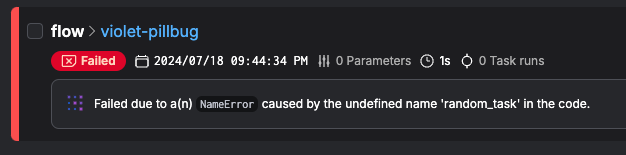 As you systematically validate each migrated workflow, you'll build confidence in the new system. When all tests pass and the outputs match the old system's, you can declare the migration a success for that workflow. After migrating a few, you'll also develop a playbook for the rest, and the process may speed up.
## Post-Migration
### Optimizing & Scaling Prefect Workflows
With your workflows running in Prefect, it's time to optimize, scale, and take full advantage of its capabilities. This section covers best practices for streamlining flows, monitoring performance, and ensuring long-term reliability.
**Simplify and Enhance Your Workflows**
* **Remove unnecessary complexity**: If your Airflow DAGs used workarounds (e.g., database intermediaries for data passing), replace them with direct Prefect task returns.
* **Use nested flows for modularity**: Instead of chaining DAGs, use **nested flows** to orchestrate dependencies within a single flow.
* **Optimize async convenience**: Use **dynamic task mapping** (`task.map(items)`) to process large datasets efficiently.
* **Leverage caching**: Enable **result persistence** to skip redundant computations.
* **Ensure idempotency**: Prevent duplicate processing by parameterizing flows and validating execution logic.
**Monitor and Maintain Your Prefect System**
* **Track performance**: Use Prefect UI and analytics to monitor run durations, failure rates, and bottlenecks.
* **Set up alerts**: Automate failure notifications via Slack, email, or other integrations.
* **Improve debugging**: Use UI logs, parameterized re-runs, and version control for better issue resolution.
* **Version control deployments**: Treat flows like code, using PRs and staging environments before production deployment.
* **Update documentation**: Ensure internal runbooks reflect Prefect's CLI/UI for managing schedules, failures, and retries.
To scale and optimize for cost:
| Technique | Description |
| ------------------------- | ---------------------------------------------------------------------------------------------------------------------------- |
| *Scale efficiently* | Prefect makes it simple to distribute workloads across work pools and workers, eliminating Airflow's scheduler bottlenecks. |
| *Optimize infrastructure* | Adjust worker capacity based on usage, scaling vertically (more resources per worker) or horizontally (adding more workers). |
| *Reduce costs* | Consider *serverless work pools* (AWS ECS, GCP Cloud Run) to avoid idle infrastructure costs. |
To set yourself up for future success:
| Technique | Description |
| ------------------------------- | ------------------------------------------------------------------------------------------------------------------------------- |
| *Share best practices* | Conduct a team retrospective to refine workflows and establish templates for new flows. |
| *Embrace Prefect's flexibility* | Now that scheduling and execution are handled seamlessly, focus on building better data workflows, not managing infrastructure. |
### Conclusion
By completing this migration, you've moved to a more scalable, efficient orchestration system.
Prefect allows your team to focus on engineering—iterating faster, improving reliability, and scaling seamlessly.
**Next steps:**
* [Learn more about Prefect](/v3/get-started/index)
* [See more Prefect examples](/v3/examples/index)
* [Join the community](https://prefect.io/slack)
* [Dig into Prefect's Integrations](/integrations/integrations)
* [Learn more about Prefect Cloud](https://prefect.io/cloud)
* [Visit Prefect's GitHub](https://github.com/PrefectHQ/prefect)
As you systematically validate each migrated workflow, you'll build confidence in the new system. When all tests pass and the outputs match the old system's, you can declare the migration a success for that workflow. After migrating a few, you'll also develop a playbook for the rest, and the process may speed up.
## Post-Migration
### Optimizing & Scaling Prefect Workflows
With your workflows running in Prefect, it's time to optimize, scale, and take full advantage of its capabilities. This section covers best practices for streamlining flows, monitoring performance, and ensuring long-term reliability.
**Simplify and Enhance Your Workflows**
* **Remove unnecessary complexity**: If your Airflow DAGs used workarounds (e.g., database intermediaries for data passing), replace them with direct Prefect task returns.
* **Use nested flows for modularity**: Instead of chaining DAGs, use **nested flows** to orchestrate dependencies within a single flow.
* **Optimize async convenience**: Use **dynamic task mapping** (`task.map(items)`) to process large datasets efficiently.
* **Leverage caching**: Enable **result persistence** to skip redundant computations.
* **Ensure idempotency**: Prevent duplicate processing by parameterizing flows and validating execution logic.
**Monitor and Maintain Your Prefect System**
* **Track performance**: Use Prefect UI and analytics to monitor run durations, failure rates, and bottlenecks.
* **Set up alerts**: Automate failure notifications via Slack, email, or other integrations.
* **Improve debugging**: Use UI logs, parameterized re-runs, and version control for better issue resolution.
* **Version control deployments**: Treat flows like code, using PRs and staging environments before production deployment.
* **Update documentation**: Ensure internal runbooks reflect Prefect's CLI/UI for managing schedules, failures, and retries.
To scale and optimize for cost:
| Technique | Description |
| ------------------------- | ---------------------------------------------------------------------------------------------------------------------------- |
| *Scale efficiently* | Prefect makes it simple to distribute workloads across work pools and workers, eliminating Airflow's scheduler bottlenecks. |
| *Optimize infrastructure* | Adjust worker capacity based on usage, scaling vertically (more resources per worker) or horizontally (adding more workers). |
| *Reduce costs* | Consider *serverless work pools* (AWS ECS, GCP Cloud Run) to avoid idle infrastructure costs. |
To set yourself up for future success:
| Technique | Description |
| ------------------------------- | ------------------------------------------------------------------------------------------------------------------------------- |
| *Share best practices* | Conduct a team retrospective to refine workflows and establish templates for new flows. |
| *Embrace Prefect's flexibility* | Now that scheduling and execution are handled seamlessly, focus on building better data workflows, not managing infrastructure. |
### Conclusion
By completing this migration, you've moved to a more scalable, efficient orchestration system.
Prefect allows your team to focus on engineering—iterating faster, improving reliability, and scaling seamlessly.
**Next steps:**
* [Learn more about Prefect](/v3/get-started/index)
* [See more Prefect examples](/v3/examples/index)
* [Join the community](https://prefect.io/slack)
* [Dig into Prefect's Integrations](/integrations/integrations)
* [Learn more about Prefect Cloud](https://prefect.io/cloud)
* [Visit Prefect's GitHub](https://github.com/PrefectHQ/prefect)