> ## Documentation Index
> Fetch the complete documentation index at: https://docs.prefect.io/llms.txt
> Use this file to discover all available pages before exploring further.
# How to use assets to track workflow outputs
Assets in Prefect represent important outputs (such as data) that are produced by your tasks and flows. Assets can reference virtually any output such as files, dataframes, tables, dashboards, or ML models. By using the `@materialize` decorator, you can track when your workflows create, update, or reference these objects.
## Basic asset materialization
Use the `@materialize` decorator to mark functions that create or update assets. This decorator wraps your function similar to `@task` but specifically tracks asset creation:
```python theme={null}
from prefect import flow
from prefect.assets import materialize
@materialize("s3://my-bucket/processed-data.csv")
def process_data(data: dict) -> dict:
# Your data processing logic here
# save_to_s3(data, "s3://my-bucket/processed-data.csv")
return data
@flow
def data_pipeline(data: dict):
process_data(data)
```
Asset keys must be valid URIs that uniquely identify your workflow outputs. Assets are automatically grouped by type (specified by the URI prefix) and can be nested based on the URI path structure. For example, `s3://` assets are grouped separately from `postgres://` assets, and nested paths like `s3://bucket/team-a/data.csv` and `s3://bucket/team-b/data.csv` create hierarchical organization.
**`@materialize` wraps `@task`**: the `@materialize` decorator accepts all keyword arguments and configuration that the `@task` decorator accepts and can be used as a drop-in replacement.
## Asset dependencies
### Inferred from task graphs
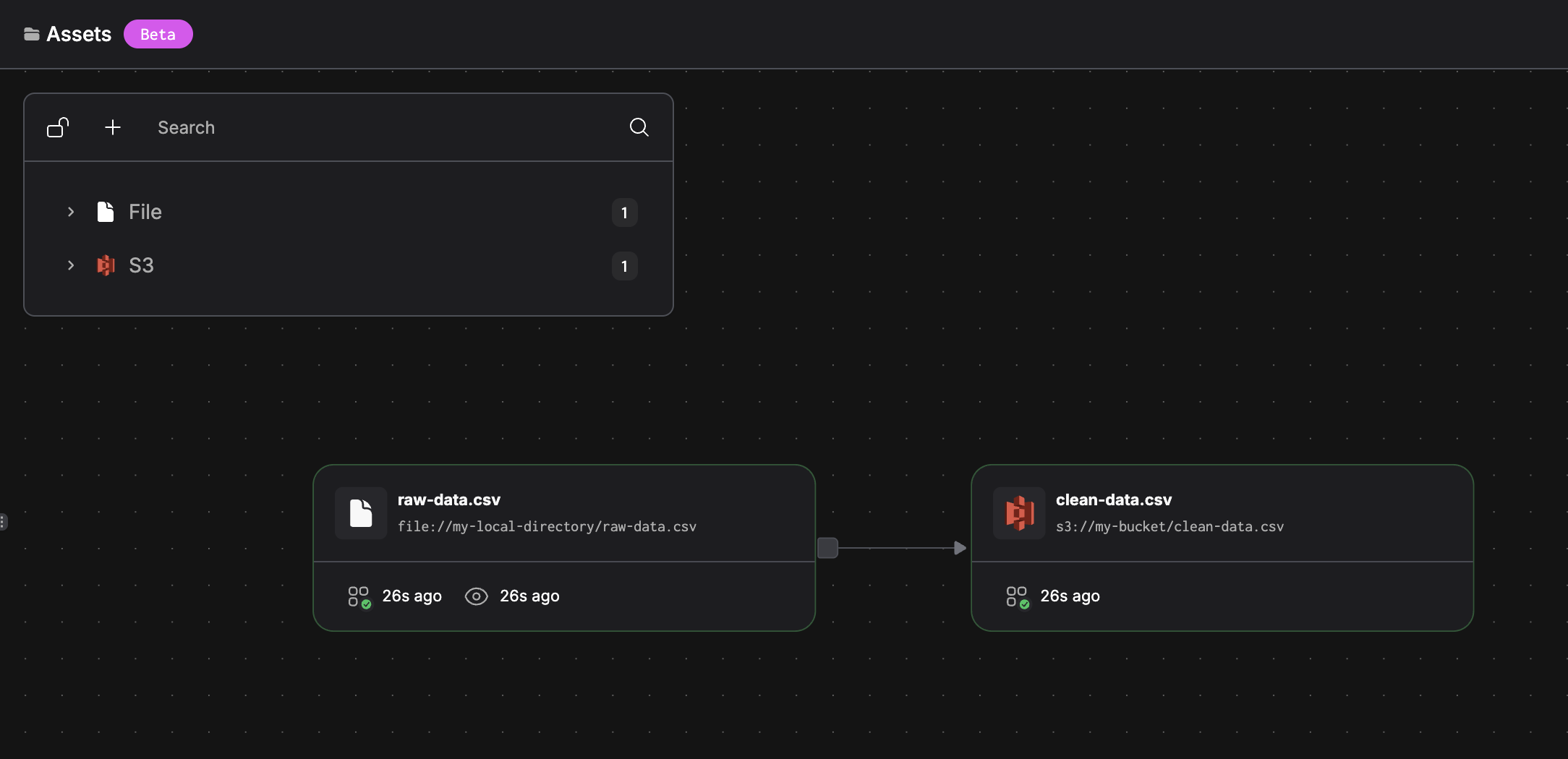
Prefect automatically infers asset dependencies from your task graph. When materialized assets flow through your workflow, downstream materializations inherit these dependencies:
```python theme={null}
from prefect import flow
from prefect.assets import materialize
@materialize("file://my-local-directory/raw-data.csv")
def extract_data() -> str:
raw_data = "name,age\nchris,21"
with open("raw-data.csv", "w") as f:
f.write(raw_data)
return raw_data
@materialize("s3://my-bucket/clean-data.csv")
def transform_data(raw_data):
# saves raw_data to s3
pass
@flow
def etl_pipeline():
raw_data = extract_data()
transform_data(raw_data) # Automatically depends on raw-data.csv
```
Running this flow produces the following asset graph:
 ### External and cross-flow asset dependencies
Use `asset_deps` to reference assets that are external to your current workflow. This creates dependencies on assets that may be materialized by other flows, external systems, or manual processes:
```python theme={null}
from prefect import flow
from prefect.assets import materialize
# Depends on asset from another Prefect flow
@materialize(
"s3://my-bucket/downstream-data.csv",
asset_deps=["s3://my-bucket/upstream-data.csv"] # From different flow
)
def process_downstream_data():
pass
# Depends on external system assets
@materialize(
"s3://my-bucket/enriched-data.csv",
asset_deps=[
"postgres://db/users_table", # External database
"sftp://vendor/daily-feed.csv" # External data feed
]
)
def enrich_user_data():
pass
@flow
def analytics_pipeline():
process_downstream_data()
enrich_user_data()
```
Running this flow produces the following asset graph:
### External and cross-flow asset dependencies
Use `asset_deps` to reference assets that are external to your current workflow. This creates dependencies on assets that may be materialized by other flows, external systems, or manual processes:
```python theme={null}
from prefect import flow
from prefect.assets import materialize
# Depends on asset from another Prefect flow
@materialize(
"s3://my-bucket/downstream-data.csv",
asset_deps=["s3://my-bucket/upstream-data.csv"] # From different flow
)
def process_downstream_data():
pass
# Depends on external system assets
@materialize(
"s3://my-bucket/enriched-data.csv",
asset_deps=[
"postgres://db/users_table", # External database
"sftp://vendor/daily-feed.csv" # External data feed
]
)
def enrich_user_data():
pass
@flow
def analytics_pipeline():
process_downstream_data()
enrich_user_data()
```
Running this flow produces the following asset graph:
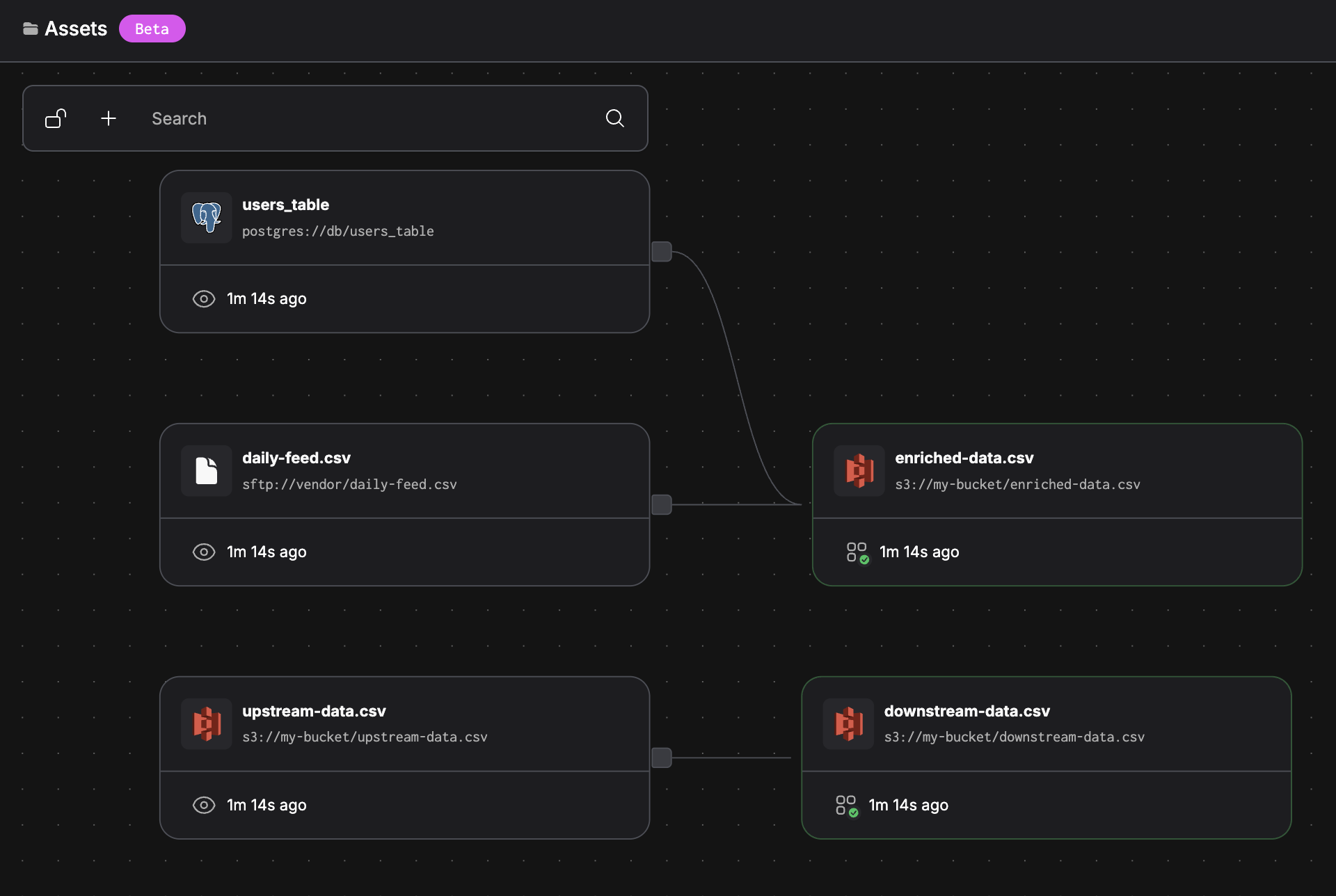 This approach allows you to model your complete data ecosystem, tracking dependencies even when some assets are managed outside your current workflow or outside Prefect entirely.
## Multiple asset materialization
Materialize multiple related assets in a single function when they share the same upstream dependencies:
```python theme={null}
from prefect.assets import materialize
@materialize(
"s3://my-bucket/summary.csv",
"s3://my-bucket/details.csv"
)
def generate_reports():
data = fetch_source_data()
create_summary_report(data)
create_detailed_report(data)
```
## Dynamic asset materialization
Use [the `with_options` pattern](/v3/api-ref/python/prefect-tasks#with-options) to dynamically change asset keys and dependencies at runtime. This is useful when you need to parameterize asset paths based on flow inputs, dates, or other runtime conditions:
```python theme={null}
from prefect import flow
from prefect.assets import materialize
from datetime import datetime
@materialize("s3://my-bucket/daily-report.csv")
def generate_daily_report(date: str):
# Process and save daily report
pass
@flow
def dynamic_reporting_pipeline():
base_task = generate_daily_report
today = datetime.now().strftime("%Y-%m-%d")
# Dynamically set asset key based on date
daily_task = base_task.with_options(
assets=[f"s3://my-bucket/reports/{today}/daily-report.csv"]
)
daily_task(today)
```
You can also dynamically modify asset dependencies alongside the materialized assets:
```python theme={null}
from prefect import flow
from prefect.assets import materialize
@materialize(
"s3://my-bucket/processed-data.csv",
asset_deps=["s3://my-bucket/raw-data.csv"]
)
def process_data(environment: str):
pass
@flow
def environment_specific_pipeline(env: str):
base_task = process_data
# Use different assets based on environment
env_task = base_task.with_options(
assets=[f"s3://my-bucket/{env}/processed-data.csv"],
asset_deps=[f"s3://my-bucket/{env}/raw-data.csv"]
)
env_task(env)
```
This pattern enables you to reuse the same processing logic across different environments, time periods, or data partitions while maintaining proper asset lineage tracking.
## Further Reading
* [How to customize asset metadata](/v3/advanced/assets)
* [Learn about asset health and asset events](/v3/concepts/assets)
This approach allows you to model your complete data ecosystem, tracking dependencies even when some assets are managed outside your current workflow or outside Prefect entirely.
## Multiple asset materialization
Materialize multiple related assets in a single function when they share the same upstream dependencies:
```python theme={null}
from prefect.assets import materialize
@materialize(
"s3://my-bucket/summary.csv",
"s3://my-bucket/details.csv"
)
def generate_reports():
data = fetch_source_data()
create_summary_report(data)
create_detailed_report(data)
```
## Dynamic asset materialization
Use [the `with_options` pattern](/v3/api-ref/python/prefect-tasks#with-options) to dynamically change asset keys and dependencies at runtime. This is useful when you need to parameterize asset paths based on flow inputs, dates, or other runtime conditions:
```python theme={null}
from prefect import flow
from prefect.assets import materialize
from datetime import datetime
@materialize("s3://my-bucket/daily-report.csv")
def generate_daily_report(date: str):
# Process and save daily report
pass
@flow
def dynamic_reporting_pipeline():
base_task = generate_daily_report
today = datetime.now().strftime("%Y-%m-%d")
# Dynamically set asset key based on date
daily_task = base_task.with_options(
assets=[f"s3://my-bucket/reports/{today}/daily-report.csv"]
)
daily_task(today)
```
You can also dynamically modify asset dependencies alongside the materialized assets:
```python theme={null}
from prefect import flow
from prefect.assets import materialize
@materialize(
"s3://my-bucket/processed-data.csv",
asset_deps=["s3://my-bucket/raw-data.csv"]
)
def process_data(environment: str):
pass
@flow
def environment_specific_pipeline(env: str):
base_task = process_data
# Use different assets based on environment
env_task = base_task.with_options(
assets=[f"s3://my-bucket/{env}/processed-data.csv"],
asset_deps=[f"s3://my-bucket/{env}/raw-data.csv"]
)
env_task(env)
```
This pattern enables you to reuse the same processing logic across different environments, time periods, or data partitions while maintaining proper asset lineage tracking.
## Further Reading
* [How to customize asset metadata](/v3/advanced/assets)
* [Learn about asset health and asset events](/v3/concepts/assets)