> ## Documentation Index
> Fetch the complete documentation index at: https://docs.prefect.io/llms.txt
> Use this file to discover all available pages before exploring further.
# How to visualize workflow structure
You can visualize the structure of your flow using two methods:
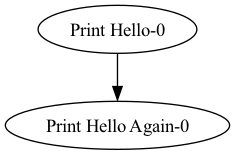
* **`flow.visualize()`** — renders a PNG via Graphviz and opens it in a new window, or inline in Jupyter notebooks. Requires the Graphviz system package.
* **`flow.generate_mermaid_graph()`** — returns a [Mermaid](https://mermaid.js.org/) `flowchart TD` diagram as a string. No additional dependencies required.
**These methods execute code outside of tasks**
Code outside of tasks will run when calling `visualize()` or `generate_mermaid_graph()`. To avoid inadvertent execution, place code you don't want to run in tasks.
## Graphviz output
**Install Graphviz**
To use `visualize()`, you must have Graphviz installed. Please follow the [Graphviz installation instructions](https://graphviz.org/download/) for your platform.
```python theme={null}
from prefect import flow, task
@task(name="Print Hello")
def print_hello(name):
msg = f"Hello {name}!"
print(msg)
return msg
@task(name="Print Hello Again")
def print_hello_again(name):
msg = f"Hello {name}!"
print(msg)
return msg
@flow(name="Hello Flow")
def hello_world(name="world"):
message = print_hello(name)
message2 = print_hello_again(message)
if __name__ == "__main__":
hello_world.visualize()
```
 ## Mermaid output
`generate_mermaid_graph()` returns a Mermaid diagram string. This is useful when you want to embed the diagram in GitHub markdown, Notion, or any other tool that supports Mermaid.
```python theme={null}
from prefect import flow, task
@task(name="Print Hello")
def print_hello(name):
msg = f"Hello {name}!"
print(msg)
return msg
@task(name="Print Hello Again")
def print_hello_again(name):
msg = f"Hello {name}!"
print(msg)
return msg
@flow(name="Hello Flow")
def hello_world(name="world"):
message = print_hello(name)
message2 = print_hello_again(message)
if __name__ == "__main__":
diagram = hello_world.generate_mermaid_graph()
print(diagram)
```
Because the diagram is returned as a string, you can also write it to a file or embed it in other output:
````python theme={null}
diagram = hello_world.generate_mermaid_graph()
with open("flow.md", "w") as f:
f.write(f"```mermaid\n{diagram}\n```")
````
The returned string looks like:
```
flowchart TD
Print_Hello_0["Print Hello-0"]
Print_Hello_Again_0["Print Hello Again-0"]
Print_Hello_0 --> Print_Hello_Again_0
```
Paste the output into [mermaid.live](https://mermaid.live) or any Mermaid-compatible renderer to view the diagram.
## Dynamic flows with mock return values
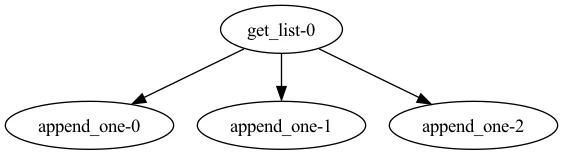
For workflows with dynamic structure using loops and/or if/else statements, you can provide tasks with mock return values to choose which code paths to visualize.
```python theme={null}
from prefect import flow, task
@task(viz_return_value=[4])
def get_list():
return [1, 2, 3]
@task
def append_one(n):
return n.append(6)
@flow
def viz_return_value_tracked():
l = get_list()
for num in range(3):
l.append(5)
append_one(l)
if __name__ == "__main__":
viz_return_value_tracked.visualize()
```
## Mermaid output
`generate_mermaid_graph()` returns a Mermaid diagram string. This is useful when you want to embed the diagram in GitHub markdown, Notion, or any other tool that supports Mermaid.
```python theme={null}
from prefect import flow, task
@task(name="Print Hello")
def print_hello(name):
msg = f"Hello {name}!"
print(msg)
return msg
@task(name="Print Hello Again")
def print_hello_again(name):
msg = f"Hello {name}!"
print(msg)
return msg
@flow(name="Hello Flow")
def hello_world(name="world"):
message = print_hello(name)
message2 = print_hello_again(message)
if __name__ == "__main__":
diagram = hello_world.generate_mermaid_graph()
print(diagram)
```
Because the diagram is returned as a string, you can also write it to a file or embed it in other output:
````python theme={null}
diagram = hello_world.generate_mermaid_graph()
with open("flow.md", "w") as f:
f.write(f"```mermaid\n{diagram}\n```")
````
The returned string looks like:
```
flowchart TD
Print_Hello_0["Print Hello-0"]
Print_Hello_Again_0["Print Hello Again-0"]
Print_Hello_0 --> Print_Hello_Again_0
```
Paste the output into [mermaid.live](https://mermaid.live) or any Mermaid-compatible renderer to view the diagram.
## Dynamic flows with mock return values
For workflows with dynamic structure using loops and/or if/else statements, you can provide tasks with mock return values to choose which code paths to visualize.
```python theme={null}
from prefect import flow, task
@task(viz_return_value=[4])
def get_list():
return [1, 2, 3]
@task
def append_one(n):
return n.append(6)
@flow
def viz_return_value_tracked():
l = get_list()
for num in range(3):
l.append(5)
append_one(l)
if __name__ == "__main__":
viz_return_value_tracked.visualize()
```