This guide covers the prefect-dbt API as it existed in 0.6.6 and earlier — DbtCoreOperation, DbtCliProfile, the TargetConfigs hierarchy, and the pre-built trigger_dbt_cli_command / dbt_build_task tasks. These APIs still work in modern releases, but for new projects prefer PrefectDbtRunner, which provides better logging, asset lineage, and failure handling.
Before creating blocks for the first time, register prefect-dbt’s block types:prefect block register -m prefect_dbt
prefect-dbt supports a couple of ways to run dbt Core commands.
A DbtCoreOperation block will run the commands as shell commands, while other tasks use dbt’s Programmatic Invocation.
Optionally, specify the project_dir.
If profiles_dir is not set, the DBT_PROFILES_DIR environment variable will be used.
If DBT_PROFILES_DIR is not set, the default directory will be used $HOME/.dbt/.
Use an existing profile
If you have an existing dbt profiles.yml file, specify the profiles_dir where the file is located:
from prefect import flow
from prefect_dbt.cli.commands import DbtCoreOperation
@flow
def trigger_dbt_flow() -> str:
result = DbtCoreOperation(
commands=["pwd", "dbt debug", "dbt run"],
project_dir="PROJECT-DIRECTORY-PLACEHOLDER",
profiles_dir="PROFILES-DIRECTORY-PLACEHOLDER"
).run()
return result
if __name__ == "__main__":
trigger_dbt_flow()
If you are already using Prefect blocks such as the Snowflake Connector block, you can use those blocks to create a new profiles.yml with a DbtCliProfile block.
Use environment variables with Prefect secret blocks
If you use environment variables in profiles.yml, set a Prefect Secret block as an environment variable:
import os
from prefect.blocks.system import Secret
secret_block = Secret.load("DBT_PASSWORD_PLACEHOLDER")
# Access the stored secret
DBT_PASSWORD = secret_block.get()
os.environ["DBT_PASSWORD"] = DBT_PASSWORD
This example profiles.yml file could then access that variable.
profile:
target: prod
outputs:
prod:
type: postgres
host: 127.0.0.1
# IMPORTANT: Make sure to quote the entire Jinja string here
user: dbt_user
password: "{{ env_var('DBT_PASSWORD') }}"
Create a new profiles.yml file with blocks
If you don’t have a profiles.yml file, you can use a DbtCliProfile block to create profiles.yml.
Then, specify profiles_dir where profiles.yml will be written.
Here’s example code with placeholders:
from prefect import flow
from prefect_dbt.cli import DbtCliProfile, DbtCoreOperation
@flow
def trigger_dbt_flow():
dbt_cli_profile = DbtCliProfile.load("DBT-CLI-PROFILE-BLOCK-PLACEHOLDER")
with DbtCoreOperation(
commands=["dbt debug", "dbt run"],
project_dir="PROJECT-DIRECTORY-PLACEHOLDER",
profiles_dir="PROFILES-DIRECTORY-PLACEHOLDER",
dbt_cli_profile=dbt_cli_profile,
) as dbt_operation:
dbt_process = dbt_operation.trigger()
# do other things before waiting for completion
dbt_process.wait_for_completion()
result = dbt_process.fetch_result()
return result
if __name__ == "__main__":
trigger_dbt_flow()
Supplying the dbt_cli_profile argument will overwrite existing profiles.yml filesIf you already have a profiles.yml file in the specified profiles_dir, the file will be overwritten. If you do not specify a profiles directory, profiles.yml at ~/.dbt/ would be overwritten.
Visit the SDK reference in the side navigation to see other built-in TargetConfigs blocks.
If the desired service profile is not available, you can build one from the generic TargetConfigs class.
Programmatic Invocation
prefect-dbt has some pre-built tasks that use dbt’s programmatic invocation.
For example:
from prefect import flow
from prefect_dbt.cli.commands import trigger_dbt_cli_command, dbt_build_task
@flow
def dbt_build_flow():
trigger_dbt_cli_command(
command="dbt deps", project_dir="/Users/test/my_dbt_project_dir",
)
dbt_build_task(
project_dir = "/Users/test/my_dbt_project_dir",
create_summary_artifact = True,
summary_artifact_key = "dbt-build-task-summary",
extra_command_args=["--select", "foo_model"]
)
if __name__ == "__main__":
dbt_build_flow()
See the SDK reference for other pre-built tasks.
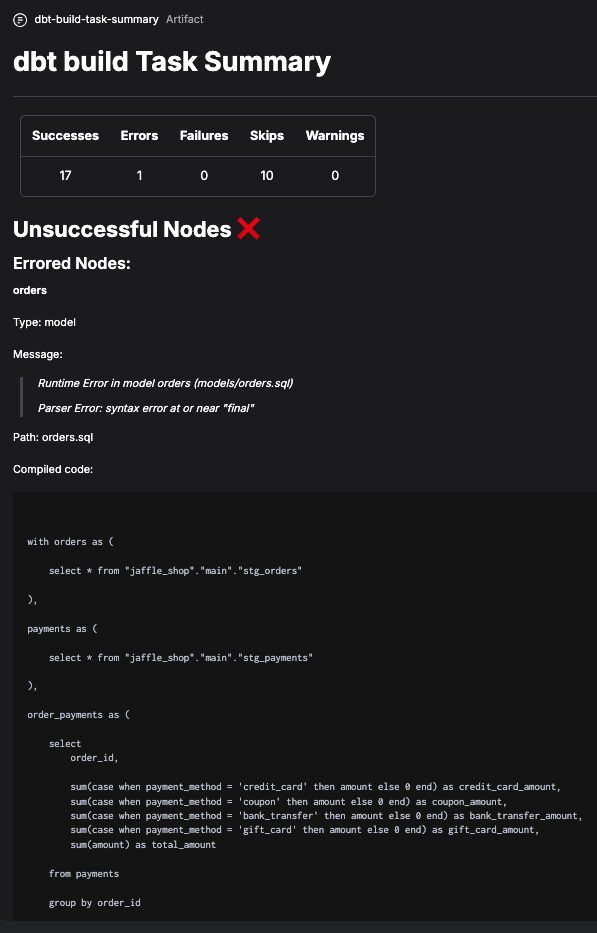
Create a summary artifact
These pre-built tasks can also create artifacts. These artifacts have extra information about dbt Core runs, such as messages and compiled code for nodes that fail or have errors.
BigQuery CLI profile block example
To create dbt Core target config and profile blocks for BigQuery:
- Save and load a
GcpCredentials block.
- Determine the schema / dataset you want to use in BigQuery.
- Create a short script, replacing the placeholders.
from prefect_gcp.credentials import GcpCredentials
from prefect_dbt.cli import BigQueryTargetConfigs, DbtCliProfile
credentials = GcpCredentials.load("CREDENTIALS-BLOCK-NAME-PLACEHOLDER")
target_configs = BigQueryTargetConfigs(
schema="SCHEMA-NAME-PLACEHOLDER", # also known as dataset
credentials=credentials,
)
target_configs.save("TARGET-CONFIGS-BLOCK-NAME-PLACEHOLDER")
dbt_cli_profile = DbtCliProfile(
name="PROFILE-NAME-PLACEHOLDER",
target="TARGET-NAME-placeholder",
target_configs=target_configs,
)
dbt_cli_profile.save("DBT-CLI-PROFILE-BLOCK-NAME-PLACEHOLDER")
To create a dbt Core operation block:
- Determine the dbt commands you want to run.
- Create a short script, replacing the placeholders.
from prefect_dbt.cli import DbtCliProfile, DbtCoreOperation
dbt_cli_profile = DbtCliProfile.load("DBT-CLI-PROFILE-BLOCK-NAME-PLACEHOLDER")
dbt_core_operation = DbtCoreOperation(
commands=["DBT-CLI-COMMANDS-PLACEHOLDER"],
dbt_cli_profile=dbt_cli_profile,
overwrite_profiles=True,
)
dbt_core_operation.save("DBT-CORE-OPERATION-BLOCK-NAME-PLACEHOLDER")
Load the saved DbtCoreOperation block to reuse it in a flow:
from prefect_dbt.cli import DbtCoreOperation
DbtCoreOperation.load("DBT-CORE-OPERATION-BLOCK-NAME-PLACEHOLDER")