Create link artifacts
To create a link artifact, use the create_link_artifact() function.
To create multiple versions of the same artifact and/or view them on the Artifacts page of the Prefect UI,
provide a key argument to the create_link_artifact() function to track the artifact’s history over time.
Without a key, the artifact is only visible in the Artifacts tab of the associated flow run or task run.
from prefect import flow, task
from prefect.artifacts import create_link_artifact


@task
def my_first_task():
    create_link_artifact(
        key="irregular-data",
        link="https://nyc3.digitaloceanspaces.com/my-bucket-name/highly_variable_data.csv",
        description="## Highly variable data",
    )


@task
def my_second_task():
    create_link_artifact(
        key="irregular-data",
        link="https://nyc3.digitaloceanspaces.com/my-bucket-name/low_pred_data.csv",
        description="# Low prediction accuracy",
    )


@flow
def my_flow():
    my_first_task()
    my_second_task()


if __name__ == "__main__":
    my_flow()
Specify multiple artifacts with the same key for artifact lineageYou can specify multiple artifacts with the same key to easily track something very specific, such as irregularities in your data pipeline.
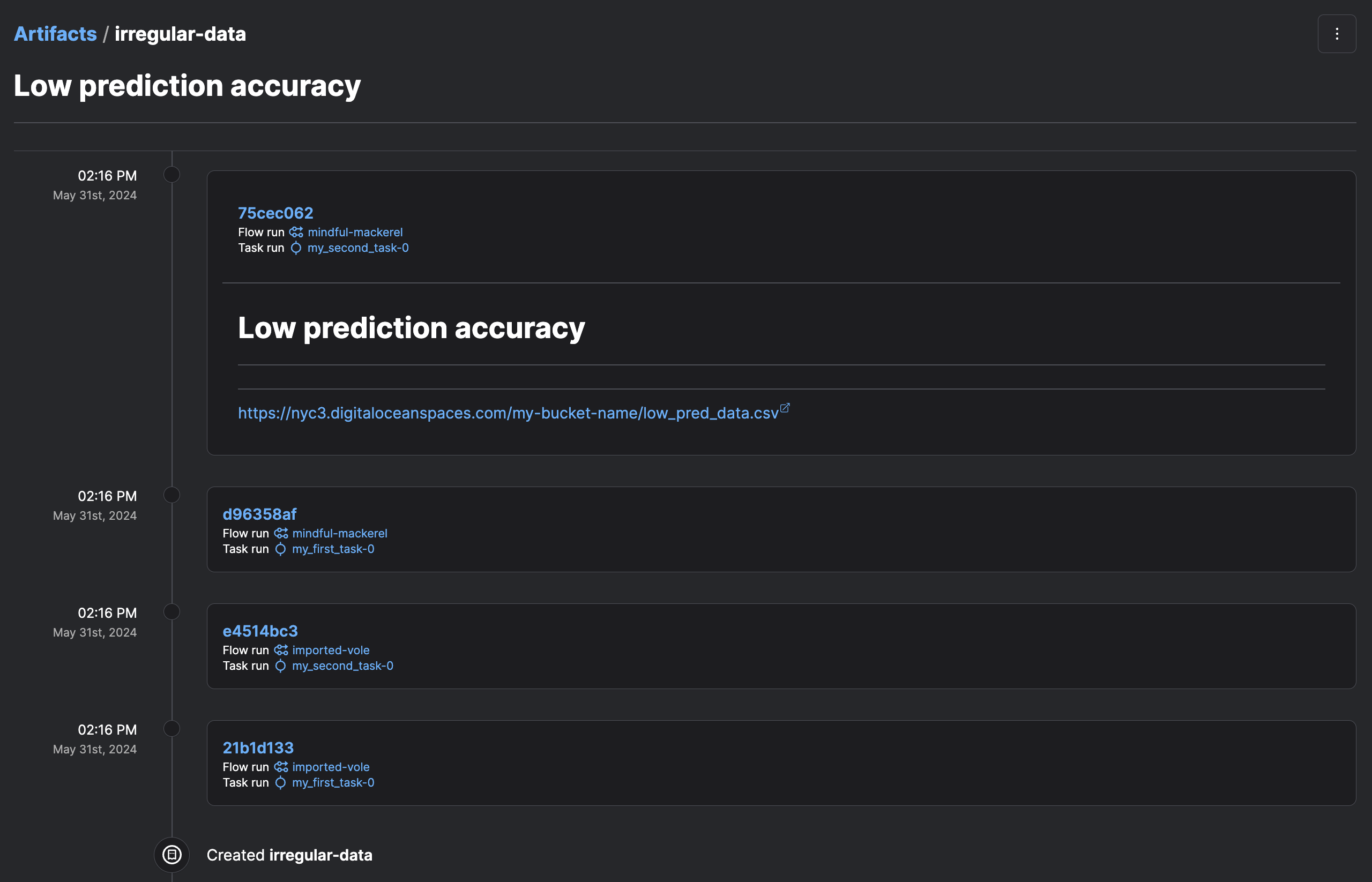 You can also view information about the artifact such as:
- its associated flow run or task run id
- previous and future versions of the artifact (multiple artifacts can have the same key to show lineage)
- data (in this case a Markdown-rendered link)
- an optional Markdown description
- when the artifact was created or updated
To make the links more readable for you and your collaborators, you can pass a link_text argument:
from prefect import flow
from prefect.artifacts import create_link_artifact


@flow
def my_flow():
    create_link_artifact(
        key="my-important-link",
        link="https://www.prefect.io/",
        link_text="Prefect",
    )


if __name__ == "__main__":
    my_flow()
create_link_artifact method is used within a flow to create a link artifact with a key of my-important-link.
The link parameter specifies the external resource to link to, and link_text specifies the text to display for the link.
Add an optional description for context.
Create progress artifacts
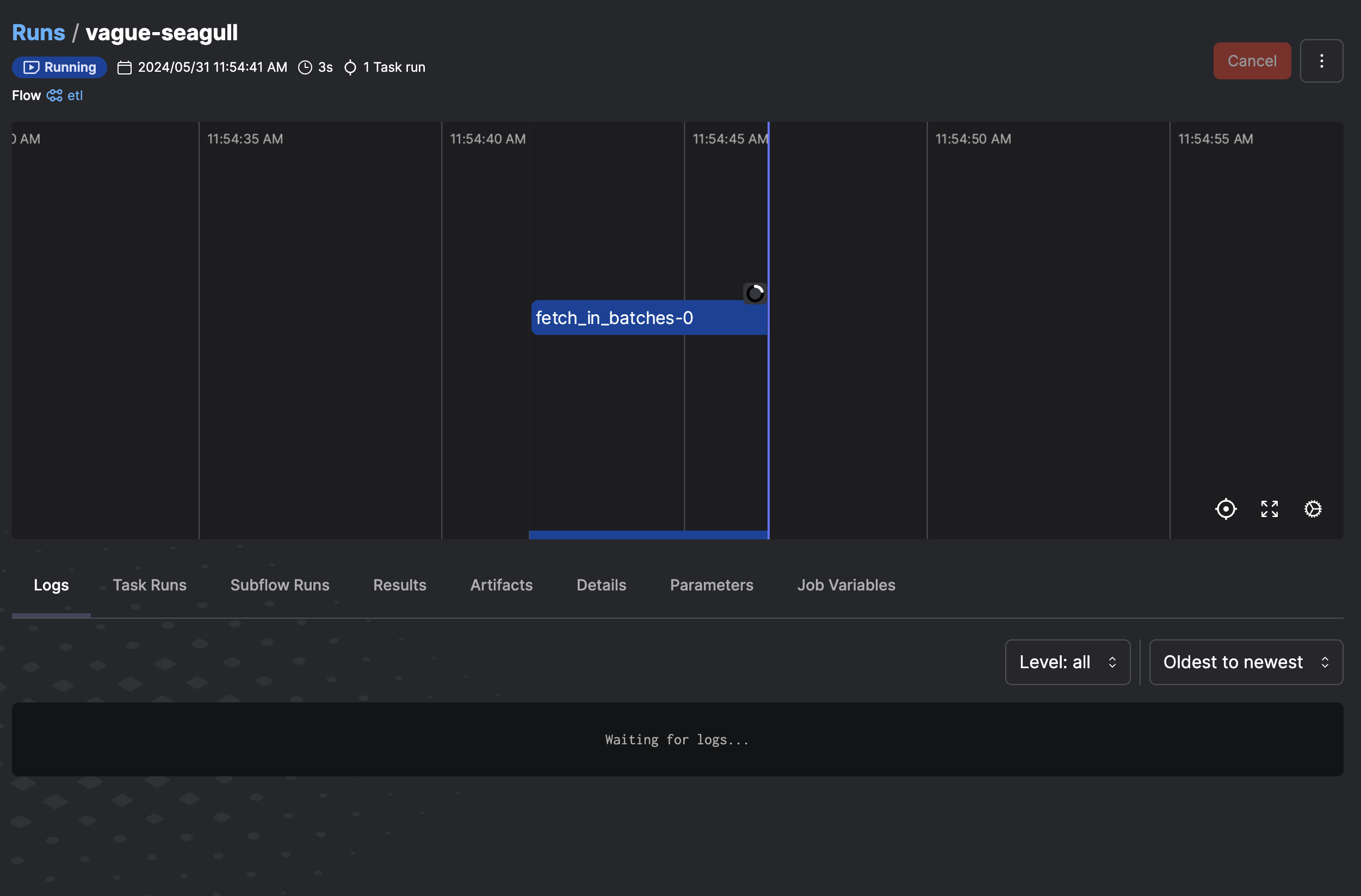
Progress artifacts render dynamically on the flow run graph in the Prefect UI, indicating the progress of long-running tasks.
To create a progress artifact, use the create_progress_artifact() function. To update a progress artifact, use the update_progress_artifact() function.
from time import sleep

from prefect import flow, task
from prefect.artifacts import (
    create_progress_artifact,
    update_progress_artifact,
)


def fetch_batch(i: int):
    # Simulate fetching a batch of data
    sleep(2)


@task
def fetch_in_batches():
    progress_artifact_id = create_progress_artifact(
        progress=0.0,
        description="Indicates the progress of fetching data in batches.",
    )
    for i in range(1, 11):
        fetch_batch(i)
        update_progress_artifact(artifact_id=progress_artifact_id, progress=i * 10)


@flow
def etl():
    fetch_in_batches()


if __name__ == "__main__":
    etl()
update_progress_artifact() function. Prefect updates a progress artifact in place, rather than versioning it.
Create Markdown artifacts
To create a Markdown artifact, you can use the create_markdown_artifact() function.
To create multiple versions of the same artifact and/or view them on the Artifacts page of the Prefect UI, provide a key argument to the create_markdown_artifact() function to track an artifact’s history over time.
Without a key, the artifact is only visible in the Artifacts tab of the associated flow run or task run.
Don’t indent MarkdownDon’t indent Markdown in multi-line strings. Otherwise it will be interpreted incorrectly.
from prefect import flow, task
from prefect.artifacts import create_markdown_artifact


@task
def markdown_task():
    na_revenue = 500000
    markdown_report = f"""# Sales Report

## Summary

In the past quarter, our company saw a significant increase in sales, with a total revenue of $1,000,000.
This represents a 20% increase over the same period last year.

## Sales by Region

| Region        | Revenue |
|:--------------|-------:|
| North America | ${na_revenue:,} |
| Europe        | $250,000 |
| Asia          | $150,000 |
| South America | $75,000 |
| Africa        | $25,000 |

## Top Products

1. Product A - $300,000 in revenue
2. Product B - $200,000 in revenue
3. Product C - $150,000 in revenue

## Conclusion

Overall, these results are very encouraging and demonstrate the success of our sales team in increasing revenue
across all regions. However, we still have room for improvement and should focus on further increasing sales in
the coming quarter.
"""
    create_markdown_artifact(
        key="gtm-report",
        markdown=markdown_report,
        description="Quarterly Sales Report",
    )


@flow()
def my_flow():
    markdown_task()


if __name__ == "__main__":
    my_flow()
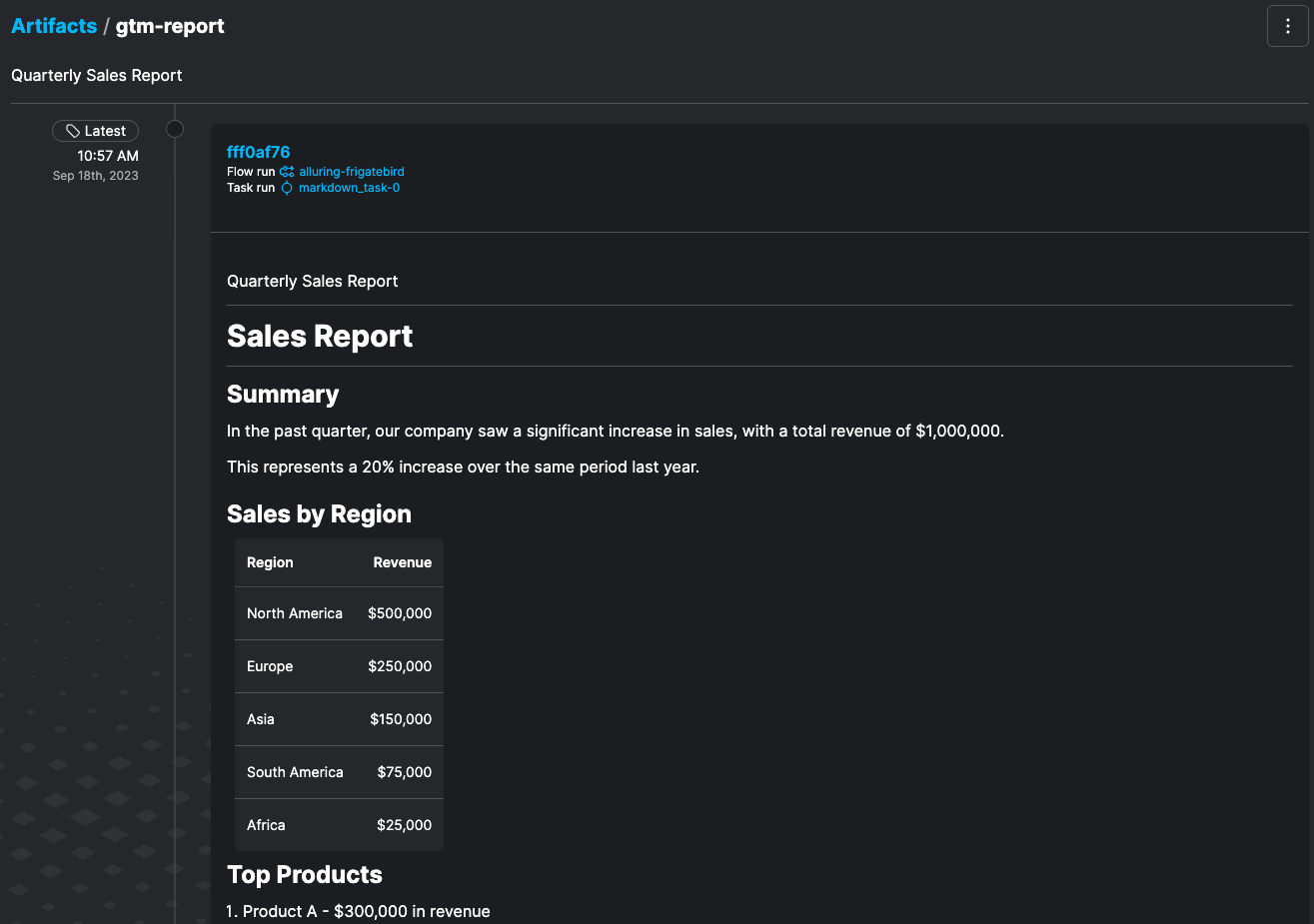 You can view the associated flow run id or task run id, previous versions of the artifact, the rendered Markdown data, and the optional Markdown description.
Create table artifacts
Create a table artifact by calling create_table_artifact().
To create multiple versions of the same artifact and/or view them on the Artifacts page of the Prefect UI, provide a key argument to the create_table_artifact() function to track an artifact’s history over time.
Without a key, the artifact is only visible in the artifacts tab of the associated flow run or task run.
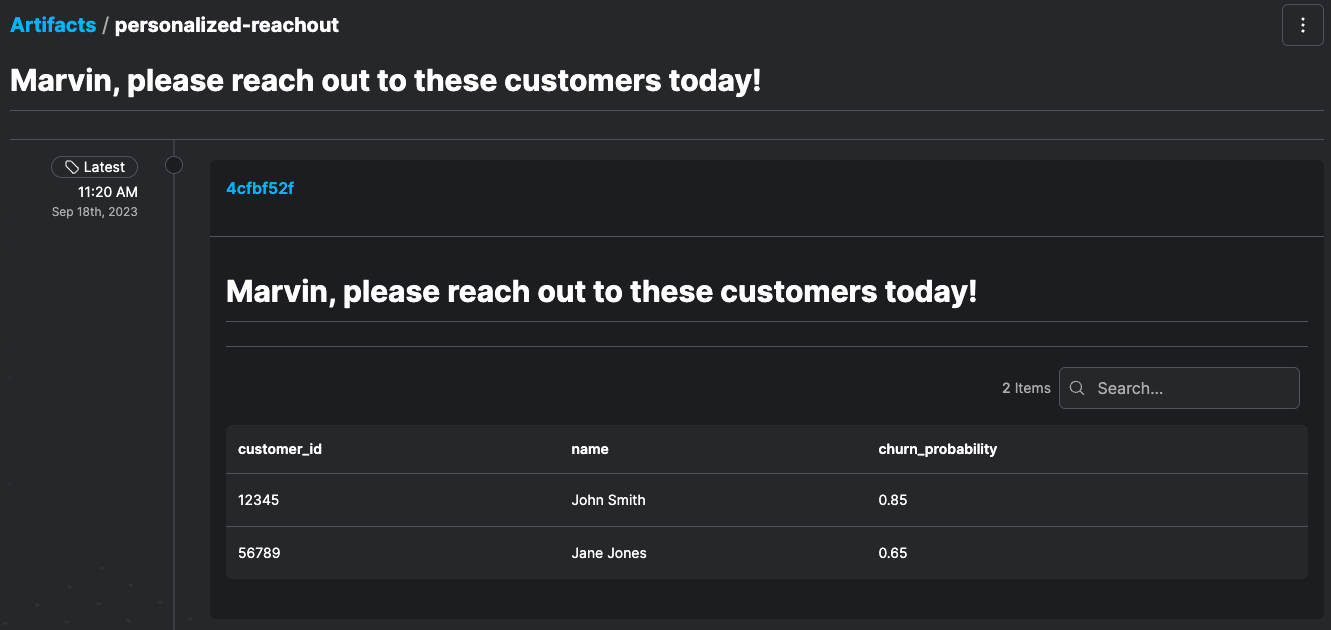
The create_table_artifact() function accepts a table argument. Pass this as a list of lists, a list of dictionaries, or a dictionary of lists.
from prefect.artifacts import create_table_artifact


def my_fn():
    highest_churn_possibility = [
       {'customer_id':'12345', 'name': 'John Smith', 'churn_probability': 0.85 },
       {'customer_id':'56789', 'name': 'Jane Jones', 'churn_probability': 0.65 }
    ]

    create_table_artifact(
        key="personalized-reachout",
        table=highest_churn_possibility,
        description= "# Marvin, please reach out to these customers today!"
    )


if __name__ == "__main__":
    my_fn()
Create image artifacts
Image artifacts render publicly available images in the Prefect UI. To create an image artifact, use the create_image_artifact() function.
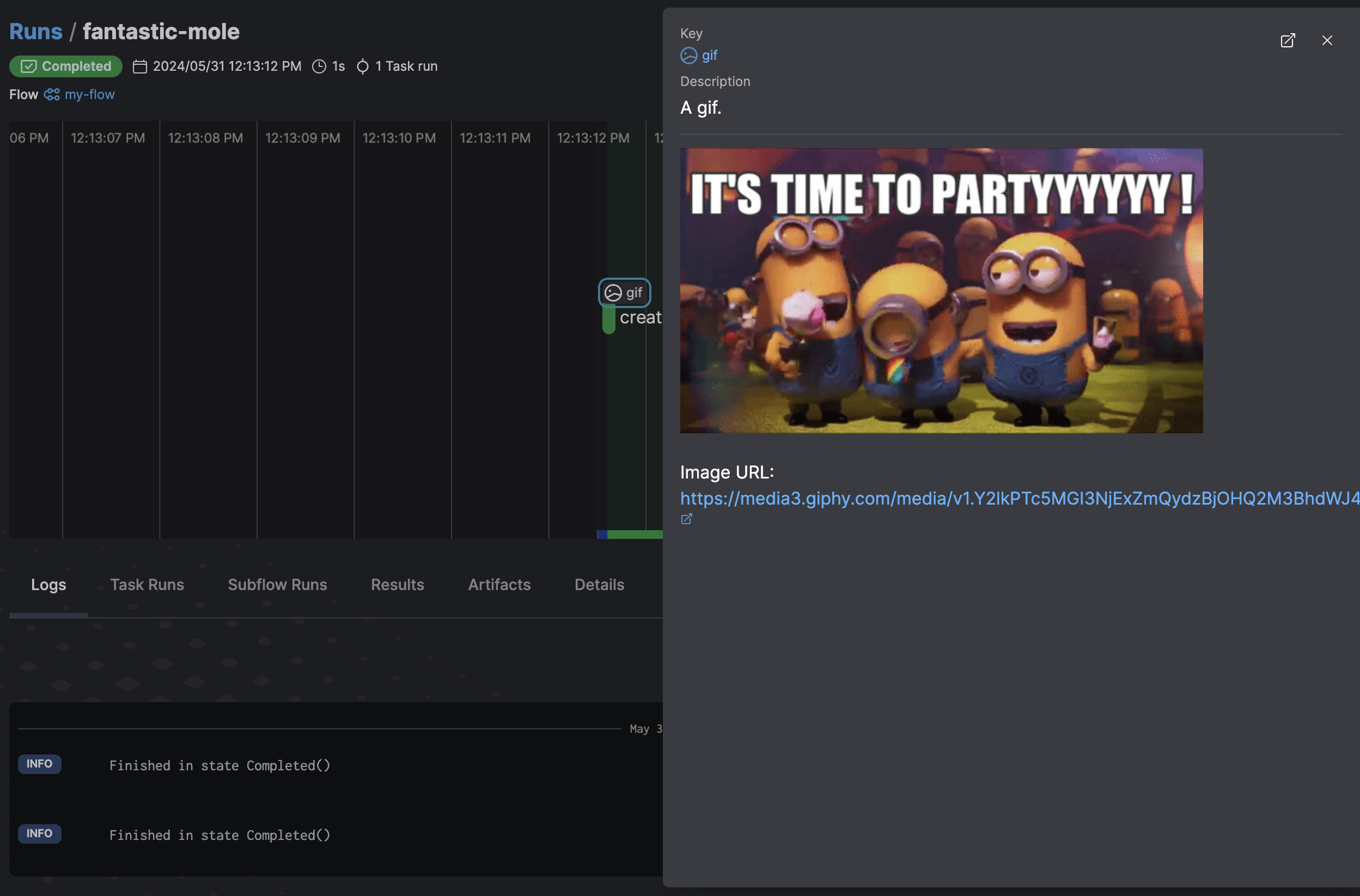
from prefect import flow, task
from prefect.artifacts import (
    create_image_artifact,
)


@task
def create_image():
    # Do something to create an image and upload to a url
    image_url = "https://media3.giphy.com/media/v1.Y2lkPTc5MGI3NjExZmQydzBjOHQ2M3BhdWJ4M3V1MGtoZGxuNmloeGh6b2dvaHhpaHg0eSZlcD12MV9pbnRlcm5hbF9naWZfYnlfaWQmY3Q9Zw/3KC2jD2QcBOSc/giphy.gif"
    create_image_artifact(image_url=image_url, description="A gif.", key="gif")
    return image_url


@flow
def my_flow():
    return create_image()


if __name__ == "__main__":
    image_url = my_flow()
    print(f"Image URL: {image_url}")
create_link_artifact() function instead.
Reading artifacts
In the Prefect UI, you can view all of the latest versions of your artifacts and click into a specific artifact to see its lineage over time.
Additionally, you can inspect all versions of an artifact with a given key from the CLI by running:
prefect artifact inspect <my_key>
Fetching artifacts
In Python code, you can retrieve an existing artifact with the Artifact.get class method:
from prefect.artifacts import Artifact


my_retrieved_artifact = Artifact.get("my_artifact_key")
Delete artifacts
Delete an artifact in the CLI by providing a key or id:
prefect artifact delete <my_key>
prefect artifact delete --id <my_id>

