

Manage global concurrency and rate limits
You can create, read, edit, and delete concurrency limits through the Prefect UI, CLI, Python SDK, Terraform, or API. When creating a concurrency limit, you can specify:- Name: How you’ll reference the limit in your code (no special characters like
/,%,&,>,<) - Concurrency Limit: Maximum number of slots available
- Slot Decay Per Second: Rate at which slots are released (required for rate limiting)
- Active: Whether the limit is enforced (
true) or disabled (false)
Using the UI
Navigate to the Concurrency section in the Prefect UI to create, update, and delete concurrency limits.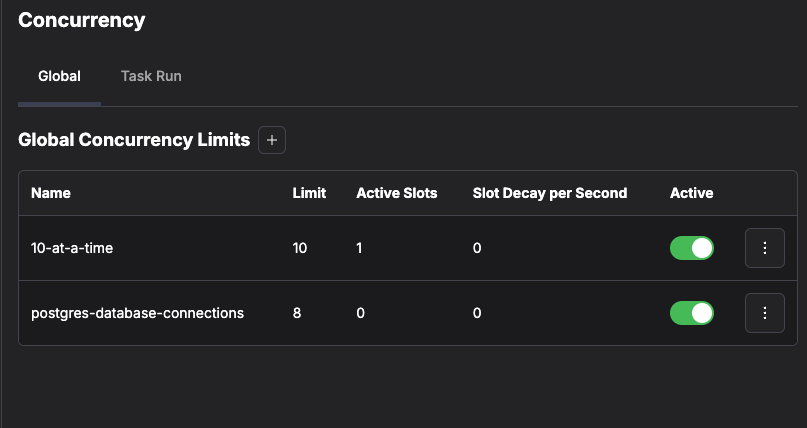
Using the CLI
Create a new concurrency limit with theprefect gcl create command:
prefect gcl --help.
Using Terraform
Using the API
Use the concurrency context manager
Control concurrent operations using the concurrency context manager. Choose the synchronous or asynchronous version based on your code.
Synchronous usage
Asynchronous usage
concurrency context manager occupies one slot on the database concurrency limit. If no slots are available, execution blocks until a slot becomes available.
Before running these examples, create an active global concurrency limit that matches the name used in code:If the limit does not exist, the default behavior is to log a warning and continue execution without blocking. Use
strict=True when you need concurrency enforcement to fail fast when the specified limit does not exist instead of silently proceeding.strict=True does not enforce limits that exist but are inactive — ensure the limit is active (the default for prefect gcl create) before expecting tasks to block.Using strict mode
Enable strict mode to ensure errors are raised if the limit doesn’t exist (not if it is merely inactive) or if lease renewal fails:raise_on_lease_renewal_failure to control lease renewal behavior independently of strict. For example, use strict=True to require the limit exists at acquisition time, while allowing long-running tasks to continue through transient renewal errors:
Use rate_limit
Control the frequency of operations using the rate_limit function.
Synchronous usage
Asynchronous usage
rate_limit function ensures requests are made at a controlled pace based on the concurrency limit’s slot_decay_per_second setting.
Use outside of flows
You can useconcurrency and rate_limit in any Python code, not just within flows.