
Documentation Index

Fetch the complete documentation index at: https://docs.prefect.io/llms.txt

Use this file to discover all available pages before exploring further.

You can visualize the structure of your flow using two methods:
  • flow.visualize() — renders a PNG via Graphviz and opens it in a new window, or inline in Jupyter notebooks. Requires the Graphviz system package.
  • flow.generate_mermaid_graph() — returns a Mermaid flowchart TD diagram as a string. No additional dependencies required.
These methods execute code outside of tasksCode outside of tasks will run when calling visualize() or generate_mermaid_graph(). To avoid inadvertent execution, place code you don’t want to run in tasks.

Graphviz output

Install GraphvizTo use visualize(), you must have Graphviz installed. Please follow the Graphviz installation instructions for your platform.
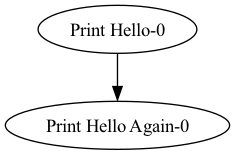
from prefect import flow, task

@task(name="Print Hello")
def print_hello(name):
    msg = f"Hello {name}!"
    print(msg)
    return msg

@task(name="Print Hello Again")
def print_hello_again(name):
    msg = f"Hello {name}!"
    print(msg)
    return msg

@flow(name="Hello Flow")
def hello_world(name="world"):
    message = print_hello(name)
    message2 = print_hello_again(message)

if __name__ == "__main__":
    hello_world.visualize()
A simple flow visualized with the .visualize() method

Mermaid output

generate_mermaid_graph() returns a Mermaid diagram string. This is useful when you want to embed the diagram in GitHub markdown, Notion, or any other tool that supports Mermaid.
from prefect import flow, task

@task(name="Print Hello")
def print_hello(name):
    msg = f"Hello {name}!"
    print(msg)
    return msg

@task(name="Print Hello Again")
def print_hello_again(name):
    msg = f"Hello {name}!"
    print(msg)
    return msg

@flow(name="Hello Flow")
def hello_world(name="world"):
    message = print_hello(name)
    message2 = print_hello_again(message)

if __name__ == "__main__":
    diagram = hello_world.generate_mermaid_graph()
    print(diagram)
Because the diagram is returned as a string, you can also write it to a file or embed it in other output:
diagram = hello_world.generate_mermaid_graph()
with open("flow.md", "w") as f:
    f.write(f"```mermaid\n{diagram}\n```")
The returned string looks like:
flowchart TD
    Print_Hello_0["Print Hello-0"]
    Print_Hello_Again_0["Print Hello Again-0"]
    Print_Hello_0 --> Print_Hello_Again_0
Paste the output into mermaid.live or any Mermaid-compatible renderer to view the diagram.

Dynamic flows with mock return values

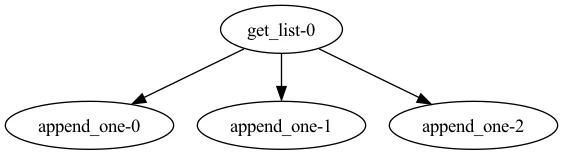
For workflows with dynamic structure using loops and/or if/else statements, you can provide tasks with mock return values to choose which code paths to visualize.
from prefect import flow, task

@task(viz_return_value=[4])
def get_list():
    return [1, 2, 3]

@task
def append_one(n):
    return n.append(6)

@flow
def viz_return_value_tracked():
    l = get_list()
    for num in range(3):
        l.append(5)
        append_one(l)

if __name__ == "__main__":
    viz_return_value_tracked.visualize()
A flow with return values visualized with the .visualize() method